-9-
• If setting mode has not been exited, you can change the calling mode by pressing KEY1 circularly.
• The LED_NAME indicator will blink all the time until exit out the setting mode.
• If without any operation in 10 seconds, it will exit out setting mode automatically.
• In this step,press KEY_SET button three times to exit out the setting mode manually.
SETUP INSTRUCTIONS
* More details about code setting for monitor, please refer to corresponding user manual .
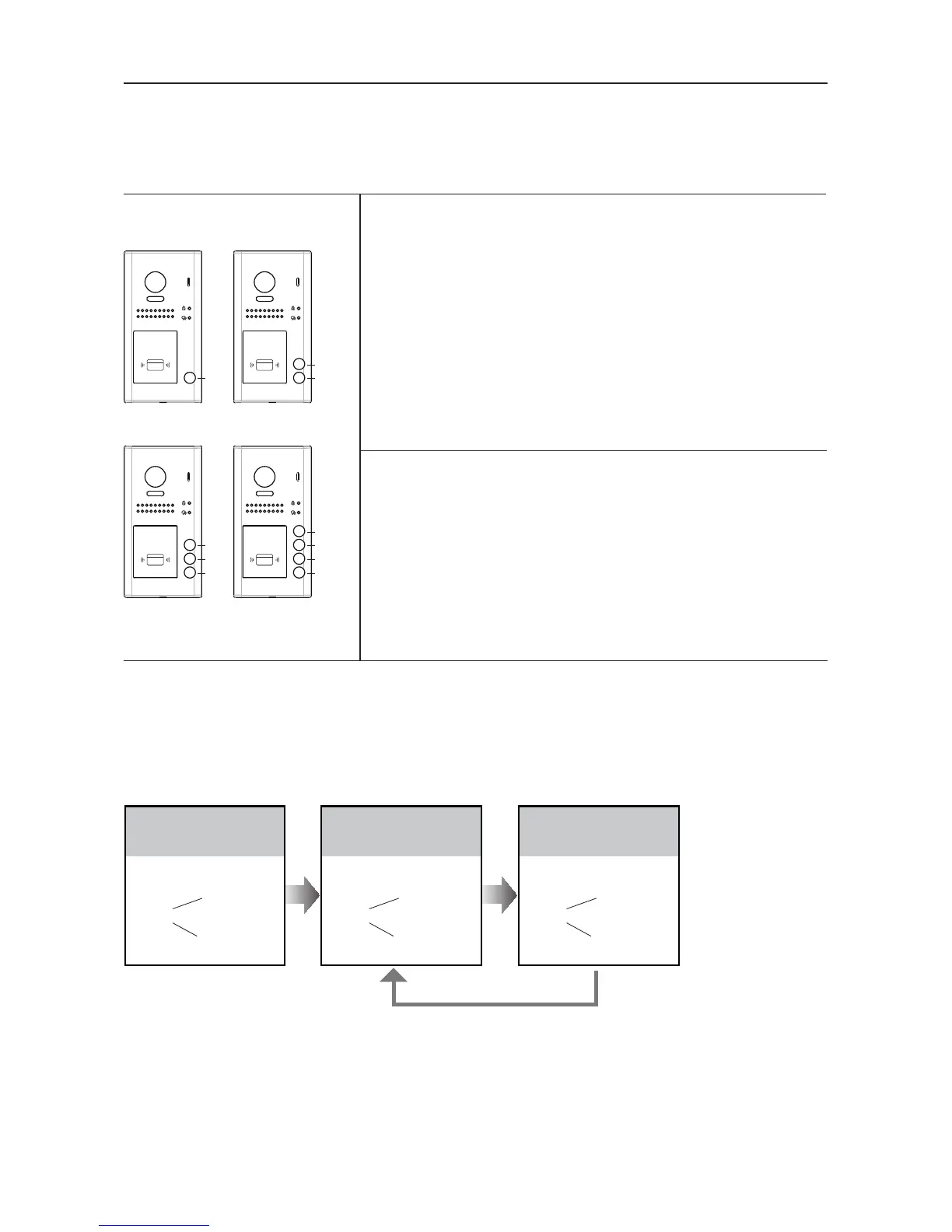
Each call button will respond different addresses when set in different calling mode. Refer to the
followings for more informations.
Call buttonA: call the monitor with address 01 by default.
Call buttonB: call the monitor with address 02 by default.
Call buttonC: call the monitor with address 03 by default.
Call buttonD: call the monitor with address 04 by default.
Call buttonA: Call all monitors in group address from
00~15.(one of the monitor should be set to 00)
Call buttonB,C,D: Call all monitors in group address from
16~31. (one of the monitor should be set to 16)
UNLOCK Indicator:OFF
TALK Indicator:ON
Buzzer
Beep+, Beep
In standby mode, press
KEY_SET button twice.
UNLOCK Indicator:OFF
TALK Indicator:ON
Buzzer
Beep+
Press KEY_1 button to
activate Standard calling
mode for door station.
UNLOCK Indicator:OFF
TALK Indicator:ON
Buzzer
Beep, Beep
Press KEY_1 button again
to activate Group calling
mode for door station.
Press KEY_1
A
B
C
A
B
C
D
RF CARDRF CARD
A A
B
RF CARDRF CARD
1.Standard calling mode(Address range 01-04
by default)
2.Group calling mode
To change this setting, please follow the steps:



 To Next Page