Need help?
Do you have a question about the V.TOP AV202 and is the answer not in the manual?
Install Audacity and LAME MP3 Encoder software from CD or website.
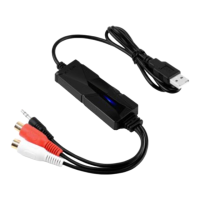
Connect analog audio source to AV202 audio input jack.
Connect AV202 USB end to computer and verify recognition.
Run Audacity for capturing and editing music.
Transfer captured digital audio files to your device.
Check Device Manager for 'USB Audio Device' after connecting AV202.
Troubleshoot driver issues by removing and reconnecting AV202.
Aim for -6 dB peak on recording meter to avoid clipping. Boost if needed.
Record vinyl/tapes/MiniDiscs using specific turntables or decks.
Detailed operation manual for Audacity is included on the CD.
Ensure CPU supports SSE2; use legacy Audacity 2.0.6 if not.
Guidance on connecting turntables, phono pre-amplifiers, and input ports.
Troubleshoot MP3 export issues by verifying LAME MP3 encoder installation.
Check volume, ensure correct recording device ('USB Audio Device') is set.
Convert recordings to WAV/MP3, then import into iTunes for iPod/iPad/iPhone.
Adjust player volume, software recording levels, and set channels to stereo.
Export file, play externally, verify 'USB Audio Device' as recording input.
Select silent gaps, use 'Export Selection' to save individual audio tracks.
Audio transfer occurs at normal playback speed; AV202 records actual audio.
 General
| Brand | V.TOP |
|---|---|
| Model | AV202 |
| Category | Recording Equipment |
| Language | English |

 To Next Page