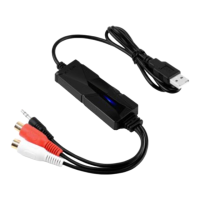
2. How do I record from vinyl records, cassee tapes or MiniDiscs? (Or the Recorded voice is
very low from vinyl)
Vinyl or shellac records can also be recorded into Audacity with a special type of turntable
that connects to the USB port of your computer. These turntables need to be set up
differently from those that connect to line-in. See Recording with USB turntables or USB
cassee decks for setup instrucons, then Basic Recording, Eding and Exporng in the main
tutorial.
3.I cannot find how to use Audacity, it is bad.
Do not worry. We have placed detailed operaon manual in this CD.
4.Why I have issues with Windows 10?
Make sure that your computer's CPU supports SSE2 (any CPU made aer 2003 should support
it). Please use the legacy Audacity 2.0.6 version if your computer does not support SSE2.
Connecon hints:
Do not connect a turntable directly to your computer.
The signal from a turntable must be passed through a phono pre-amplifier or a receiver with a
“phono” input that provides phono amplificaon. Otherwise, it will be too quiet and will also
sound "nny" due to incorrect equalizaon.
Do not plug stereo equipment into your computer’s “Microphone” port.
This port is usually designed only for low level, mono microphone input. It will produce
distoron if you connect phono amplified output. Use the “Line In” port if you have one (on
some laptops or other portable computers, the "Mic" port can be switched to a line-level
input).
Plug one end of a stereo cable into the "Line Out" or "Headphone" connector on your tape
deck, MiniDisc player, or stereo system.
Plug the other end into your computer’s "Line In" port. If you do not have a suitable cable, you
can find one at an electronics store.
Choose "Line In" as the recording source in Audacity's Device Toolbar or Devices Preferences.
Press the red Record buon. While Audacity is recording, start playing your tape or disc.
When you have captured the audio you want to record, press the yellow Stop buon. You can
also press the blue Pause buon to pause recording, and Pause again to resume recording on
the same track.
For a detailed tutorial, see Copying tapes, LPs or MiniDiscs to CD. This covers all the steps
from recording your records, cassees or MiniDiscs to exporng as an audio file and burning
to an audio CD.
>4<
AV202 EN
USB Audio Capture


 To Next Page