ON SCREEN DISPLAY
3
Using On Screen Display (OSD) Functions
Main Menu
Button Function
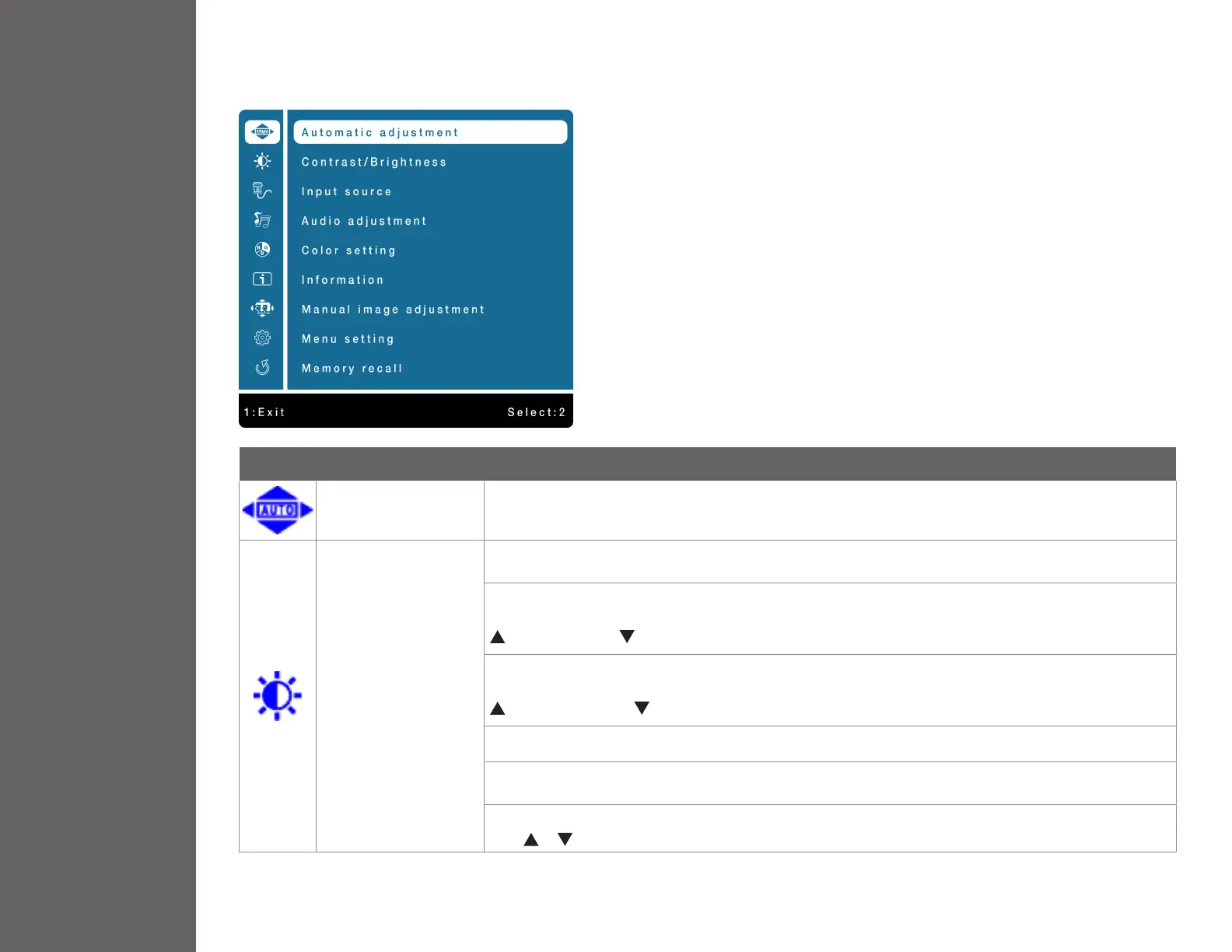
Automatic Adjustment To auto adjust Horizontal Position, Vertical Position, Phase (Fine Tune) and Clock (H. Size) of the screen.
Contrast/Brightness
To manually adjust the Picture Format, Contrast, Brightness, DCR Mode, ECO Mode and Over Drive
of screen image.
Contrast: To adjust the foreground white level of screen image.
increase contrast, decrease contrast.
Brightness: To adjust the luminance of the video.
increase brightness, decrease brightness.
DCR: To control DCR function ON/OFF.
ECO: Allows the user to change the ECO mode. Contrast, Brightness and DCR adjustment will be disabled
when ECO is active.
Over Drive: Allows the user to change the Over Drive strength. Improve the quality of motion pictures.
Press or key to adjust the Over Drive strength in ve levels.


 To Next Page