www.V7-world.com
Operation Display
UPS Mode LCD Description
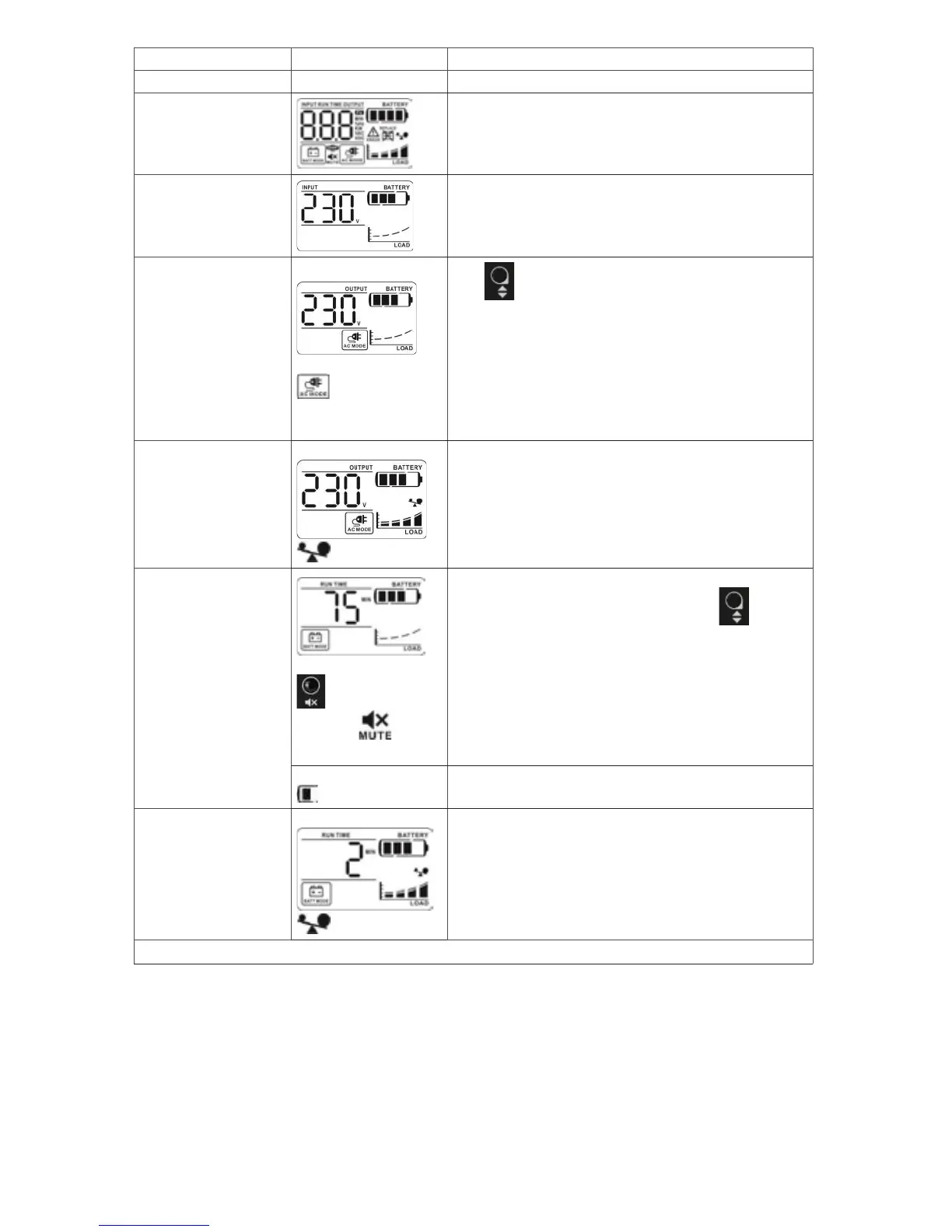
UPS Power ON When UPS is powered on, all icons will light up 1 second
Standby Mode
AC Mode
When AVR is functioning,
icon will ash
every second.
Press button to switch displayed information.
1. Output voltage
2. Output frequency
3. Input voltage
4. Input frequency
5. Output power in kW
6. Output power in kVA
7. Estimated backup time
Overload in AC mode
icon will ash
When overload occurs, alarm will beep every 0.5 second.
Battery Mode
In battery mode, press
button to mute
alarm and icon will
be on.
Alarm will beep every 10 seconds and LCD information will be
displayed in the following order when pressing button.
1. Estimated backup time
2. Output voltage
3. Output frequency
4. Input voltage
5. Input frequency
6. Output power in kW
7. Output power in kVA
When battery level is low,
icon will ash
Alarm will beep every second. This alarm can not be mute.
Overload in battery mode
icon will ash
When overload occurs, alarm will beep every 0.5 second.
NOTE: The backlight will be always on when any fault or warning occurs.


 To Next Page