Troubleshooting
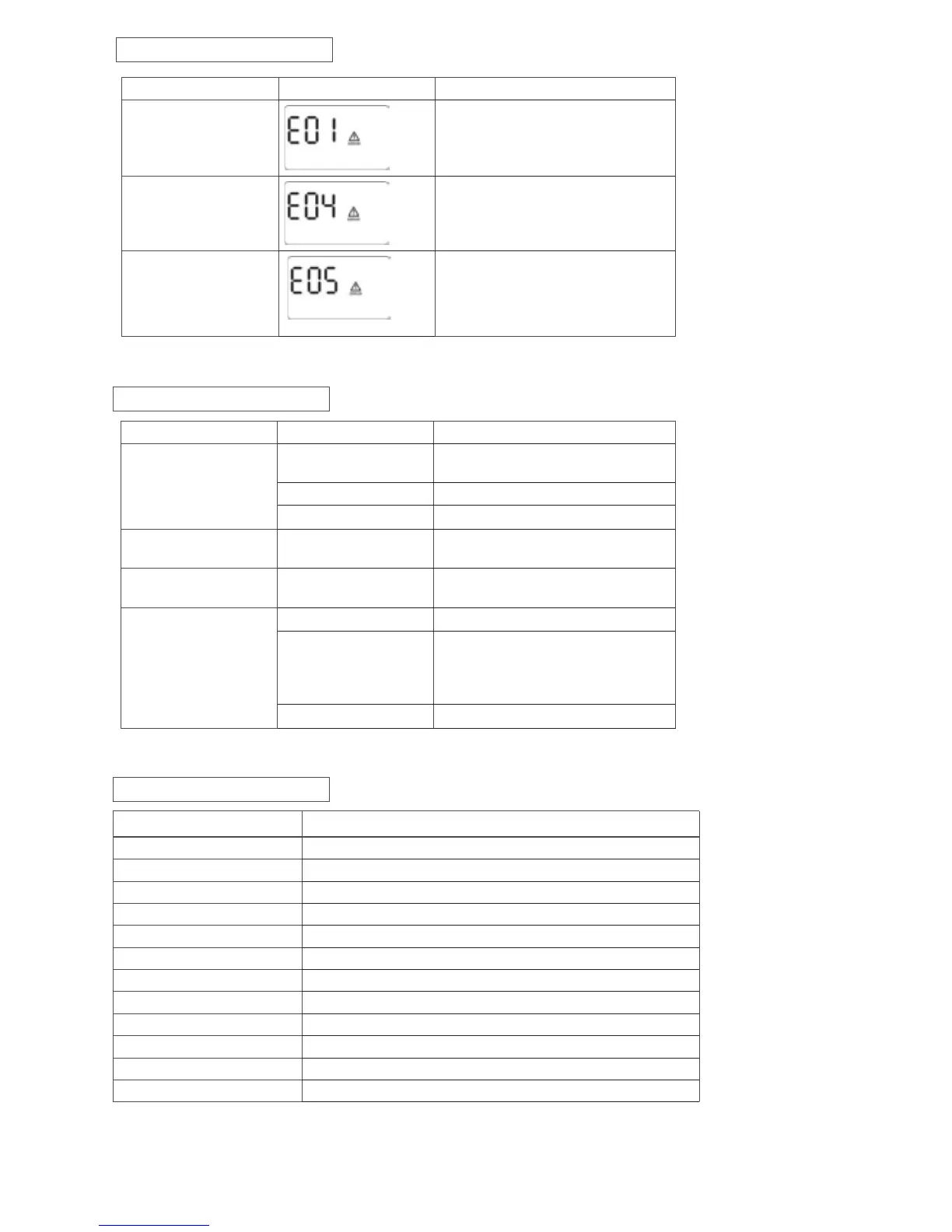
Problem Possible Cause Solutions
Nothing is displayed on
the panel
The UPS is not on
Press the power switch again to turn on
the UPS
Battery voltage is too low Charge the battery at least 6 hours
Battery fault Replace the battery
The UPS always on
battery mode
Power cord is loose Re-plug the power cord
The UPS continuously
beeps
Please check the fault
code for details
Check the fault code table for details
Backup time too short
Battery voltage is too low Charge the battery at least 6 hours
Overload
Remove some unnecessary loads. Before
reconnecting equipment, please verify
that the load matches the UPS capability
in the specications of your UPS
Battery defect Replace the battery
Fault Code Table
Fault Condition LCD Solutions
Output short circuited
Disconnect short-circuited loads and
restart the UPS again
Inverter/Output failure Call for service immediately
Overcharge
1. Turn o the unit and wait for cooling.
2. Or remove excessive loads and wait
for cooling.
Note: If fault alarm occurs, please call for service immediately.
Specications
Model 1500
CAPACITY 1500VA/900W
Input Voltage 230 VAC
Input Voltage Range 170-270 VAC
Output Voltage Regulation ± 5 % (Bat. mode)
Transfer Time Typical 6 ms, max. 10 ms
Waveform Simulated Sine Wave
Battery Type & No 12V/9Ah x 2
Charging Time 6-8 hours recover to 90% capacity
Dimension (DxWxH) 16” x 4” x 11”
Net Weight 26lbs (11.79 kg)
Humidity 0-90% RH @ 0-40°C non-condensing
Noise Level Less than 45dB @ 1 meter (3 ft.)


 To Next Page