13
INSTALLING & CLEANING CARTRIDGE FILTER
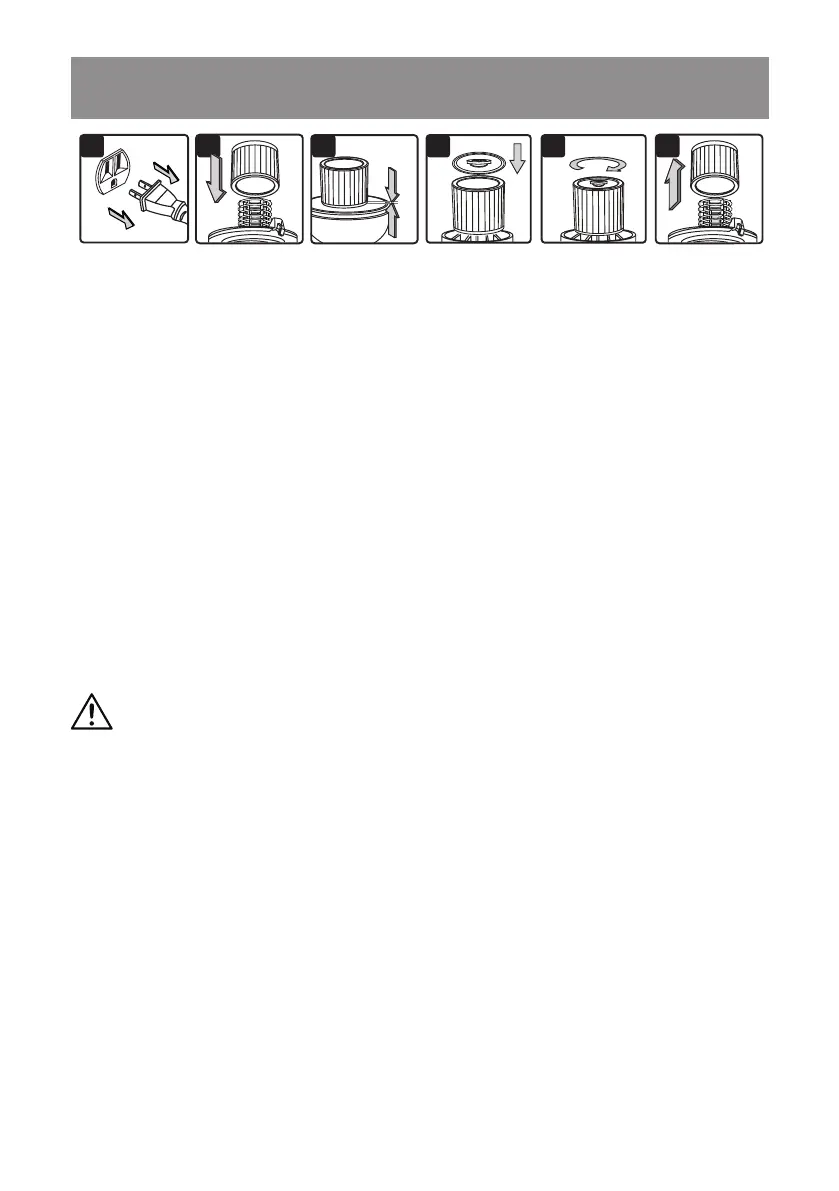
2 3 4 5 61
INSTALLING CARTRIDGE FILTER
1. Verify that the power cord is disconnected from the outlet (Fig. 1).
2. Remove the power head and place in an upside down position.
3. Install the cartridge lter over the lter cage making sure the cage is completely covered (Fig. 2
& 3).
4. Place the lter retainer on the top of the cartridge lter over the raised lip and tighten down by
turning the retainer clockwise; do not over-tighten (Fig. 4 & 5).
5. Place the power head back onto the collection tank.
REMOVING & CLEANING CARTRIDGE FILTER
1. Unlock and remove the lter retainer by turning the retainer handle counter clockwise.
2. With the removed power head in an upside down position, carefully remove the cartridge lter
from the lter cage (Fig. 6).
3. Clean the cartridge lter by gently tapping or brushing dirt off. Cleaning should not be done
indoors in living areas. For optimal performance a new lter is recommended.
4. Install cleaned or new lters as above in steps 2-4 of Installing Cartridge Filter.
5. Allow the wet lter to air dry for 24 hours before installing onto the lter cage.
IMPORTANT!
Clean or change the cartridge lter regularly for best performance.
ALWAYS USE THE CARTRIDGE FILTER FOR DRY VACUUMING.
If the machine is used without
the cartridge lter, the motor will burn out and the warranty will be voided. Always keep spare lters
on hand.
WARNING:
ALWAYS DISCONNECT THE PLUG FROM THE POWER OUTLET
BEFORE REMOVING THE POWER HEAD FROM THE COLLECTION TANK.






 To Next Page