14
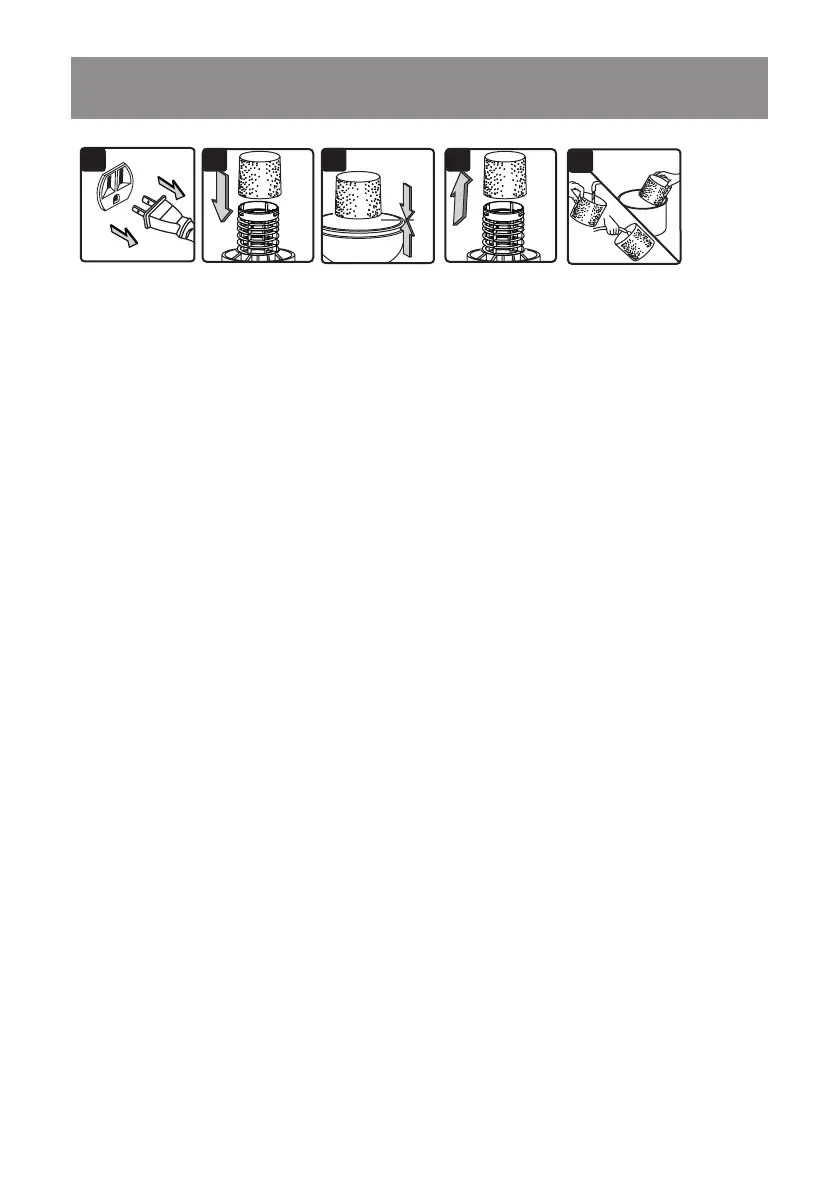
3. Carefully slide the foam wet lter down over the lter cage making sure the cage is completely
covered (Fig. 2 & 3).
4. Place the power head onto the collection tank.
CLEANING FOAM WET FILTER
1. With the removed power head in an upside down position, carefully remove the foam wet lter
(Fig. 4).
2. Use a mild soap and water solution to wash the foam wet lter and rinse with clean water (Fig. 5).
3. Allow the wet lter to air dry for 24 hours before installing onto the lter cage.
INSTALLING & CLEANING FOAM WET FILTER
2 3 4
5
1
INSTALLING FOAM WET FILTER
1. Verify that the power cord is disconnected from the outlet (Fig.1).
2. Remove the power head and place in an upside down position. Follow instructions to remove
the cartridge lter on page 13.






 To Next Page