10
ARY, Inc. | 5200 W 110th Street Suite 200, Overland Park, KS 66211 | www.VacMasterFresh.com | 800-821-7849
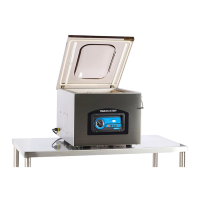
VP321 Chamber Vacuum Sealer | User Guide
Set Up - Adjusting the VP321 Timing Controls
Vacuum Time: To increase or decrease the vacuum time, press the SET
button until VACUUM is illuminated and then use the UP/DOWN buttons to
adjust the vacuum time accordingly. The time setting will display on the
LED Screen on the control panel.
NOTE:Fillerplatescanbeusedtoreducethevacuumtimerequired.Placethe
fillerplatesinsidethechamberasdesired.Fillerplatesoccupyspace,leaving
lessairtoberemovedfromthechamber.Ifyourequiremorespaceinsidethe
chamber,removethefillerplatestoaccommodateyourproduct.
Sealing Time: To increase or decrease the sealing time, press the SET
button until SEALING is illuminated and then use the UP/DOWN buttons
to adjust the sealing time to accommodate your application. It is
recommended that you make adjustments in 0.1 second increments to
avoid melting the pouch.
NOTE:Forthickerpouches,youshouldincreasethesealtimein0.1second
incrementsuntilthepouchsealscompletely.Inaddition,forthinnerpouches,
youshoulddecreasethesealtimein0.1secondincrementstoavoidover-sealing
thepouch.
Cooling Time: To increase or decrease the cooling time, press the SET
button until COOLING is illuminated and then use the UP/DOWN buttons to
adjust the cooling time accordingly.
NOTE:TheVP321settingswillalwaysdefaulttothemostrecentlyusedsettings
onthemachine.
Toprolongthelifeofyoursealbar,setthecoolingtimeto
twicethesealingtime.
TIP:
How to Use


 To Next Page