Operation 4
0020160592_00 auroFLOW plus Instructions for use 7
4 Operation
4.1 Digital Information and Analysis System
(DIA)
The product is equipped with a digital information and ana-
lysis system (DIA system). The DIA system consists of a
display that shows symbols and plain text, along with 5 op-
erating buttons. The DIA system provides information on the
operating condition of the product and helps you deal with
problems.
The display lights up when one of the DIA system buttons
is pressed. At first, pressing the button does not trigger any
other function.
The light automatically switches off after one minute if no
further buttons are pressed.
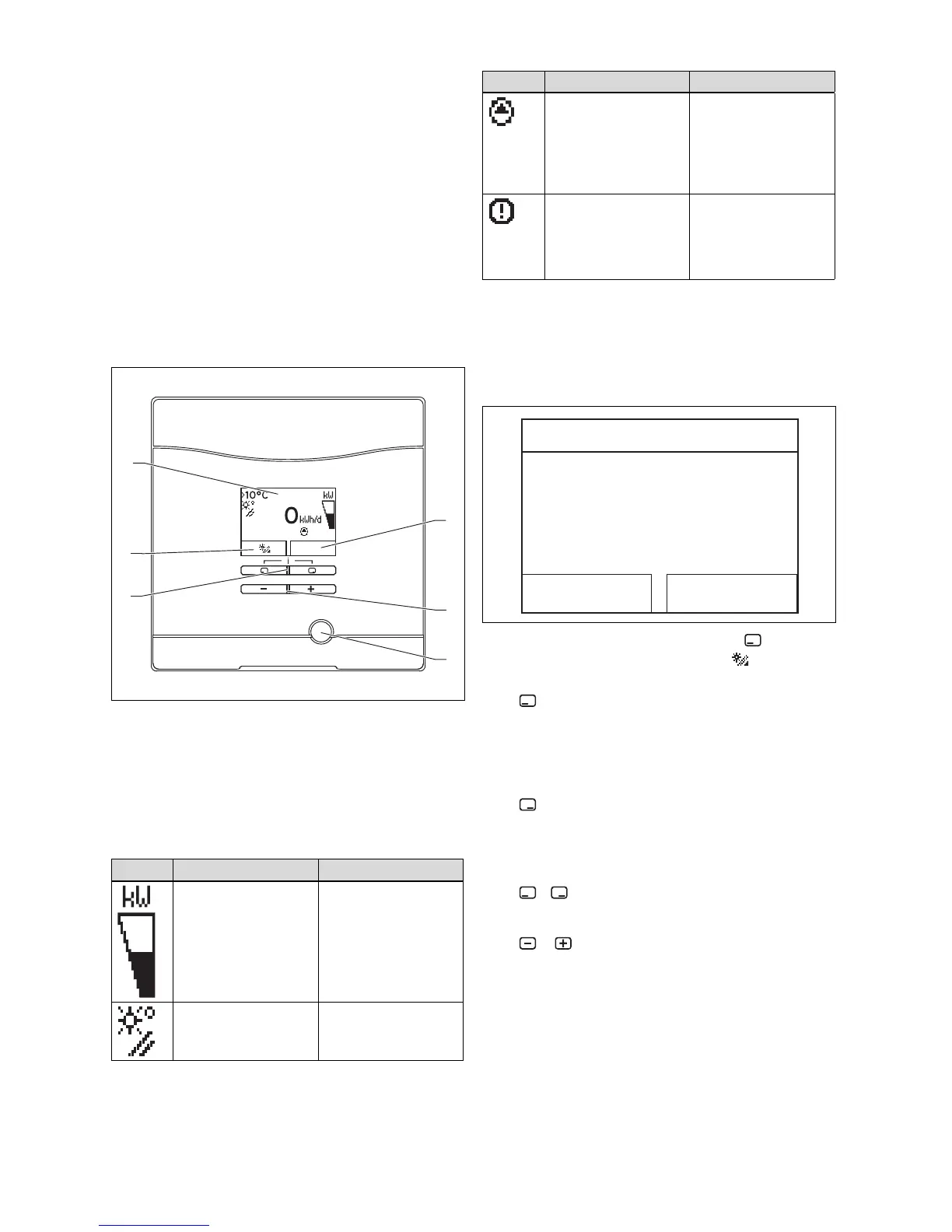
DIA system control elements
1 Display of the current
assignment of the right-
hand selection button
2 Minus and plus button
3 Fault clearance key
4 Left and right-hand selec-
tion buttons
5 Display of the current
assignment of the left-
hand selection button
6 Display
4.1.1 Displayed symbols
Symbol Meaning Explanation
Display of the current
solar output (bar display)
Power transmitted to the
cylinder
Collector temperature Temperature at the
collector temperature
sensor (T5)
Symbol Meaning Explanation
Solar pump(s) active Flashes: Solar circuit is
starting up (filling of the
field)
Permanently on: solar
circuit running, cylinder
charging pump active
Fault in the solar system Appears instead of the
basic display.
A plain text display
explains the displayed
fault code.
4.2 Operating concept
The product is operated using the selection buttons and the
plus/minus buttons.
Both selection buttons have a soft key function. This means
that the function of the selection buttons changes.
Previous day
0 kWh
Solar yield
Back
Next
If, for example, the left-hand selection button is pressed
in the basic display, the current function of (solar yield)
switches to Back.
Press :
– to switch directly from the basic display to the yield
display
– to cancel the change to a set value
– to go one selection level higher in the menu.
Press :
– to go to the next yield display, for example
– to confirm a set value
– to go one selection level lower in the menu.
Press + simultaneously:
– to call up a menu with additional functions.
Press or :
– to go back and forth between the individual points of the
entry list in the menu
– to increase or decrease a selected set value.
Configurable values are always displayed flashing.
You must always confirm any change to a value. Only then
does the product save the new setting.




 To Next Page