0020230535_07 ecoFIT pure Installation and maintenance instructions 31
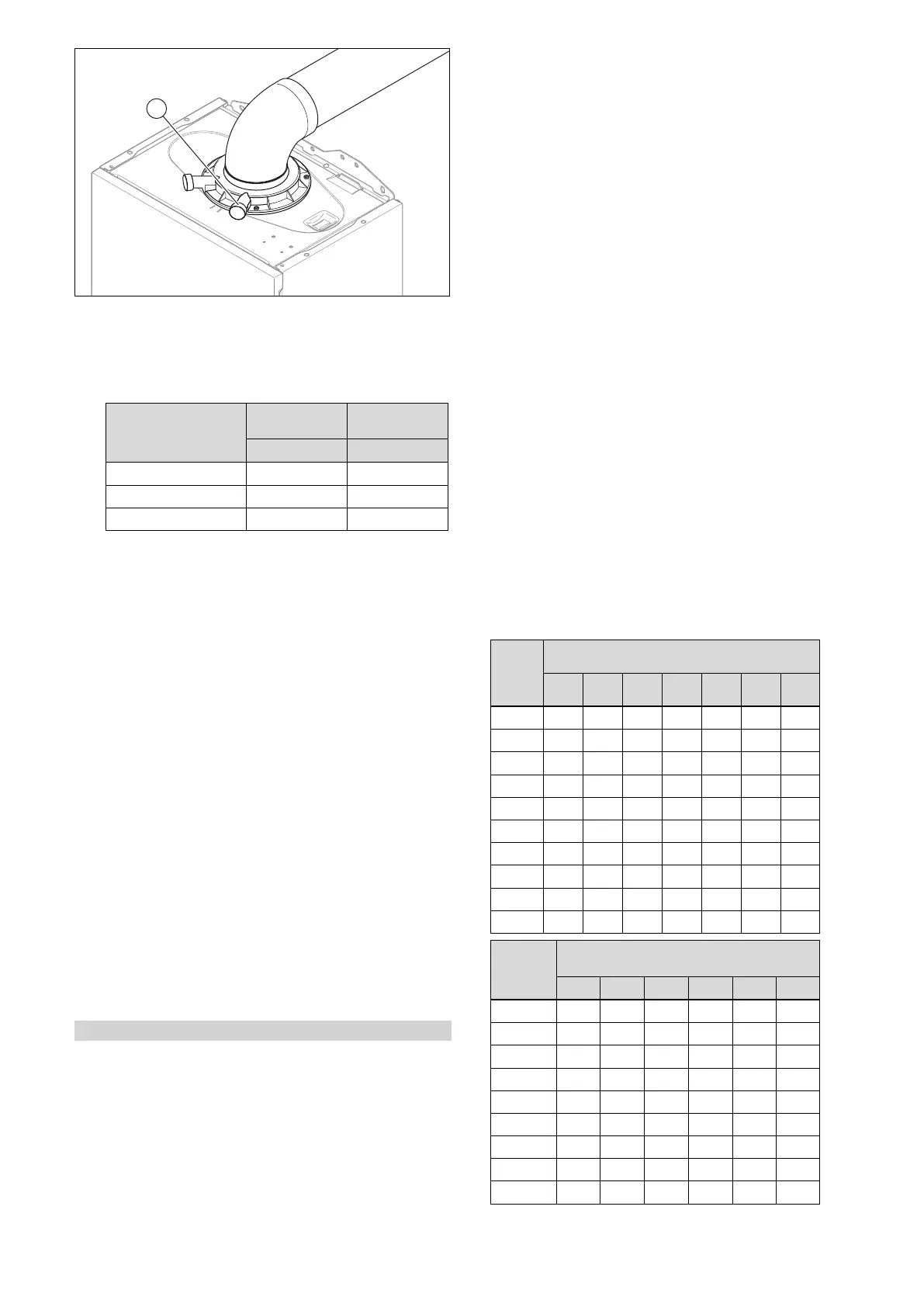
3. Unscrew the cover from the flue gas analysis point (1).
4. Measure the CO₂ content at the flue gas analysis point
(1).
5. Compare the measured value with the corresponding
value in the table.
Checking the CO₂
content
Removed
front casing
Fitted front
casing
Natural gas H Natural gas H
CO₂ at full load 9.0 ±1.0 vol. % 9.2 ±1.0 vol. %
CO at full load ≤ 250 ppm ≤ 250 ppm
CO/CO₂ ≤ 0.0031 ≤ 0.0031
◁ The value is OK.
▽ The value is not OK; you cannot start up the
product.
▶ Inform Customer Service.
9.8 Thoroughly flushing the heating installation
("hot")
1. Operate the appliance until the boiler and the heating
system are up to temperature.
2. Check the heating system for leaks.
3. Connect a hose to the drain valve located at the lowest
position of the heating system.
4. Shut off the boiler, open the drain valve and all purge
valves on the radiators and allow the water to flow out
of the heating system and the boiler quickly and fully.
5. Close the drain valve.
6. Fill the heating system again with water as described in
Filling the heating installation and Purging the heating
installation.
7. Install the front casing.
9.9 Checking leak-tightness
▶ Check the gas pipe, the heating circuit and the hot water
circuit for leak-tightness.
▶ Check that the air/flue pipe has been installed correctly.
Condition: Room-sealed operation
▶ Check whether the vacuum chamber has been closed
tightly.
9.10 Checking the heating mode
1. Activate the heating mode on the user interface.
2. Turn all thermostatic valves on the radiators until they
are fully open.
3. Allow the product to operate for at least 15 minutes.
4. Purge the heating installation.
5. Call up the Live Monitor.
– Menu → Live Monitor
Status codes – Overview (→ Page 42)
◁ If the product is working correctly, the display shows
S.04.
10 Adapting the unit to the heating
installation
You can reset/change the system parameters.
Overview of diagnostics codes (→ Page 39)
10.1 Burner anti-cycling time
To prevent frequent switching on and off of the burner and
thus prevent energy losses, an electronic restart lockout
is activated for a specific period each time the burner is
switched off. The burner anti-cycling time is only active for
the heating mode. Domestic hot water mode during a burner
anti-cycling time does not affect the time function element.
10.1.1 Setting the burner anti-cycling time
▶ Set the burner anti-cycling time via the diagnostics code.
Overview of diagnostics codes (→ Page 39)
T
Flow
(tar-
get)
[°C]
Set maximum burner anti-cycling time [min]
1 5 10 15 20 25 30
30 2.0 4.0 8.5 12.5 16.5 20.5 25.0
35 2.0 4.0 7.5 11.0 15.0 18.5 22.0
40 2.0 3.5 6.5 10.0 13.0 16.5 19.5
45 2.0 3.0 6.0 8.5 11.5 14.0 17.0
50 2.0 3.0 5.0 7.5 9.5 12.0 14.0
55 2.0 2.5 4.5 6.0 8.0 10.0 11.5
60 2.0 2.0 3.5 5.0 6.0 7.5 9.0
65 2.0 1.5 2.5 3.5 4.5 5.5 6.5
70 2.0 1.5 2.0 2.5 2.5 3.0 3.5
75 2.0 1.0 1.0 1.0 1.0 1.0 1.0
T
Flow
(target)
[°C]
Set maximum burner anti-cycling time
[min]
35 40 45 50 55 60
30 29.0 33.0 37.0 41.0 45.0 49.5
35 25.5 29.5 33.0 36.5 40.5 44.0
40 22.5 26.0 29.0 32.0 35.5 38.5
45 19.5 22.5 25.0 27.5 30.5 33.0
50 16.5 18.5 21.0 23.5 25.5 28.0
55 13.5 15.0 17.0 19.0 20.5 22.5
60 10.5 11.5 13.0 14.5 15.5 17.0
65 7.0 8.0 9.0 10.0 11.0 11.5
70 4.0 4.5 5.0 5.5 6.0 6.5




 To Next Page