1 Notes on the documentation
80 Operating and installation instructions 0020266269_00
Operating and installation instruc-
tions
1 Notes on the documentation
1.1 Observing other applicable documents
▶ You must observe all the operating and installation in-
structions included with the system components.
1.2 Validity of the instructions
These instructions apply only to:
Product article number
VR 920
0020252922, 0020252923,
0020252924, 0020252926
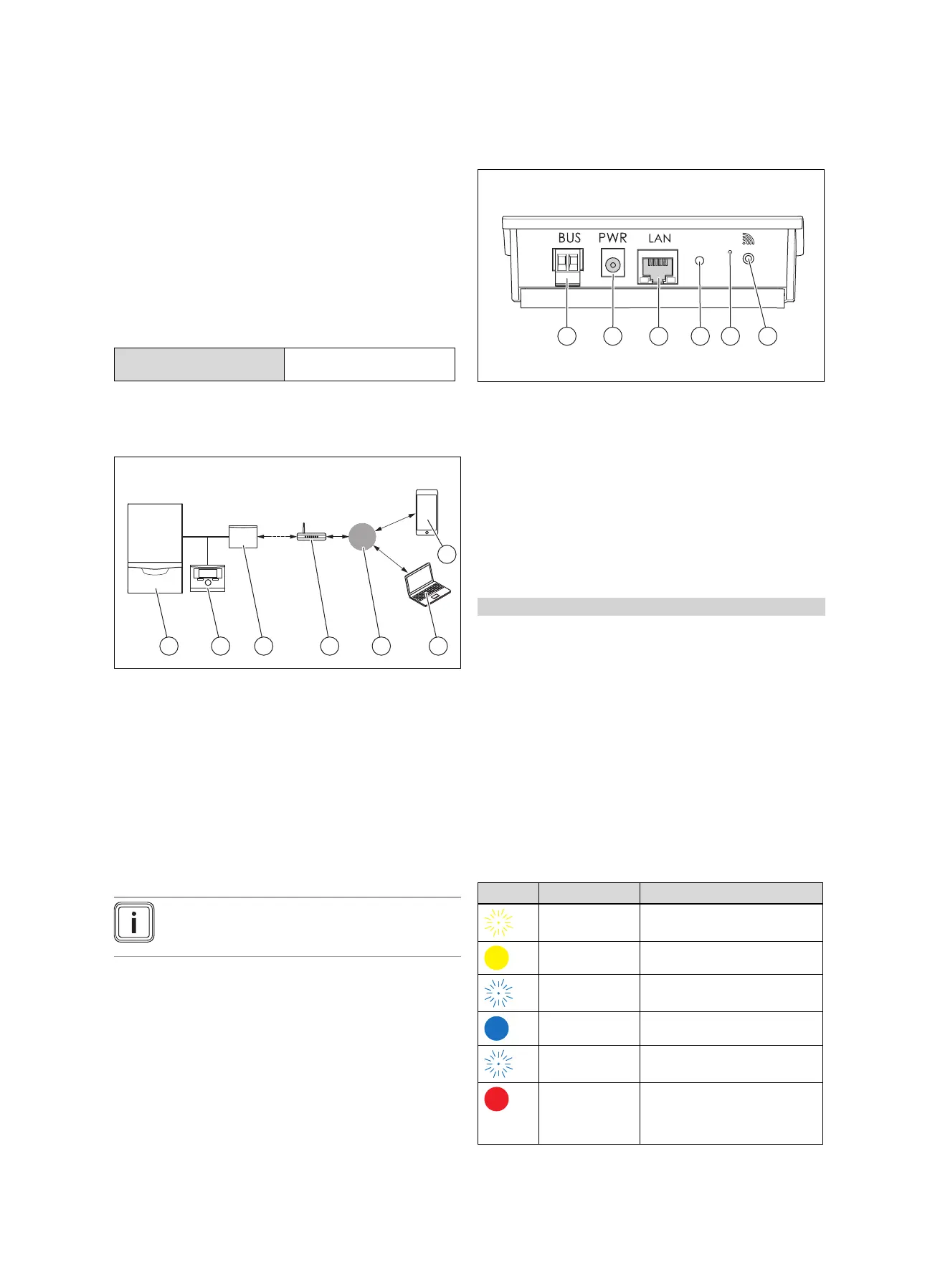
2 System overview
1 Heat generator (eBUS-
compatible)
2 multiMATIC VRC700
(all generations)
3 VR920 communication
unit
4 DSL router
5 Vaillant Group server
6 multiMATIC app
7 profiDIALOG remote
service and diagnosis
platform
The VR920 communication unit is the central Vaillant gate-
way to the Internet and enables Connectivity Services.
The multiMATIC app is only compatible with the
multiMATIC VRC700 system control and supports Apple
iOS and Android smartphones.
Note
Using the VR920 produces data traffic. We re-
commend using an Internet flat rate tariff.
3 Product description
3.1 Design of the product
1 BUS (eBUS connection
to the heat generator)
2 Power supply unit con-
nection
3 Network cable connec-
tion
4 Status LED
5 Fault clearance button
6 Radio link start-up
button
3.2 Product functions
The communication unit can be connected to the Internet
via WLAN or LAN. The communication unit has a wireless
interface for using the ambiSENSE single-room temperature
control.
Conditions: Built-in version
If you want to use the WLAN and ambiSENSE wireless in-
terfaces, you must remove the communication unit from the
boiler and position it on the boiler.
If you want to use the LAN interface, the communication unit
can remain in the boiler.
3.3 WLAN password
To start up the product, you require a password-protected
network.
A possible MAC address filter must be taken into account
in the router. You can find the required information on the
enclosed ID card.
3.4 Meaning of the LED on the product
LED Condition Meaning
Flashing The product starts up
Lights up The start process ends; ready for
coupling
Flickering The coupling mode (WLAN) is
active
Lights up LAN/WLAN is available. The
product is ready for operation.
Flashing VR 920 is being updated
Lights up Internet connection was discon-
nected; when connecting via
LAN: No Internet connection
available


 To Next Page