Start-up of the separate version by the end user 7
0020266269_00 Operating and installation instructions 97
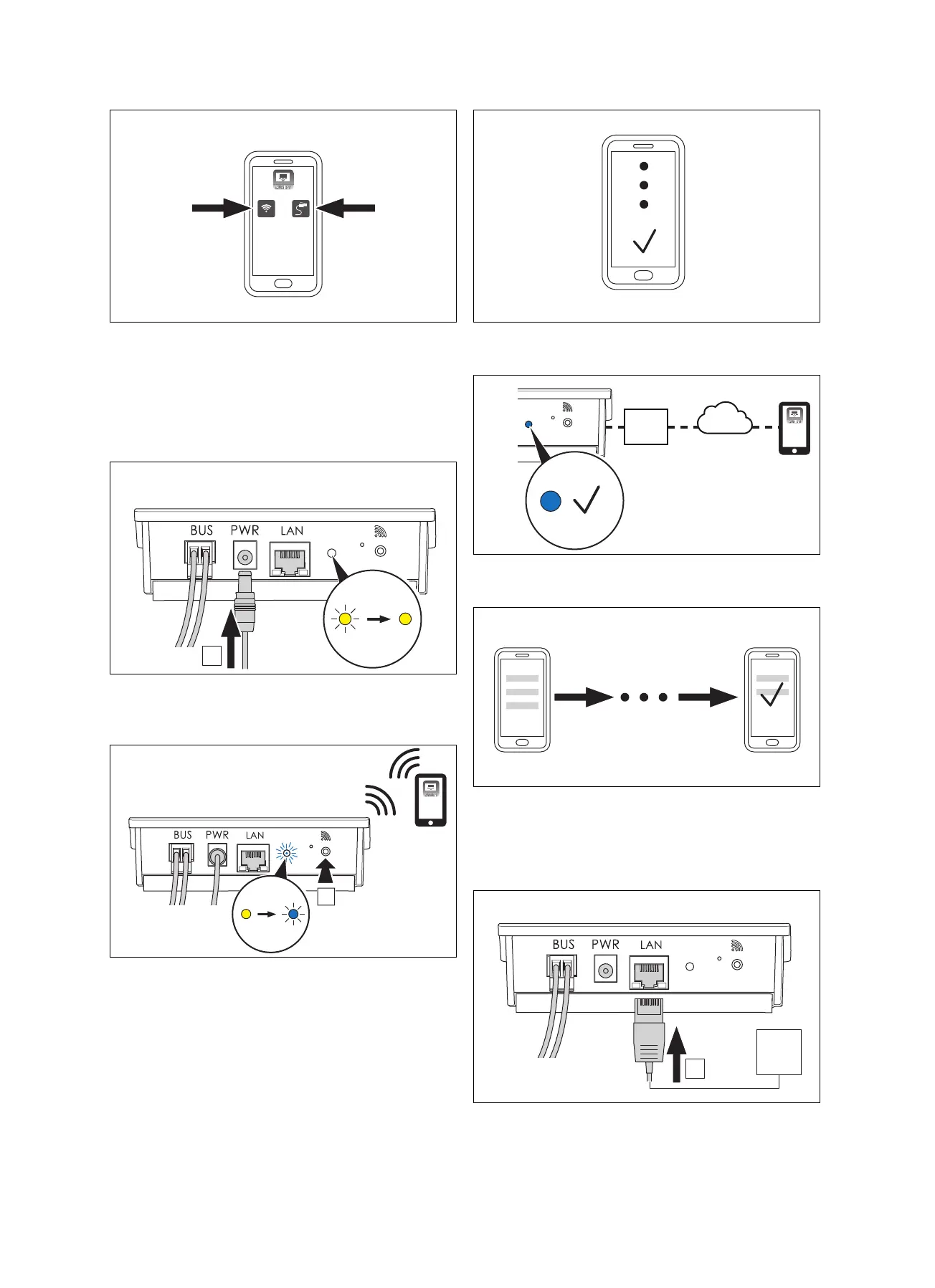
4. Select the "LAN" or "WLAN" option in the app.
5. Start up the communication unit with WLAN.
(→ Page 97)
6. Start up the communication unit with LAN. (→ Page 97)
7.1.1 Starting up the communication unit with
WLAN
1. Connect the power supply cable to the communication
unit (A).
◁ The LED flickers yellow and then lights up in yellow.
2. When the LED lights up yellow, press the start-up but-
ton (A).
◁ The LED flickers blue.
3. For the WLAN start-up, carry out the further instructions
in the app.
4. Once the LED is lit up permanently in blue, the commu-
nication unit is connected to the Internet.
5. Carry out the further instructions in the app to set up
your account and configure the installation.
7.1.2 Starting up the communication unit with
LAN
1. Connect the LAN cable to the communication unit (A).


 To Next Page