10 Operating and installation instructions 0020298957_01
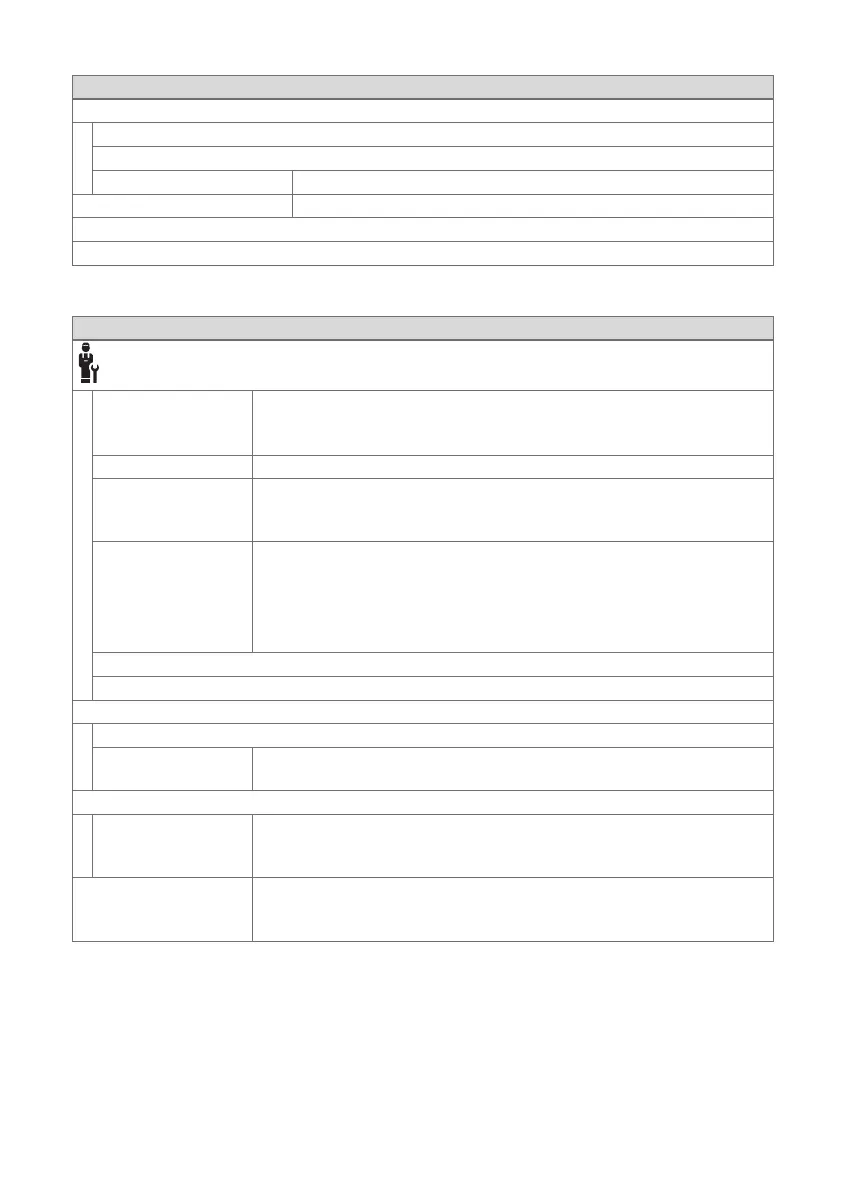
2.7.2 INFORMATION menu item
MENU → INFORMATION
→ Current temperatures
→ Zone
→ Current room air humidity
→ Control elements Explanation of the control elements
→ Menu introduction Explanation of the menu structure
→ Competent person contact info
→ Serial number
2.7.3 Menu item SETTINGS
MENU → SETTINGS
→ Installer level
→ Enter access
code
Access to the installer level, factory setting: 00
If the access code is unknown, reset the remote control to the factory
setting.
→ Fault history Faults are listed in chronological order
→ Remote control
address:
Each remote control has a unique address, starting with Address 1.
For each additional remote control, the address increases continu-
ously.
→ Control recep-
tion strength
Read the reception strength between the radio receiver unit and
product.
– 4: The radio link is within the acceptable range. If the reception
strength is < 4, the radio link is not stable.
– 10: The radio link is highly stable.
→ Software version
→ Change code
→ Language, display
→ Language:
→ Display bright-
ness:
Brightness during active use.
→ Offset
→ Room temperat-
ure: K
Comparison of the temperature difference between the measured
value in the system control and the value for a reference thermometer
in the living room.
→ Factory settings The system control resets all of the settings to the factory settings and
calls up the installation assistant.
Only the competent person can call up the installation assistant.






 To Next Page