0020298957_01 Operating and installation instructions 13
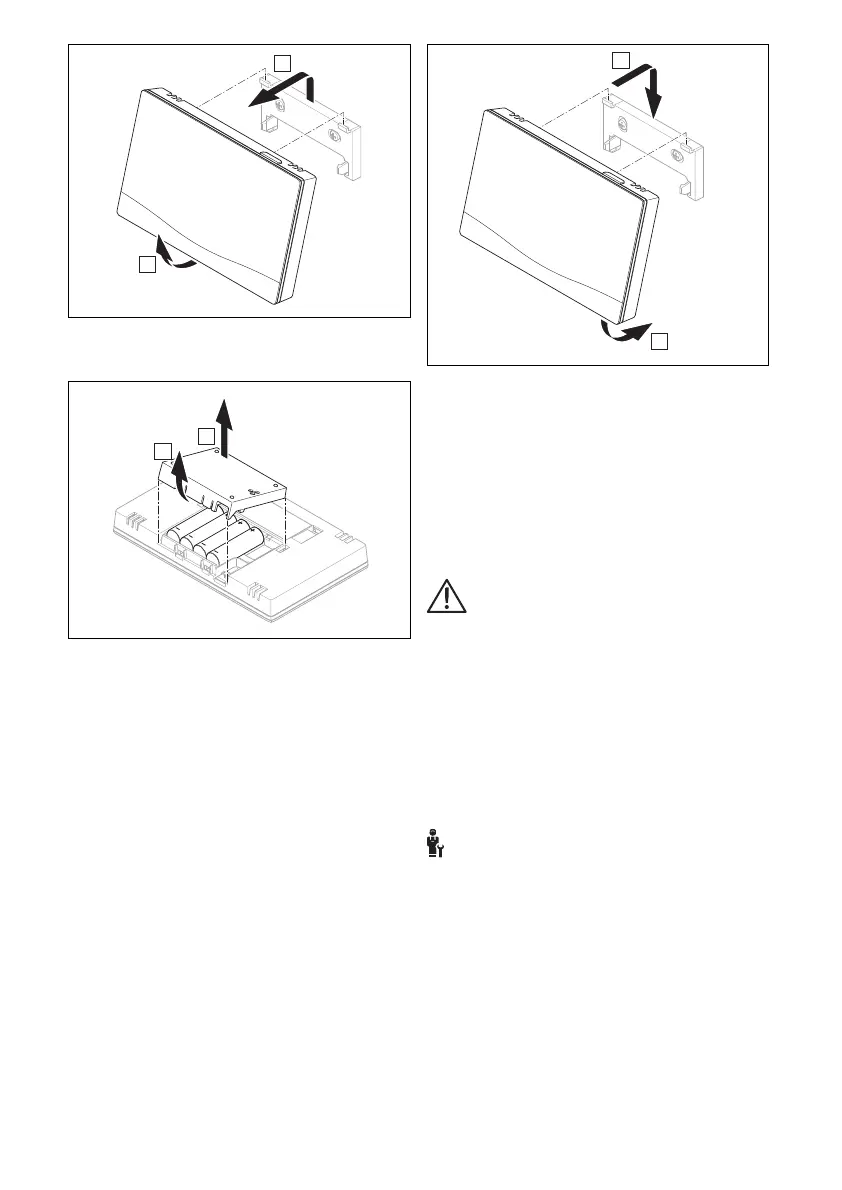
1. Take the product out of the unit mount-
ing bracket.
2. Open the battery compartment.
3. Remove the batteries.
4. Insert new batteries in the battery com-
partment, making sure that the poles
are the right way round.
– Only use LR06 batteries
– Do not use rechargeable batteries
– Do not combine the batteries with
other battery types
– Do not combine new and used bat-
teries
5. Do not short-circuit the connection con-
tacts.
6. Close the battery compartment.
7. Fit the product onto the unit mounting
bracket.
– The product clicks into place.
5 Fault and maintenance
messages
5.1 Fault messages
with the text of the fault message
appears in the display.
You can find fault messages under: MENU
→ SETTINGS → Installer level → Fault
history
Troubleshooting (→ sensoCOMFORT op-
erating and installation instructions, ap-
pendix)
5.2 Maintenance messages
with the text of the maintenance mes-
sage appears in the display.
Maintenance message for the end user (→
Appendix)
Maintenance message for the competent
person (→ sensoCOMFORT operating and
installation instructions, appendix)






 To Next Page