16 Operating and installation instructions 0020298957_01
Appendix
A Troubleshooting, maintenance message
A.1 Troubleshooting
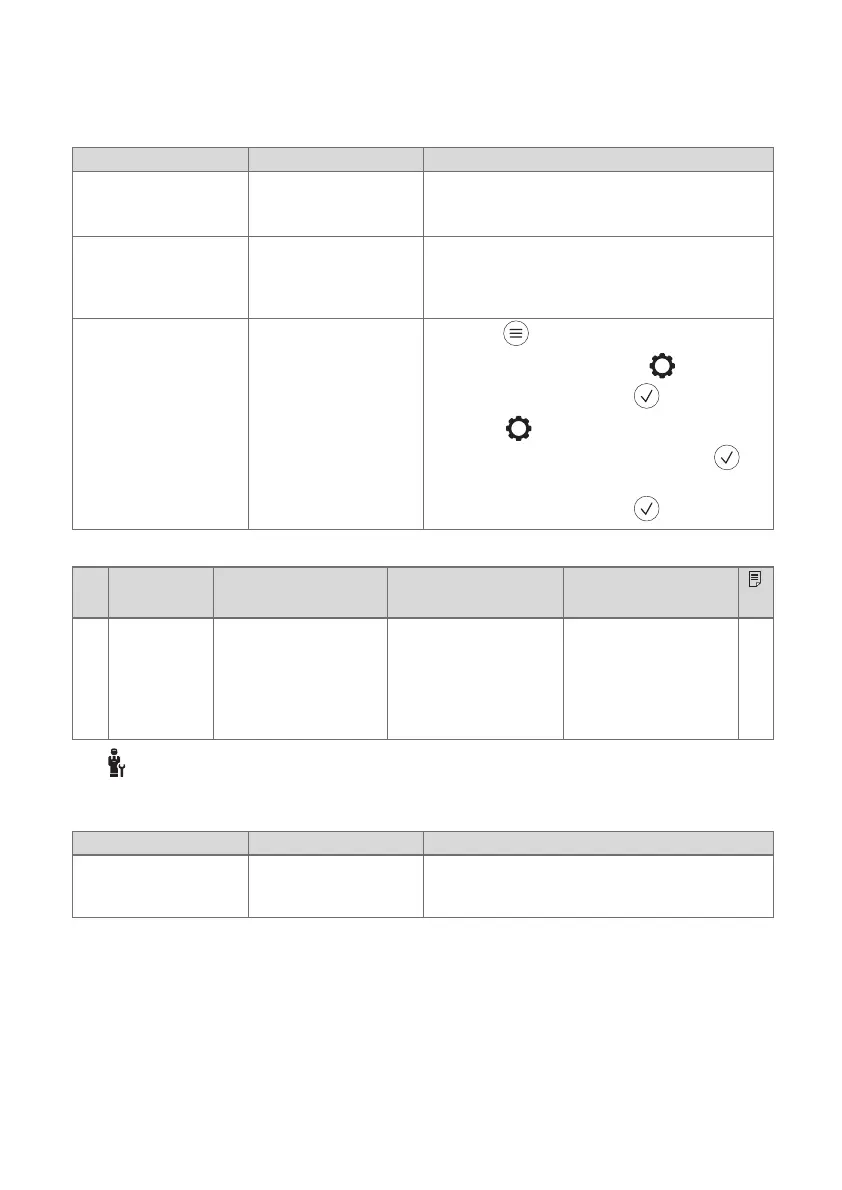
Symptom Possible cause Measure
Display remains dark The batteries are flat 1. Change all the batteries. (→ Chapter 4.1)
2. If the fault persists, inform the competent
person.
No changes in the
display can be made
via the control ele-
ments
The batteries of the
remote control have
not been inserted cor-
rectly
▶ Insert the batteries in the battery compart-
ment, making sure that the poles are the
right way round.
Display: You do not
understand the set
language
Incorrect language set 1.
Press twice.
2.
Select the last menu item ( SETTINGS)
and confirm by pressing .
3.
Under SETTINGS, select the second
menu item and confirm by pressing .
4. Select the language that you understand
and confirm by pressing .
A.2 Maintenance messages
#
Code/
meaning
Maintenance work Interval
1 Water defi-
ciency: Fol-
low the in-
structions
in the heat
gen.
The water pressure is
too low in the heating
installation.
Refer to the operat-
ing instructions for the
relevant heat gener-
ator for information on
filling with water
See the operating
instructions for the
heat generator
B -- Troubleshooting, maintenance message
B.1 Troubleshooting
Symptom Possible cause Measure
It is not possible to
switch to the installer
level
You do not know the
code for the installer
level
▶ Reset the remote control to the factory set-
ting. All set values will be lost.
Description





 To Next Page