Issue 10
1 947070
V-1073
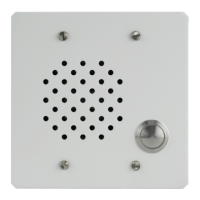
DOOR PLATE SPEAKER ASSEMBLY
INTRODUCTION
These instructions contain the specifications and
information necessary to install, operate and
maintain the V-1073 Vandal Proof Door Plate
Speaker Assembly.
SPECIFICATIONS
Purpose
• Used to provide handsfree talkback from an
outside door or entryway location.
• Equipped with a pushbutton switch for
connection to customer provided signaling
equipment.
Applications
• Any talkback control unit with a 45 Ohm
output
• All Valcom handsfree talkback control units
Nominal Specifications
• Faceplate constructed from 11AWG steel
• Heavy duty steel pushbutton
• Internal louvered speaker guard
• 45 Ohm input impedance
• Silver-plated pushbutton switch contacts
• Mounts in a 2-gang 4" x 4" electrical box
• Four (4) one-way stainless steel screws
included
Dimensions/Weight
• 4.5”H x 4.5”W x 1.75”D
(11.43cm H x 11.43cm W x 4.45cm D)
• 1.5 lbs. (0.68 kg)
INSTALLATION
Cabling
• For proper operation, distribution cable
should be unshielded twisted pair.
• Limit cable runs to talkback speakers to less
than 800 feet if using 24AWG cable.
Connections
• Connect tip and ring from page control unit
speaker output to speaker connections on
the unit.
CAUTION: When installing the V-1073 Vandal
Proof Speaker, double check connections
and test assembly before mounting. Once
mounted, the screws cannot be easily
removed.
TECHNICAL ASSISTANCE
When trouble is reported, make certain there are
no broken connections leading to the unit.
Assistance in troubleshooting is available from
the factory. When calling, have a VOM available
and call from the job site. Call (540) 563-2000
and press 1 for Technical Support or visit our
website at
http://www.valcom.com.
Valcom equipment is not field repairable.
Valcom, Inc. maintains service facilities in
Roanoke, VA. Should repairs be necessary,
attach a tag to the unit clearly stating your
company name, address, phone number, contact
person, and the nature of the problem. Send the
unit to:
Valcom, Inc.
Repair and Return Dept.
5614 Hollins Road
Roanoke, VA 24019-5056


 To Next Page
 General