Issue 1
1 947663
Machine
Shop
(Noisy)
90
80
70
60
50
10' 20' 30' 40' 50'
Shipping
(Moderate)
Waiting
Rooms
(Quiet)
Talkback not recommended above 80dB
TYPICAL REPLY DISTANCE CHART
Maximum Talkback Reply Distance
V-1071
INSTALLATION INSTRUCTIONS
INTRODUCTION
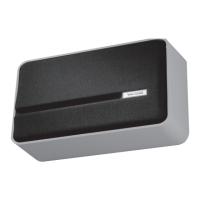
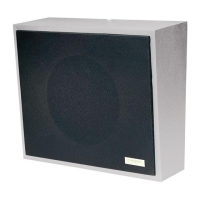
The interior wall speaker, the V-1071 is a 8”
interior talkback speaker for use with Valcom
“Handsfree” talkback page control units. The
enclosure is made of steel with a durable powder
coated finish. The color of the enclosure can
easily be changed to match any decor. A cloth
covered detachable grille is included.
MOUNTING
Remove the screw holding the mounting bracket
to the enclosure. Mount the bracket using
appropriate hardware such as #8 pan head
crews. After making the required connections,
reattach the enclosure to the mounting bracket.
INSTALLATION
Connections
Two conductor twisted wire is required for the 45
Ohm talkback speakers. Standard 22 or 24
gauge station wire is acceptable. Shielded wire
is not required or recommended. Connections
are as follows:
• Speaker out from page control to speaker tip
• Speaker common to speaker ring
SYSTEM DESIGN
General
The 45 Ohm Talkback Speakers are designed to
be used with the Valcom "handsfree" talkback
control units. In combination with these units,
they will provide both loudspeaker and talkback
functions.
A standard Valcom talkback paging system is
made up of three basic components:
1. A talkback page control unit
2. Speakers (45 Ohm)
3. A power supply
Consult Valcom's VSP - Handsfree Talkback
Paging (Part # 947099) for detailed information
on selecting the control unit and power supply.
V-1070
Talkback Wall Mount Speaker
Gray w/Black Grille
DIMENSIONS/WEIGHT
• 10.13” H x 12.31” W x 4.63” D
(25.73cm x 31.27cm W x 11.75cm D)
• Weight: 4.25 LBS (1.91 kg)
IMPORTANT
The speaker is no better than your ears. If you
cannot carry on a conversation at normal voice
levels over the required talkback distance, then
the talkback page equipment will not function
satisfactorily.
Use common sense when mounting a talkback
speaker. The speaker should be as close as
possible to the area where talkback is desired.
It should not be mounted close to or pointed at,
noise producing equipment such as fans, air
conditioners, machinery or compressors.
Sold by:
http://www.TWAcomm.com
Toll Free: (877) 389-0000


 To Next Page
 General