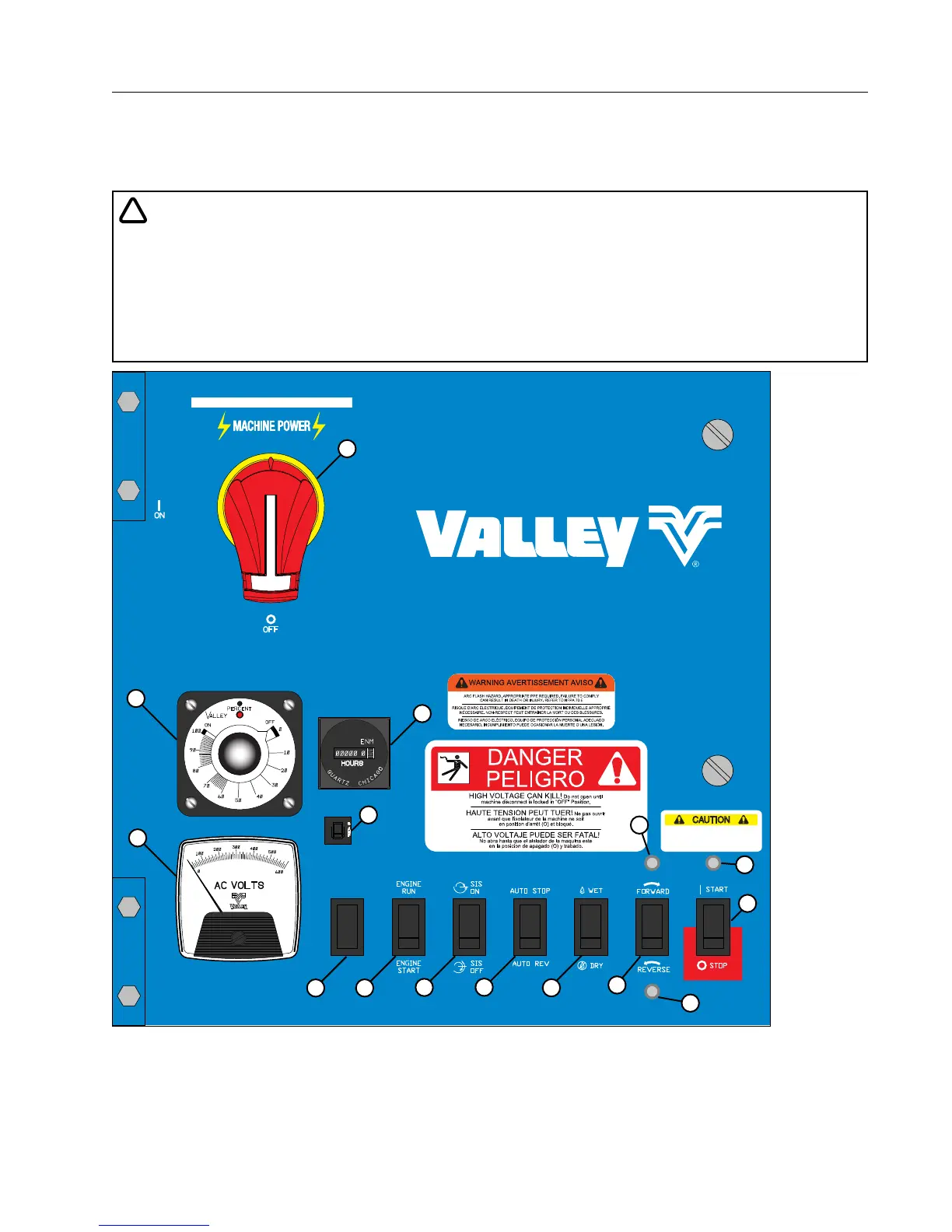
Valley Classic Control Panel
19
Overview
Controls and Components
The inside door of the Classic control panel is shown below in Figure 19-1.
!
DANGER
• 480 VOLTS – DO NOT OPEN THE INTERIOR CONTROL PANEL DOOR, ELECTRICAL SHOCK MAY
OCCUR.
• ALL NEEDED CONTROLS AND MONITORING DEVICES ARE ON THE OUTSIDE OF THE INTERIOR
CONTROL PANEL DOOR.
• SERVICE WORK DONE ON THE CONTROL PANEL IS TO BE PERFORMED BY A QUALIFIED SER-
VICE PERSON ONLY.
* Only available on control panels equipped with Auto Reverse/Auto Stop.
** Switch included with optional Auxiliary Contactor.
Overview
OFF
ON
TEST
Classic
CAUTION
DO NOT HOLD BUTTON DEPRESSED
LONGER THAN 3 SECONDS. REPEATED
START ATTEMPTS CAN CAUSE SERIOUS
STRUCTURAL DAMAGE
14
15
3
2
5
13 12
11
10
7
4
6
8
9
1
Figure 19-1 1. Main Disconnect Switch
2. Start / Stop / Safety Override Switch
3. Safety Return Light
4. Forward / Reverse Switch
5. Forward Light*
6. Reverse Light*
7. Wet / Dry Switch
8. Percentage Timer
9. Voltage Meter
10. Auto Reverse / Auto Stop Switch*
11. Stop-In-Slot Switch
12. Engine Run / Start Switch
13. Expansion Slot
(Optional Auxiliary On / Off Switch**)
14. Hour Meter
15. Circuit Breaker



 To Next Page