Valley Classic Control Panel
29
Operation
Stopping The Machine
Emergency Stopping
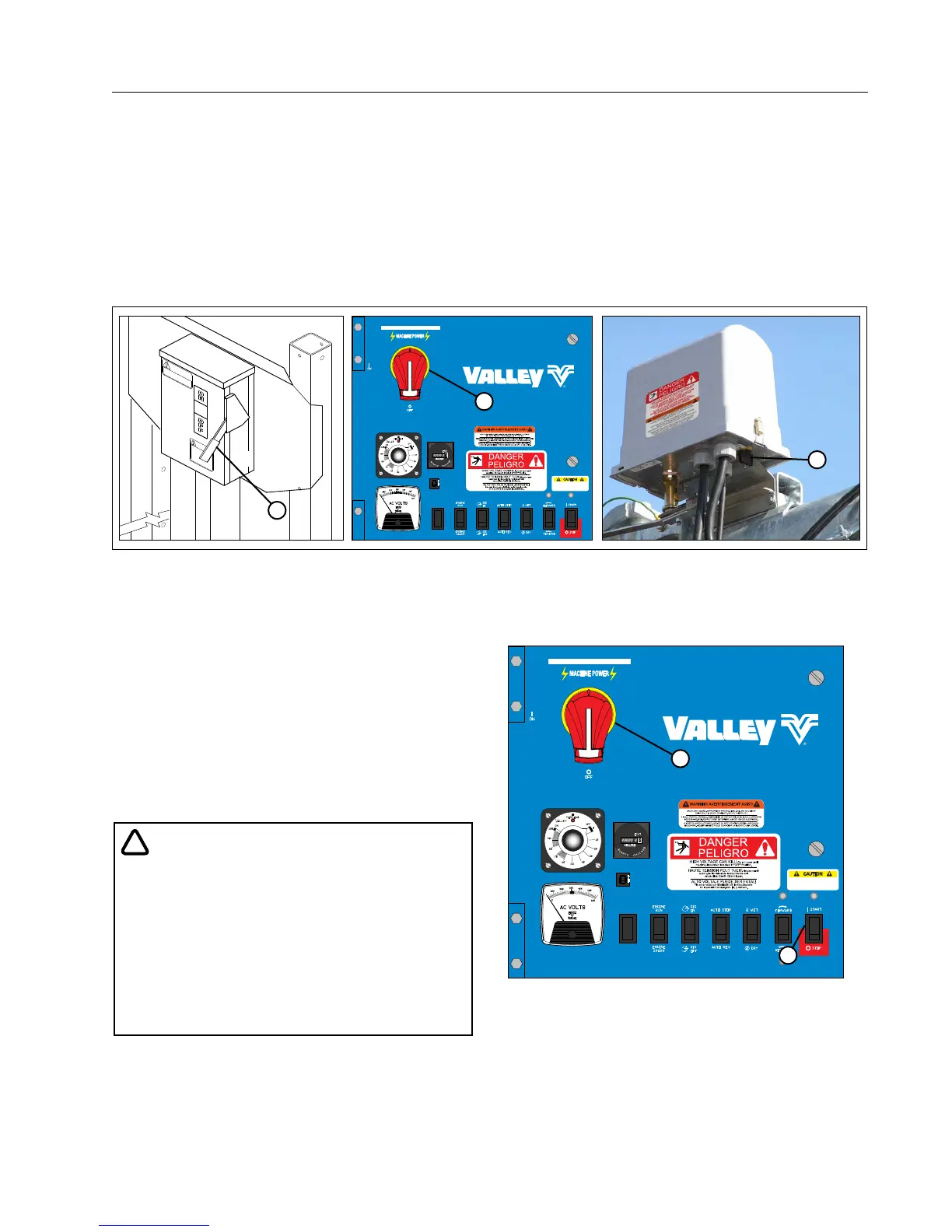
To stop the machine in an emergency situation, shut off any one of the following:
• Main Service Disconnect Switch from public power to the control panel. See Figure 29-1.
• Control Panel Main Disconnect Switch. See Figure 29-1.
• Any Tower Box Disconnect Switch. See Figure 29-1.
Stopping Under Normal Conditions
1. Place the START/STOP switch in the STOP position.
See Figure 29-2.
2. Turn the main disconnect switch to the OFF posi-
tion. See Figure 29-2.
3. Turn the pumping unit OFF (if not automatic).
4. If an engine generator set is utilized, place the
Engine Run/Start switch to the Start position for
the next start-up sequence.
!
• DO NOT SHUT THE MACHINE OFF BY SLOW-
LY IDLING DOWN THE ENGINE GENERATOR
SET. THIS PRACTICE CAUSES LOW VOLT-
AGE AND WILL DAMAGE MACHINE COMPO-
NENTS.
• ALWAYS STOP THE IRRIGATION MACHINE
PRIOR TO SHUTTING DOWN THE ENGINE-
GENERATOR SET.
OFF
ON
TEST
Classic
CAUTION
DO NOT HOLD BUTTON DEPRESSED
LONGER THAN 3 SECONDS. REPEATED
START ATTEMPTS CAN CAUSE SERIOUS
STRUCTURAL DAMAGE
1
2
Figure 29-2 1. Start/Stop Switch
2. Main Disconnect Switch "OFF"
3
1
OFF
ON
TEST
Classic
CAUTION
DO NOT HOLD BUTTON DEPRESSED
LONGER THAN 3 SECONDS. REPEATED
START ATTEMPTS CAN CAUSE SERIOUS
STRUCTURAL DAMAGE
2
Figure 29-1 1. Main Service Disconnect Switch
2. Control Panel Main Disconnect Switch
3. Tower Box Disconnect Switch



 To Next Page