ValueHD Corporation
36
2) Saturation
Saturation 0~14, slider control, on the right
shows the corresponding numerical. Default 3.
3) Contrast
Contrast0~14, slider control, on the right shows
the corresponding numerical. Default 6.
4) Sharpness
Sharpness0~15, slider control, on the right
shows the corresponding numerical. Default 1.
5) Hue
Hue 0~14, slider control, on the right shows the
corresponding numerical. Default 7.
6) Flip & Mirror
Tick Flip to realize image upside down, tick
mirror to realize image around the mirror. Default
not tick.
7) Button
Adjusting the parameters, press "apply" button to
save, press "cancel" button to cancel the adjustment
of the parameters, press "default" button obtain the
default value.
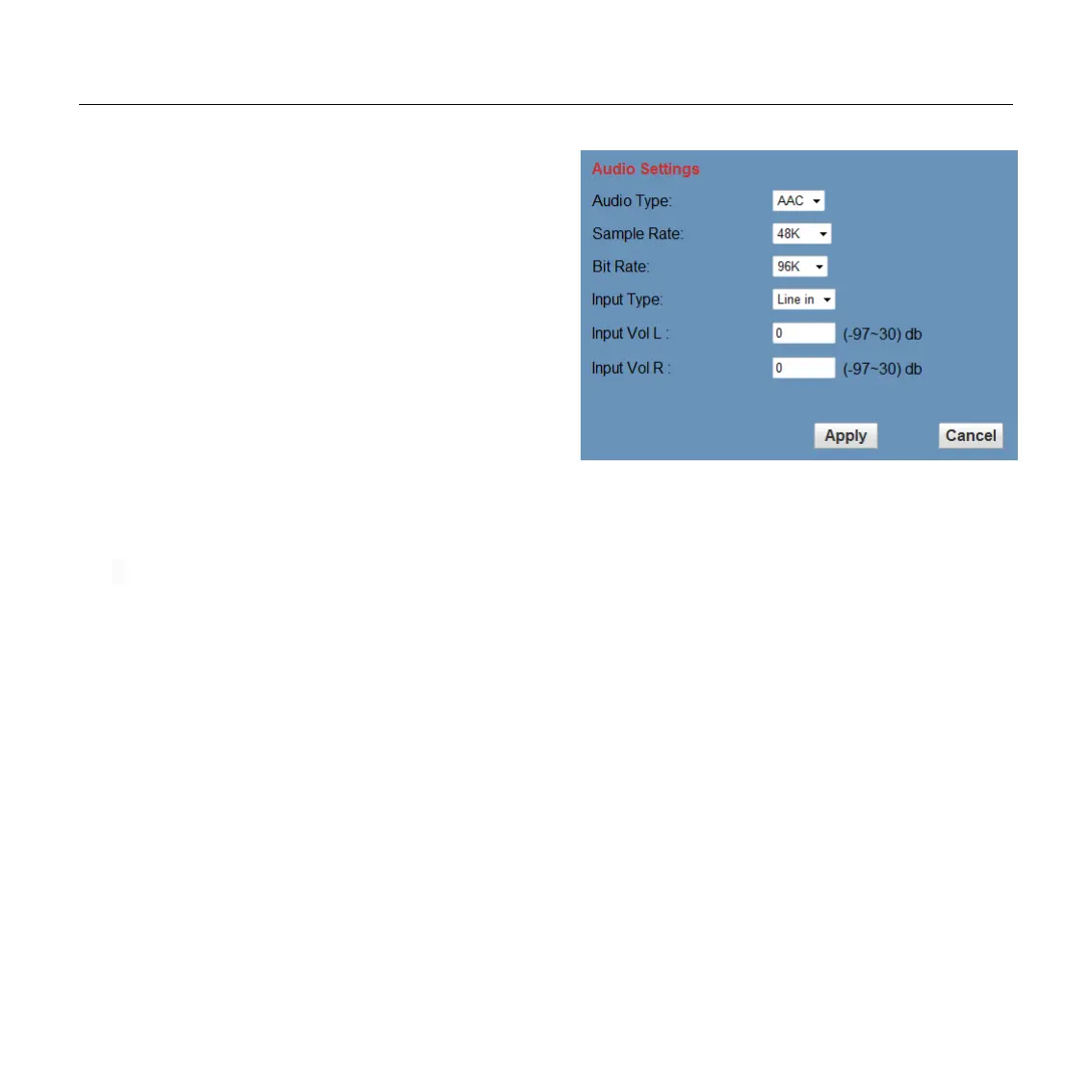
6.4 Audio Setup, please click “Audio”
1) Audio Type
Audio type AAC
2) Sample rate
Sample rate 44.1 K and 48 K, selectable.
3) Bit rate
Bit rate 96k,128k,256k, selectable
4) Input Type
line in only
5) Input VolL
The volume of the left channel
6) Input VolR
The volume of the right channel
7) Button
Press "apply" button to save parameters, press
"cancel" button to cancel parameter


 To Next Page