4
2.1 Integrated control
2. Controls
BOOTING SEQUENCE
The unit booting sequence is similar to a personnal computer boot sequence. Each time the unit
is plugged after being unplugged, or a power failure occurs, the unit will perform a 30-second
booting sequence before starting to operate.
During the booting sequence, the integrated control LED will light up and remain GREEN
for 5 seconds, and then will turn RED. During this RED light phase, the unit is checking
and resetting the motorized damper position. Once the motorized damper position
is completely set, the RED light turns off and the booting sequence is done. NOTE: No command
will be taken until the unit is fully booted.
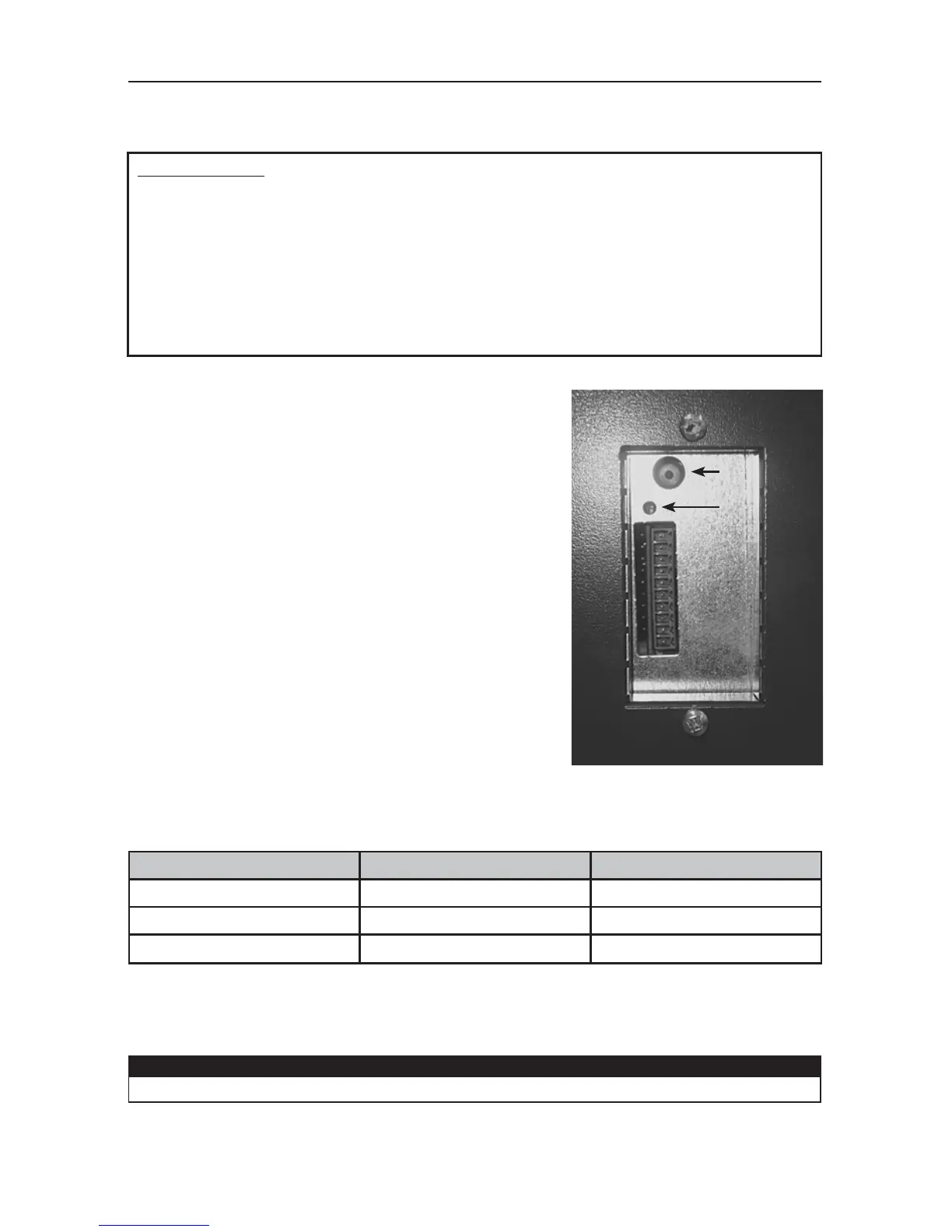
All units are equipped with an integrated control,
located on the upper left side of the unit.
Use the push button (1) to control the unit. The LED (2) will
then show which mode the unit is in.
Refer to table below to see how to operate the unit using its integrated control.
PRESS ON PUSH BUTTON LED COLOR RESULTS
ONCE AMBER UNIT IS ON LOW SPEED
TWICE GREEN Unit is on High speed
T
HREE TIMES NO LIGHT Unit is OFF
If a problem occurs during the unit operation, its integrated control LED (2) will blink. The color of
the blinking light depends on the type of error detected. Refer to Section 4 Troubleshooting on last
page for further details.
CAUTION
When using optional main control, the integrated control must be turned off.
VE0220
1
2


 To Next Page