8
HOW TO SET PERIODS FOR PROGRAM MODE
The Program Mode allows the user to customize the operation of his/her ventilation unit, for week
and weekend days. Each day is divided in 4 periods. The period’s starting hour and ventilation
speed are factory set (see below).
DAILY PERIODS DEFAULT SETTINGS
PERIOD STARTING HOUR MODE
PERIOD 1 (MORNING) 6:00 AM MIN
P
ERIOD 2 (DAY) 9:00 AM 20 MIN/H
PERIOD 3 (EVENING) 5:00 PM MIN
PERIOD 4 (NIGHT) 11:00 PM 20 MIN/H
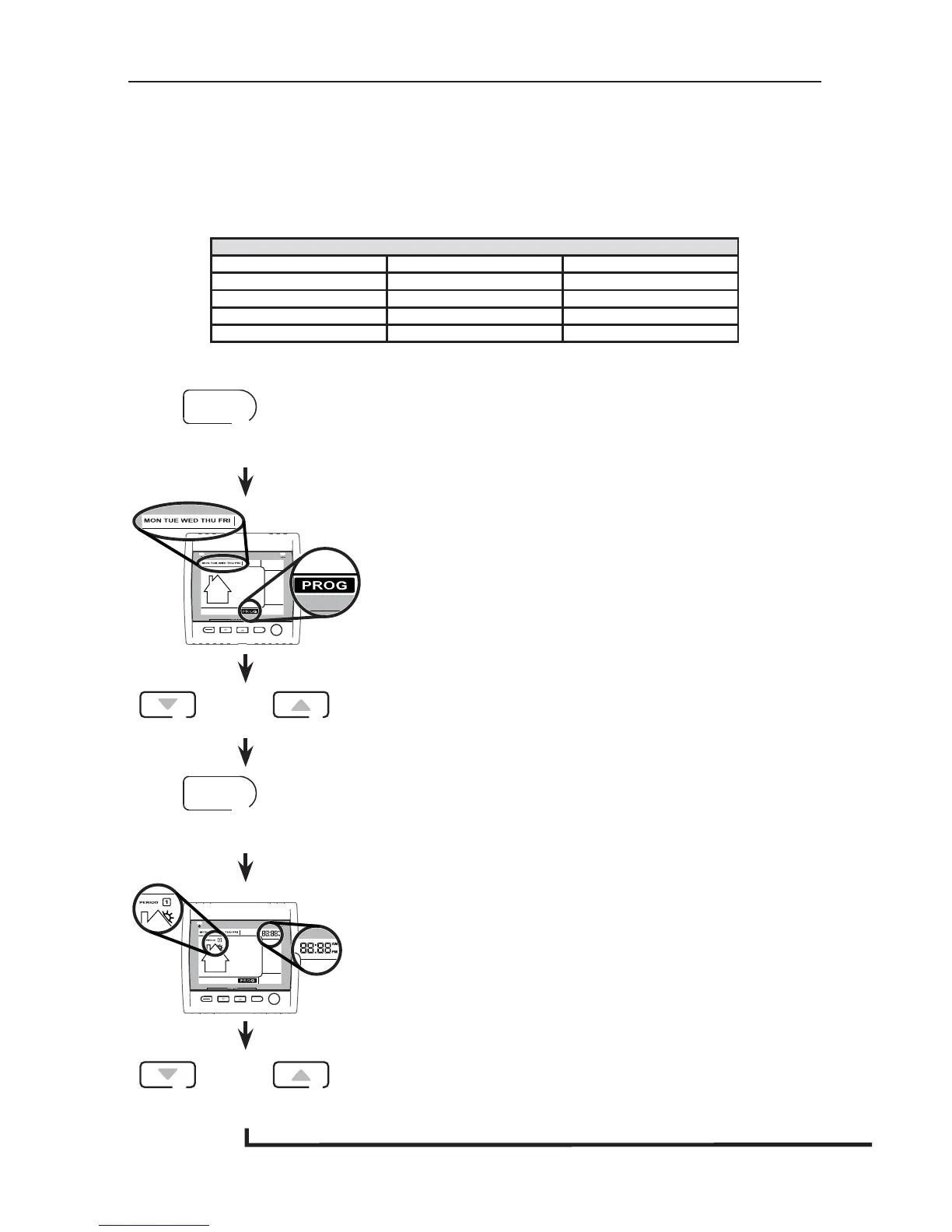
TO CHANGE THESE VALUES:
Press SET key for 3 seconds.
SET
3 SEC.
SMART
SET
MODE
PREF
PROG (for Program) will appear on screen and week days will
flash.
NOTE: If the week days were the first to be set, the weekend
days will appear on screen; but if the weekend days
were the first to be set, then the week days will appear
on screen.
Use the arrow keys to select between week days or weekend
days.
SET
SMART
SET
MODE
PREF
Period 1 will appear on screen and hour display will flash.
Use the arrow keys to select the period starting hour.
NOTE: Time changes by 15 minutes increments.


 To Next Page