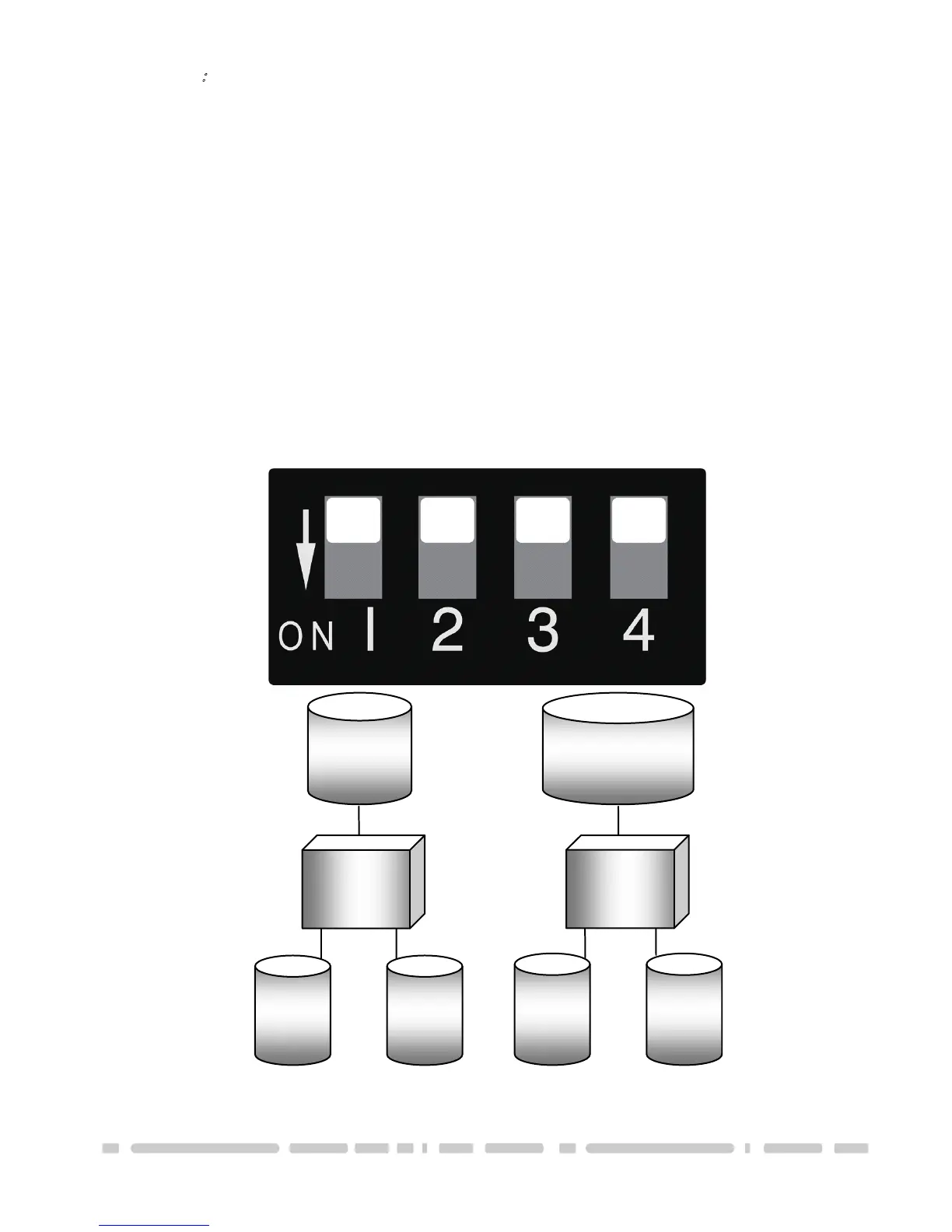
JBOD Mode
:
It concatenates a series of physical hard drives as a single large volume; resulting in a seamless expansion
of virtual volumes beyond the physical limitations of singularly connected hard drives. Hard drive A and B
are concatenated into a single virtual volume in the figure below with a storage capacity that is equal to the
sum of each of the physical hard drives A and B.
It is also possible to create a JBOD volume using only a single hard disk drive connected to Port 0, and
then increase the storage capacity of the volume later by adding another hard disk drive to Port 1 and
pressing reset button. The new disk blocks of Port 1 will be concatenated to the end of the disk blocks of
Port 0, and any data that is stored on the existing JBOD volume will be preserved. However, it is not
possible to expand an existing JBOD volume by adding another hard disk drive to Port 0 and still preserve
any existing data on that volume.
Drive A
250GB
NST-400MX-SR
Port 0 Port 1
Drive A
250GB
Drive A
250GB
NST-400MX-SR
Port 0 Port 1
JBOD
1







 To Next Page