- 4 -
5.
During video recording, long press to
turn on/o Wi-Fi;
In the menu setting and le browsing
inteace, sho press to return to the
previous inteace.
option or le and long press to scroll
through the options or les below.
When playing a le, sho press to pop
up a menu for deleting les.
6.
Sho press to resta the camera
LED Indicator
LED LED Status Description
REC Steady green light
Blinking green light
Instandby
Camera is recording
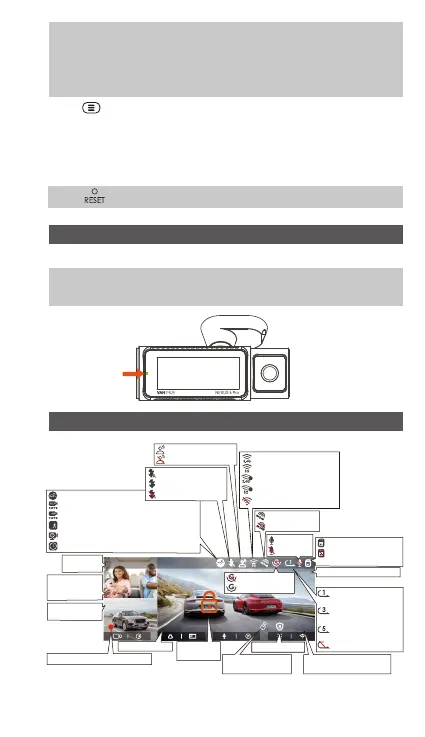
Screen Oveiew
C
R
F
MP/H
14:25:35 06-01-202300:00:37
35
2160P+1080P+1080P 30FPS
G-Sensor is ON
G-Sensor is OFF
2.4G Wi-Fi is ON
5G Wi-Fi is ON
2.4G Wi-Fi is Connected
5G Wi-Fi is Connected
Wi-Fi is Turned OFF
GPS is located
GPS is OFF
Memo card inseed
Loop recording for 1
min
Loop recording for 3
mins
Loop recording for 5
mins
Loop recording OFF
Video
Resolution
R means Rear
Camera
Time and Date
F means Front Camera
Voice control is ON
Voice control is OFF
Recording Time(Current Clip)
Collision Detection ON
1080P Low Bitrate Recording ON 15FPS
720P Low Bitrate Recording ON 15FPS
Motion Detection
Low Framerate Mode
Time Lapse ON
IR Auto Mode
IR Always On Mode
IR Mode is OFF
Mic is ON
Mic is OFF
C means Cabin
Camera
Display
Emergency
File Locked
NO Memo card/SD
card error
Recorded Driving Speed
(KMH/MPH)
Remote control is
connected
Privacy Mode
- 4 -



 To Next Page