
 Need help?
Do you have a question about the VARUN K5304-LCD and is the answer not in the manual?
Describes the material and operating temperature range of the product housing.
Outlines the various functions and data displayed by the K5304 display unit.
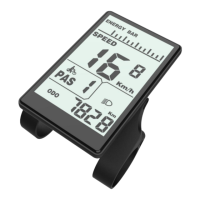
Details the different sections and icons visible on the K5304 LCD display.
Explains the function and physical characteristics of the three buttons on the display.
Instructions for turning the display unit on, off, and its automatic power-off feature.
Visual representation and explanation of the K5304 display's main interface elements.
Explains how to switch between and view real-time, average, and maximum speed readings.
Details how to cycle through and view single trip and cumulative mileage.
Describes how to activate and use the walk assist function for pushing the e-bike.
Instructions for controlling the e-bike's headlight using the display unit.
Explains how to interpret the battery level display and voltage warnings.
Method for clearing the single trip mileage data on the display.
Ensures proper connection of components before powering on the e-bike display.
Covers basic system configurations like units and speed limits.
Allows selection between kilometers and miles for speed and distance units.
Enables setting a maximum speed limit for the e-bike display.
Configures the wheel diameter for accurate speed and distance measurements.
Procedures for saving settings and exiting the current setting interface.
Accessing personalized settings requires entering a specific password for security.
Allows setting voltage values to define battery capacity levels for accurate display.
Configuration of Pedal Assist System (PAS) levels and their corresponding assist ratios.
Adjusts the maximum current limit for the controller to manage motor power output.
Configures the Pedal Assist System sensor, including direction, sensitivity, and proportion parameters.
Configures the speed sensor based on the number of magnets on the wheel for accurate speed readings.
Settings related to the throttle's walk assist function and level splitting.
Enables or disables the throttle's walk assist functionality.
Controls whether the throttle's output is split according to PAS levels.
Procedures for saving settings and exiting the configuration menu.
Sets the delay time for battery power reporting or cutoff.
Configures the maximum speed limit that the display will enforce.
Activates or deactivates the button-controlled walk assist feature.
Adjusts the speed at which the walk assist function operates.
Configures the acceleration profile for a smoother start from a standstill.
 General
| Brand | VARUN |
|---|---|
| Model | K5304-LCD |
| Category | Bicycle Accessories |
| Language | English |

 To Next Page