16
1
54
6,
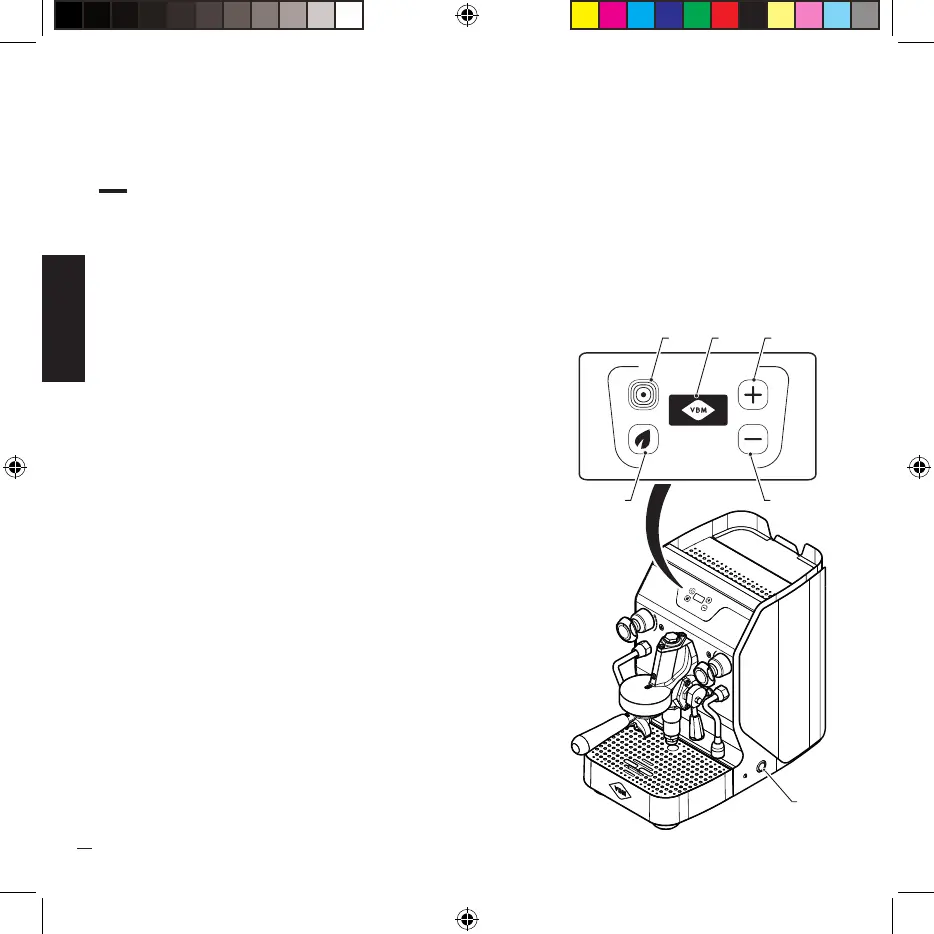
DESCRIPTION OF BUTTONS AND LIGHTS.
MAIN SWITCH ON/OFF (1):
· The machine is equipped with a power switch with two positions:
OFF position: no power to internal components of the switch line LED off.
ON position: power supply for electrical operating
components. The switch LED lights up.
DISPLAY (2):
· By turning the main switch to the ON position, the display
lights up, it indicates:
the selected function (coffee delivery - ECO mode), the
temperature and time of coffee delivery, alarm codes.
MACHINE STATUS LED (3):
· Three-color LED indicating the status of the machine.
Green LED on: machine ready;
Orange LED on: machine loading;
Red LED on: machine in alarm;
ECO MODE LED KEY (4):
· If pressed, it activates the ECO mode which allows the
machine to maintain the set temperature (the ECO symbol
appears on the display). After 2 hours of inactivity,
the machine goes into stand-by (the shutdown symbol
appears on the display.)
LED KEYS FOR COFFEE TEMPERATURE INCREASE/
DECREASE (5):
· Once pressed, they increase/decrease the temperature
of the brewed coffee. When the temperature is changed
this will remain stored for the next delivery until a new
variation.


 To Next Page