Panel Controls
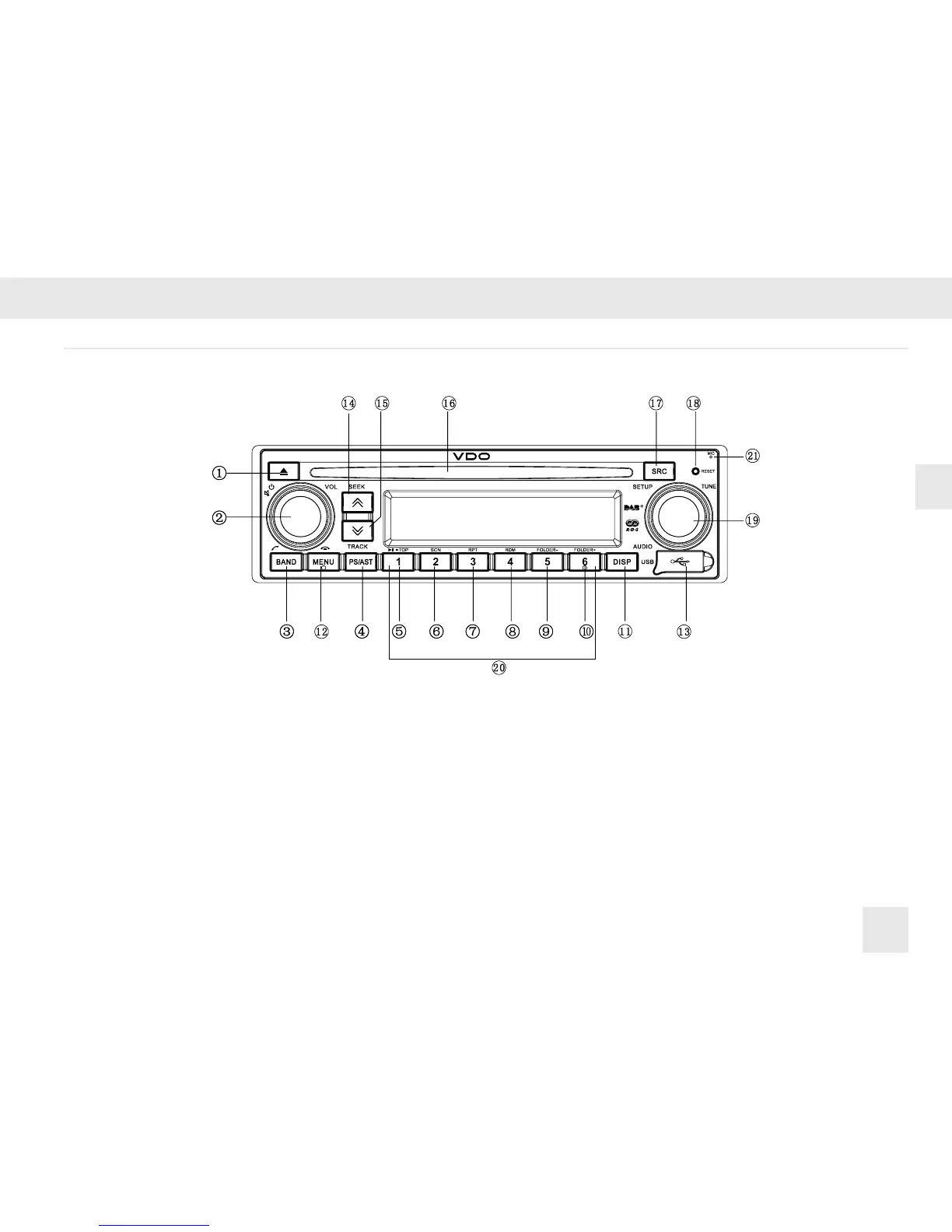
n Panel Controls
(1) Disc eject
(2) Rotate to adjust volume
Radio: Mute
CD/MP3: Pause
Hold it to power off
(3) Band select
(4) 1-6 preset
Automatically search and save station
(5) Channel 1/Play/Stop/Top
(6) Channel 2/SCN
(7) Channel 3/RPT
(8) Channel 4/RDM
(9) Channel 5/FOLDER-
(10) Channel 6/FOLDER+
(11) Display paly time and clock in the CD state.
The LCD will display the ID3 TAG
information recycle: le name/folder name/
ID3 TAG/system time in the MP3 state.
Display PTY info and system time in the
Radio state.
(12) Menu select
(13) USB connector
(14) Seek+/Select the next track
(15) Seek-/Select the previous track
(16) Disc slot
(17) SCR button
Radio
Disc (when disc is in)
USB (when USB inserted)
AUX IN
(18) Reset hole
(19) Press to select VOL/BAS/TRE/BAL/LOUD/
FAD/AF/TA/PTY, rotate VOL knob to adjust
RADIO: Rotate to adjust radio tune
CD /MP3: Rotate to select the previous/next
track
(20) 1-6 preset:
Press to tune in a preset station.
Hold for more than 2 seconds to store a
desired station.
(21) Microphone


 To Next Page