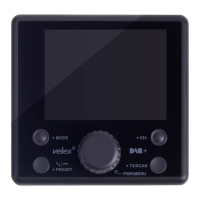
The Velex VX280 is a marine media player with Bluetooth connectivity, designed for gauge hole installation in marine environments. It serves as a central audio unit for boats, offering radio, USB, auxiliary input, and Bluetooth music playback.
Function Description:
The VX280 allows users to listen to AM/FM radio, play MP3/WMA files from a USB device, connect external audio sources via a 3.5mm auxiliary input, and stream music wirelessly from Bluetooth-enabled devices. It features a user-friendly interface with dedicated buttons for power, volume control, mode selection, band scanning, track navigation, and various audio settings. The unit is designed to be water-resistant with an IPX6 rating, making it suitable for marine applications where exposure to water is possible.
Important Technical Specifications:
- Power Supply Requirements: DC 12V Negative Ground
- Load Impedance: 4-8 Ohms/channel
- Maximum Output Power: 40W x 4 (CH)
- Operate Temperature: -10 to 50℃
- FM Tuner Tuning Range:
- USA: 87.9MHz-107.9MHz
- EUR: 87.5MHz-108MHz
- AM Tuner Tuning Range:
- USA: 530KHz-1710 KHz
- EUR: 522KHz-1620 KHz
- USB Playback:
- Signal to Noise Ratio: 55dB
- Frequency Response: 50Hz-20KHz
- A/D Conversion Filter: 16BIT
- USB Storage Capacity: 16GB Max
- Bluetooth Version: 5.0
- Waterproof Rating: IPX6
Usage Features:
- General Operation:
- Power On/Off: Short press the power button to turn on; press and hold for 2 seconds to turn off.
- Mode Selection (SRC): Cycles through Radio, USB, Aux In, and Bluetooth Music modes.
- Volume Control: Dedicated up/down keys for adjusting audio volume.
- Auxiliary Input: Connects external audio devices via a 3.5mm jack.
- Audio Setup Menu (SEL): Accesses settings for VOL/BASS/TREBLE/BALANCE/FADE/LOUD(ON/OFF), EQ (Rock/Class/Pop/Off), STEREO/MONO, DX/LOCAL, AREA EURO/USA, TIME/CLOCK, and RESET.
- AM/FM Tuner Operation:
- Automatic Radio Station Tuning (AMS): Press and hold the band button to scan and store all available stations.
- Manual/AUTO Search: Press and hold the << or >> buttons for 2 seconds to switch between manual and automatic search modes.
- Manual Tuning: Short press << or >> buttons to manually seek next or previous stations.
- Band Selection (BND): Selects between FM1, FM2, FM3, AM1, and AM2 bands.
- Preset Stations: Short press numeric buttons (1-4) to jump to preset stations.
- Storing Stations: Press and hold one of the four preset station memory buttons for 1 second to save the current station.
- USB Operation (MP3/WMA):
- Playback: Insert a USB device (not supplied) containing MP3/WMA files.
- Track Select: Press >> to skip to the beginning of the next track.
- Pause/Resume: Press >II button to temporarily stop or resume playback.
- Fast Forward/Reverse: Press and hold >> or << to fast forward or reverse a track.
- Playback Controls:
- 1/PLAY/PAUSE: Play or pause the current track.
- 2/INT: Play the first 10 seconds of each track (Intro Scan).
- 3/RPT: Continually repeat the current track.
- 4/RDM: Play tracks in random order.
- Bluetooth Operation:
- Pairing:
- Press SRC to select BT mode; "BT CONNECT" will flash on the LCD.
- Activate Bluetooth on your smartphone and search for "VELEX".
- If prompted for a PIN, enter "0000".
- "CONNECTED" will display on the screen upon successful pairing.
- Track Navigation: Press >> or << to select next or previous tracks.
- Pause/Resume: Press >II button to pause or continue playback.
- Clock Display and Adjustment:
- Display Clock: Press SEL repeatedly to display the clock.
- Enter Time Setting: Press and hold SEL.
- Adjust Hour: Use VOL+ or VOL-.
- Enter Minute Setting: Short press SEL.
- Adjust Minute: Use VOL+ or VOL-.
- The system automatically saves adjustments after 3 seconds of inactivity.
Maintenance Features:
- Installation:
- Requires disconnecting the negative battery terminal before installation.
- Avoid installing in areas subject to high temperatures, direct sunlight, dust, dirt, or excessive vibration.
- A square mounting gasket is provided for tracing the cut-out (approx. 5.5" wide, 3.6" tall, 2.5" deep).
- The unit should not be mounted where it can be submerged in water.
- The player is secured using a mounting bracket and screws.
- Wiring:
- A detailed wire connection diagram is provided, including connections for radio antenna, USB, AUX IN, RCA outputs, accessory, +12V, and ground.
- ISO connector pinout is also detailed for speaker, power, and other connections.
- Troubleshooting:
- Unit will not turn on (no power):
- Cause: Yellow/red wire not connected or incorrect voltage. Action: Check connections for proper voltage (11-16V DC).
- Cause: Black wire not connected. Action: Check connection to ground.
- Cause: Fuse blown. Action: Replace the fuse.
- Unit has power (but no sound):
- Cause: Speaker wire not connected. Action: Check connections at speakers.
- Cause: One or more speaker wires touching each other or chassis ground. Action: Insulate all bare speaker wires from each other and chassis ground.
- Unit blows fuses:
- Cause: Yellow/red wire touching chassis ground. Action: Check for pinched wire.
- Cause: Speaker wires touching chassis ground. Action: Check for pinched wire.
- Cause: Incorrect fuse rating. Action: Use fuse with correct rating.
- Fuse Replacement: When replacing a fuse, ensure the new fuse is of the correct type and amperage to prevent damage to the radio.
- Grounding: If a suitable ground wire is not present in the vehicle wiring harness, connect the black ground wire to the vehicle chassis.


 To Next Page
 General