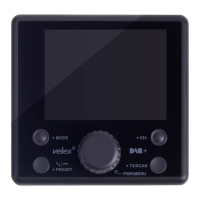
DAB+ Search
1. Press the MODE button until DAB mode is found.
2. Press 'TX/SCAN' button to scan the available DAB+ channel. The scanning
progress will takes around 20-30 seconds.
3. To view DAB+ stations in a list, press the PRESET button. Use the Tuning Knob
to scroll up or down to select the desired DAB+ channel from 'Service List' and
press the MENU again to confirm the selection.
4. You may also press and hold the TX/SCAN button for 3 seconds to re-activate
the Auto Scan process if you need to update the DAB+ radio channels.
Note: For normal use, you don't have to perform Auto Scan every time you use the
car DAB+ radio unless there are newly added DAB+ channels, in which case
you may need to perform Auto Scan again.
DAB+ Service Information
While listening to DAB+, the display will show the following if applicable:
1. Channel Name
2. Frequency
3. DAB+ Icon
4. Signal Strength
5. FM Transmitting Frequency
6. Bluetooth Connection Status


 To Next Page