Preset Stations
Selecting Preset Stations:
To select your favorite DAB+ preset stations:
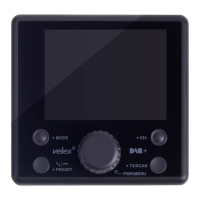
1. Press the PRESET button to enter Select Preset Stations mode.
2. Use the Tuning Knob to scroll up or down to select a Preset Station.
3. Press the MENU button again to confirm and exit.
Bluetooth
Pairing a Phone:
When pairing a phone with DAB+ receiver for the first time, follow the below
procedures:
1. Press the MODE button and switch to Bluetooth mode.
2. From your smartphone, turn on Bluetooth and search for Bluetooth peripherals.
A list of available Bluetooth peripherals will be displayed.
3. Select 'VELEX BT' in the list and once connection is established, the Bluetooth
screen will display Connected and a Bluetooth icon will be shown at the top left
of the display.
Press PRESET button to answer the incoming call or return, press and hold
'PRESET' button to hang up the call.
Press CH- button to skip to the previous song while using Bluetooth streaming music.


 To Next Page