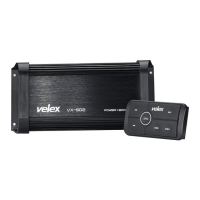
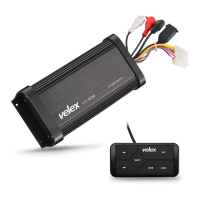
The Velex VX505 is a Bluetooth amplifier designed to enhance your audio experience in a motorized vehicle. This device comes with a multifunction controller, allowing for versatile operation and mounting options. The package includes the VX505 Bluetooth 4-CH Amplifier, a multifunction controller, a pre-installed flush mount bezel, a handlebar mounting bracket and hardware kit, a power harness, and a user manual.
Function Description
The VX505 serves as a 4-channel amplifier, capable of delivering audio output to your speakers. Its primary function is to receive audio signals via Bluetooth, AUX-IN, or USB, amplify them, and then output them to connected speakers. The integrated Bluetooth 5.0 technology enables wireless streaming from your mobile devices, providing a convenient and clutter-free audio solution. The AUX-IN feature allows for a wired connection to any device with an RCA output, accommodating a wide range of audio sources. Additionally, the multifunction controller includes a USB charging port, providing a handy power source for your devices while on the go.
Usage Features
The VX505 offers flexible installation and operation, catering to various user preferences and vehicle types.
Mounting Options:
The multifunction controller can be mounted in three different configurations:
- Flush Mount: This method utilizes the quick-mount bezel, requiring no screws. A cutout with dimensions of 3-3/16" W x 1-11/16" H (82mm x 43mm) is needed for this installation.
- Surface Mount: The flush mount bezel features two recessed screw holes, allowing for secure attachment using the included oval-head screws.
- Handlebar Mount: For motorcycles or similar vehicles, the provided pan-head screws and stainless steel clamp enable handlebar mounting. There are multiple variations for securing the clamp, ensuring a snug fit for your specific application.
Controller Functions:
The multifunction controller (MFC) is the central interface for operating the VX505. It features several buttons for intuitive control:
- SRC (Source) Button: This button cycles through the available input modes: AUX IN (purple LED), USB mode (red LED), and Bluetooth. A short press powers on the VX505, and a long press powers it off.
- Volume Up/Down Buttons: Dedicated buttons for adjusting the audio volume.
- Next Track/Fast Forward Button: Used to skip to the next song or fast forward within a track when held down.
- Play/Pause Button: Toggles playback of audio.
- Previous Track/Fast Rewind Button: Used to go back to the previous song or fast rewind within a track when held down.
Bluetooth Operation:
- Pairing: To pair a new Bluetooth device, short press the SRC button to power on the VX505. The Bluetooth blue LED will illuminate, and a confirmation tone will sound, indicating that the device is ready for pairing. Users can then navigate to their device's Bluetooth settings, scan for "VX505 (VELEX)," and connect. If prompted, the passcode is "0000."
- Reconnection: The VX505 automatically reconnects to the last paired Bluetooth device upon power-on. If the device was previously paired but not the last one, users can manually select "VX505" from their device's available Bluetooth devices list. If the device goes out of range, it will disconnect, and a single press of the power button on the MFC will re-establish the connection once back in range.
- Streaming Music: Once connected, users can control music playback using the MFC buttons (Play/Pause, Next Track, Previous Track) or directly from their device's media player. It is recommended to set the Bluetooth volume level on the connected device to 100% for optimal audio quality.
AUX-IN Operation:
- Mode Selection: Short press the SRC button to power on the VX505. Press the SRC button again to switch to AUX-IN mode, indicated by a red LED on the controller. Bluetooth devices will remain paired even in AUX-IN mode.
- Connection: Connect your audio device to the integrated RCA AUX-IN cable on the amplifier. For devices with a 3.5mm jack, a 3.5mm to RCA adaptor (not included) is required.
- Volume Control: Volume can be adjusted using the Up/Down buttons on the MFC. The Play/Pause button can be used to mute/unmute the volume. Similar to Bluetooth, it's advisable to set the headphone volume level on your connected device to 100%.
Safety Precautions:
- Volume Control: Always set the volume to a comfortable level to avoid hearing damage and ensure awareness of surroundings, especially in hazardous situations.
- Driving Safety: Do not operate mobile video equipment while driving. Safe driving is paramount.
- Troubleshooting: In case of smoke, strange noises, or odors, immediately turn off the power and consult a technician to prevent system damage.
Installation Precautions:
- Professional Installation: It is strongly recommended to have the VX505 installed by a professional to avoid electric shock, injury, or other hazards.
- Power Connection: The VX505 should be powered directly to a vehicle battery. Disconnect the battery's negative terminal before any wiring procedures. If extending the main power wire, an optional in-line fuse and fuse holder (not included) with a minimum rating of 15 Amperes should be used with the positive battery terminal.
- Ground Cable: The ground cable length should not exceed 18 inches. Ensure the ground cable is properly connected to metal parts of the vehicle's body frame or directly to the battery if a grounded chassis frame is unavailable. Separate screws should be used for the ground cables of the power amp and any second powered system.
- Weather Resistance: The VX505 is weather-resistant but should not be submerged in water.
- Mounting Parts: Use only the installation parts provided with the VX505 to avoid voiding the warranty.
- Pink Antenna Wire: Do not ground or short the PINK antenna wire.
Maintenance Features
The VX505 is designed for durability and ease of use, with a few key maintenance considerations:
Fuse Replacement:
- In the event of a power issue where the unit does not turn on, check if the fuse is blown.
- When replacing the fuse, ensure you use a fuse of the exact rating specified for this product (15A ATO Fuse Type Only). Using an incorrect fuse can lead to damage or malfunction.
Wiring and Connections:
- To prevent short-circuiting, insulate any disconnected or unused wires with electrical tape. This is crucial for safety and system integrity.
- Ensure all ground connections are secure. A loose ground wire can lead to fire or malfunction.
Troubleshooting Guide:
The manual provides a comprehensive troubleshooting guide to address common issues:
- Unit will not turn on: Check/replace the fuse, ensure ignition is in the "on" position.
- No sound is heard: Check if the device is paused or muted, verify your device's playing/volume status.
- Cannot pair Bluetooth: Refer to your device's user manual to ensure Bluetooth function is enabled.
- Poor audio quality (Bluetooth): Move the device closer to the audio system or remove any obstacles between the device and the system's antenna.
- Unit unresponsive: Disconnect power for 10 seconds to reset the unit.
Battery Management:
- To avoid draining the vehicle's battery, always run the vehicle's engine while using the VX505. Continuous use without the engine running can exhaust the battery.
By following these guidelines, users can ensure optimal performance, longevity, and safe operation of their Velex VX505 Bluetooth amplifier.

 Need help?
 Bluetooth

 To Next Page