11
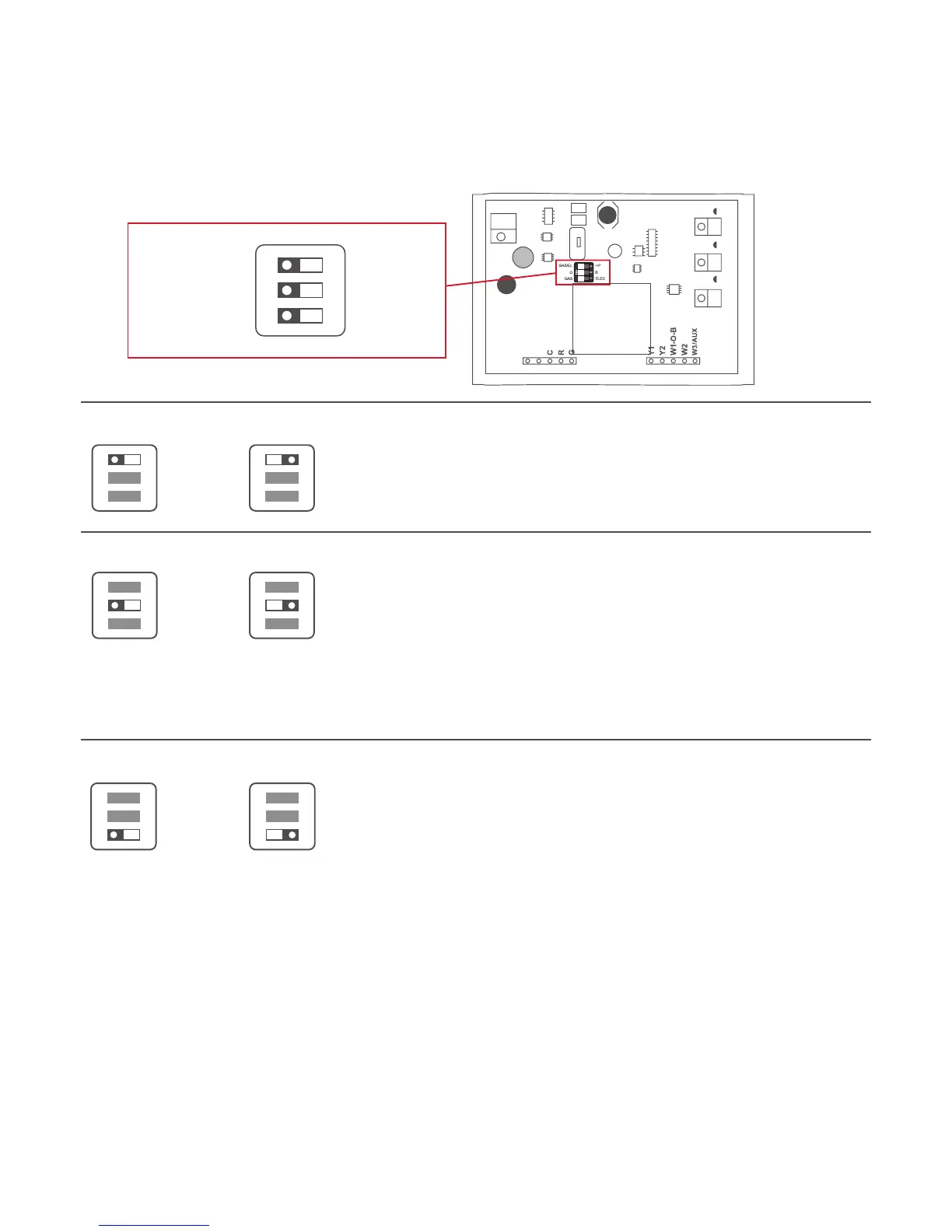
Step 8 - CheckDipSwitch
1) Ensurewhichswitchiscorrectforyoursystem.Dipswitchesare
located on the back of the thermostat
GAS/EL HP
OR
GAS/EL HP
ON
1 2 3
ON
1 2 3
OR
O B BO
ON
1 2 3
ON
1 2 3
GAS/ ELEC
OR
GAS/ ELEC
ON
1 2 3
ON
1 2 3
SENSOR
GAS/EL
GAS
O
ON
1 2 3
HP
ELEC
B
This dip switch configures the thermostat to control
aconventionalgas/electricsystemoraheatpump.
If your system is anything other than a heat pump,
leave this switch set for GAS/EL.
For Heat Pump Only
WhentheGAS/ELorHPdipswitchisconfiguredfor
HP,thisdipswitch(OorB)mustbesettocontrol
theappropriatereversingvalve.IfOischosen,
theW1/O/Bterminalwillenergizeincooling.If
Bischosen,theW1/O/Bterminalwillenergizein
heating.
1.WhenGAS/EL or HP is set for GAS/EL:
Thisswitch(GASorELEC)controlshowthe
thermostatwillcontroltheFan(G)terminalin
heating mode. When GAS is chosen, the thermostat
will notenergizetheFan(G)terminalinheating.
When ELEC is chosen the thermostat willenergize
the fan in heating.
2. When GAS/EL or HP is set for HP:
Thisswitch(GASorELEC)definestheAuxHeattype.
When GASischosen,theauxiliaryheatwillnotbe
allowed to run during heat pump operation. When
usingaDualFuelsystem,setthisswitchforGAS.
When ELECischosen,uptotwostagesofauxiliary
strip heat will be allowed to run.








 To Next Page