7
www.ventilation-system.com
CONTROL
THTUNE CONTROL PANEL
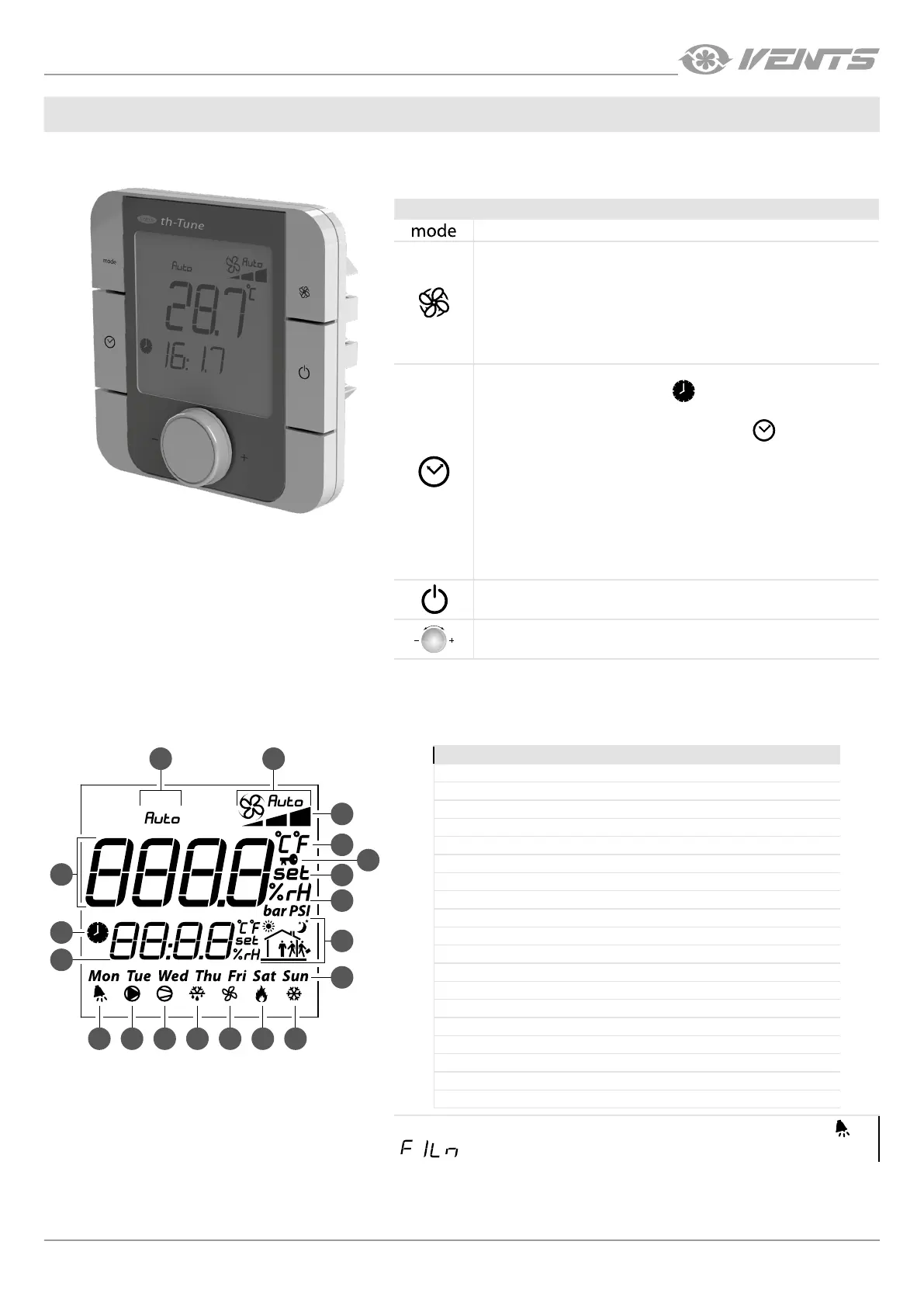
Button Functions
Operation mode selection: set the operation mode according to the procedure.
Fan speed selection: set the desired speed level (low, high or medium).
While the Automatic Speed Reduction mode is enabled the fan speed is set
automatically to maintain the supply air temperature higher than the minimum
value.
When the Auto Speed mode is activated, the fans operate at speed 3 to maintain
set air quality parameters on the humidity sensor and/or outdoor air quality
sensor 0-10 V and/or the relay sensor.
The Automatic Speed Reduction mode is a priority.
Time range on/off: short pressing.
Activation is confirmed by a pictogram
.
Access to the clock/time range setup menu: press and hold for 3 seconds.
Use the rotary knob to choose the necessary option:
setting the current
date/time: starts blinking. Turn the knob to make the desired setting and press
to confirm.
TIMEBAND: setting the time range.
Press the knob to set the start time and the corresponding temperature setpoint
for each time range individually (you may create up to six time ranges).
The pictogram shows the current time of a day status (i.e. Day/Nigh) and the
presence or absence of inhabitants in the serviced spaces.
Press ESC to exit and return to the standard display mode.
After 10 seconds the th-Tune returns to the main menu automatically.
Unit switching on/off. In some menus a short pressing has the same function as
ESC.
PUSH
Enter the desired value and press to confirm.
Press to see temperature and humidity values.
1 3
2
19
18
11 12 13 14 15 16 17
4
6
5
7
8
9
10
Display symbols:
1. Automatic temperature control mode.
2. Main field.
3. Fan operation mode: Manual/Auto.
4. Fan speed indicator.
5. Temperature measurement unit.
6. Lock function.
7. Setpoint value.
8. Humidity measurement unit.
9. Current time range.
10. Day of the week.
11. Alarm signal.
12. Not applied.
13. CCU operation enable signal.
14. Not applied.
15. Fan operation signal.
16. Operation signal of the electric heating elements.
17. Not applied.
18. Auxiliary field.
19. Unit scheduled operation enabled.
Upon elapsing of the time to filter replacement the display shows the alarm symbol and
in the auxiliary field.


 To Next Page
 Loading...