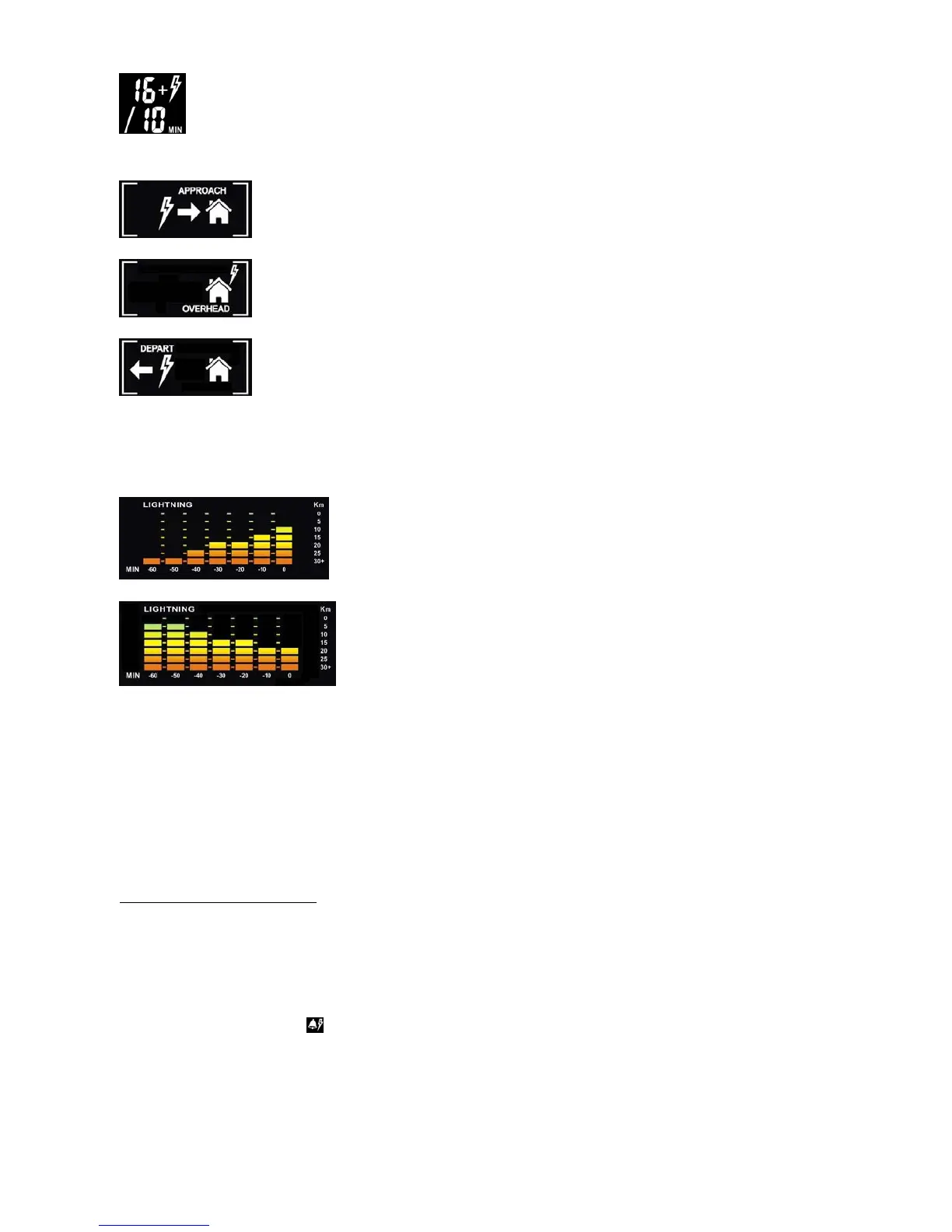
16 or more lightning strikes in the past 10 minutes.
Lightning is approaching
Lighting is overhead
Lightning is departing
Once [LIGHTNING] button is pressed, 60 minutes historical bar graph is displayed in the middle left of the
display showing the lightning distance record in the past 60 minutes.
Bar graph (Examples)
Lightning is approaching
Lightning is departing
To set the lightning distance unit, hold the [LIGHTNING] button and the distance unit will flash.
Press [+] or [-] button to select between “km” or “miles”. Press [LIGHTNING] to confirm. Press [LIGHTNING]
repeatedly to skip other settings and exit.
NOTE: The measured lightning events are for reference only and should not be directly compared with lightning
statistics provided by professional weather monitoring agencies
LIGHTNING ALERT SETTING
:
To set the lightning alert, hold the [LIGHTNING] button to set the following in sequence.
In each setting, press [+] or [-] button to select and press [LIGHTNING] to confirm.
Lightning distance unit> Lightning distance alert > Number of lightning strike alert > strike in every 10/30/60
minutes > Lightning alert on
or off > Exit
When one of the alert conditions is met, beep alert sound will be emitted. Press any key to stop the beep alert
sound.
- Lightning distance alert: Alert when the lightning distance has reached within the set distance



 To Next Page