EasyManua.ls Logo

Venus X1C5 Pro - User Manual

Venus X1C5 Pro
5 pages
Print Icon
To Next Page IconTo Next Page
Loading...
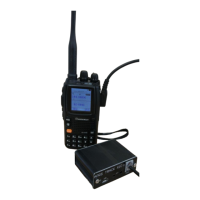
X1C5 Pro portable
APRS tracker
Manual
X1C5 Pro is a handheld Automatic Position Reporting System using built-in GPS via
Radio link/WiFi/Bluetooth to report position over internet or to APRS devices.
Features:
Support fixed station FIXED, sports SPORT, 2 site modes
Support complete TRACK tracker, support intelligent, timing, PTT linkage, queue beacon
Support beacon additional information, mileage, satellite number, voltage, temperature, air
pressure, etc.
Support mileage calculation, support accumulated mileage or automatically clearance
Support for automatic icons (TRACK smart mode)
Support GPS power saving mode (TRACK PTT linkage mode, TRACK timing mode)
Integrated 2.0+4.0 dual mode Bluetooth,
Support Bluetooth output KISS hex, UI, GPWPL, KISS ASC, GS232B and other protocols
Support Bluetooth output GPS data (GPRMC+GPGGA), support mixed output
Support Bluetooth KISS data bidirectional transparent transmission
Question and Answer IconNeed help?

Do you have a question about the Venus X1C5 Pro and is the answer not in the manual?

Summary

Product Features

Operating Modes and Tracking

Supports fixed station, sports, and 2 site modes, plus comprehensive TRACK tracker functions.

Beacon and Data Capabilities

Beacon can include mileage, satellite, voltage, temp, pressure. Supports mileage calculation and GPS power saving.

Bluetooth Integration

Dual mode Bluetooth 2.0+4.0, supporting various output protocols and GPS data transmission.

Advanced Connectivity and Data

Supports DIGI relay, remote sensor input, CMX programming, and advanced GPS/Beidou/GLONASS positioning.

User Interface and Software

Features USB charging, comprehensive GPS interface, and companion PC setup software.

Operational Notes and Specifications

Includes weight, dimensions, and important usage notes like GPS locking and heat management.

Operating Instructions

Hardware Overview and Indicators

Details the physical ports, connectors (ANT, USB, TTL), and LED indicators (BT, WIFI, PW, TX/RX/LOCK).

Power and Connection

Explains how to power on/off the device and connect via MicroUSB for charging or programming.

Software Configuration

Setup Procedure

Steps to connect the tracker to a computer via USB and install drivers for software configuration.

APRS 51 Series Setup Software

Guide to using the APRS 51Series Setup software for programming callsigns, modes, and settings.

Configuration Parameters

Details key settings like callsign, site mode, GPS, language, volume, RF output, and APRS server.

Connection Status and Information

Shows connection status, firmware version, and system information within the software interface.

Venus X1C5 Pro Specifications

General IconGeneral
BrandVenus
ModelX1C5 Pro
CategoryGPS
LanguageEnglish

Related product manuals