n English
Your Verbatim Store ‘n’ Go hard drive is a versatile external hard drive
ormance storage. Your model will come with either
1 x FireWire 800 and 1 x USB 3.0 interface, or 1 x USB 3.0 interface. Once
ou will be able
to use it as you would any hard drive for storing your data and for performing data back-up functions. Before you begin to use the drive there
are a few important things to learn about your new product.
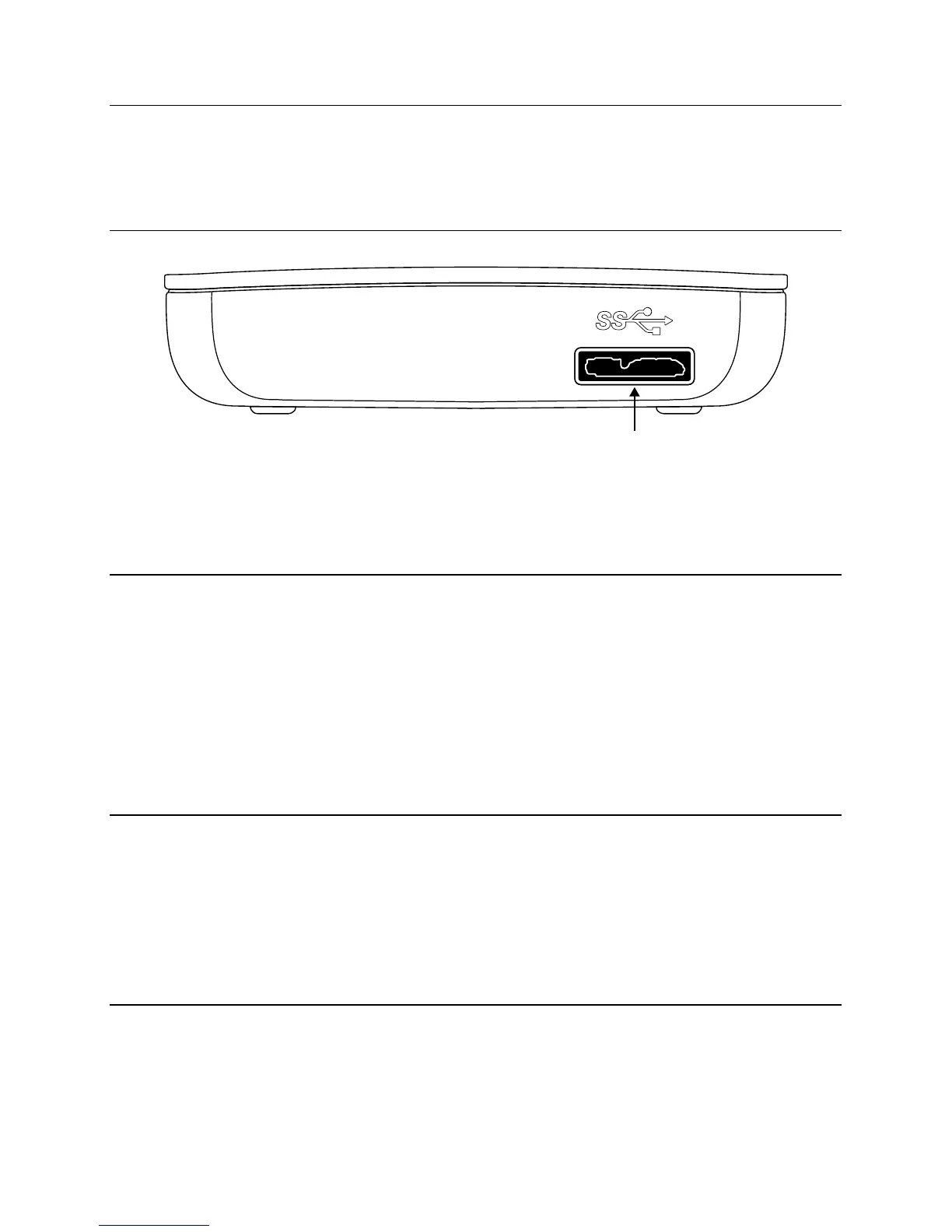
o Hard Drive: Rear Panel Are
Along the rear panel you will
nd the data and power connectors. Re
1. USB 3.0 Connector. Use t
rive to your computer via USB
Activity LED. The LED will come on to indicate the power-on state. The LED will
The Store ‘n’ Go hard drive
eaturing FW800 and USB 3.0 inter
or use on computers running Mac OS
The Store ‘n’ Go hard drive
or use on both Mac OS X and PC Windows
you plan to use your Store ‘n’ Go hard drive only with computers running Mac OS, you can leave it
you plan to use your
hard drive with computers running Windows, or with both Mac OS and Windows computers, you should re
ormat the drive. Enclosed on the
hard drive is the Verbatim HD Formatter Tool which will enable you to re-
ormat the Store ‘n’ Go hard drive to FAT32
FAT32 lets you use the Store ‘n’ Go hard drive with both Mac OS and Windows but has a single
4GB.
Note: Capacity dependent on model. 1 MB = 1,000,000 bytes/1 GB = 1,000,000,000 bytes/1 TB = 1,000,000,000,000 bytes. Some capacity used
unctions, and thus is not available
or data storage. As a result, and due to di
ering calculation methods, your operating systems may report as
ewer megabytes/gigabytes/
tes.
Connecting Store ‘n’ Go Har
You can connect your Store ‘n’ Go hard drive to a computer with either FireWire or USB, but not both at the same time. Please use the inter
ace
cables that come with
our device (i.e. USB / FireWire) for connectin
Connect the USB 3.0 cable from the USB port on the drive to an available USB port on your computer.
On computers running Windows a new icon will appear in my computer representing your hard drive. On computers running Mac OS your
hard drive will mount automaticall
Note: USB 3.0: Since USB 3.0 is
the Store ‘n’ Go hard drive will be much lower than when connected to a USB 3.0 port.
Storing and Trans
erring Data
Once your Store ‘n’ Go hard drive is connected to a computer, it can be accessed and used like any other removable disk drive. You can
dra
boxes, or delete fi les stored on


 To Next Page
 Loading...