POS Terminal User Manual POS Terminal User Manual
User Manual
Thank you very much for choosing VERIFONE products, please read this manual before deployment so that you could know
the performance deeply. Please keep this manual for your reference.
Our company will try best to adopt new technologies, new components, new software to improve products. The feature, function
and operation described in this document may be different from the performance of the selling products, in some cases, image
is prototype devices. Please inquiry the company or agent for appropriate update.
The device should be installed by after sale service personnel. Our company shall not be liable for any consequences arising
from unauthorized changes to the equipment, replacement of the connected equipment and cables not as specified.
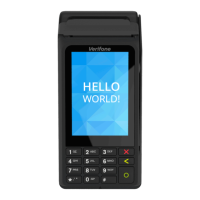
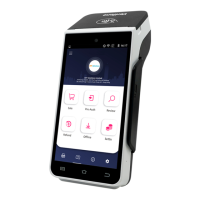
The Product Manual applies to Model X990 Plus, X990 Plus M, X990 Plus G, X990.
Verifone Systems (China) Inc. reserves the right to change product technical specification without prior notice.
1. Overview
3. Terminal specification
2.1 ON/OFF
Power ON:
Connect the terminal with the dedicated 9V/2.5A power supply in the box, press " " ON/OFF button for 3 seconds.
Power OFF:
press " " ON/OFF button for 3 seconds and then click "Power Off ". on the screen
2.2 Magnetic stripe card
Put the magnetic card into the magnetic card slot to read, magnetic side towards the LCD. Keep it smooth, uniform when
swiping the card.
2.3 Smart card
Insert smart card into the smart card slot, the metal pads of the smart card should facing up, please refer to card identification.
2.4 Contactless card
Tab the contactless card near the contactless card reader zone on the device, to make contactless card transaction.
Put one contactless card one time to avoid confliction if putting more then one card.
2. User instruction
Specification
64-bit high performance CPU
1G RAM + 8G ROM Flash (Extendable to 2G RAM+16G Flash)Memory
CPU
X990 Plus, X990 Plus M, X990 Plus G, X990Model Name
X990Product
Item
VanOS secure payment system, based on Android 10.x Operating System
5.5 inch IPS screen, 1280×720Display
Micro-SD card interfaceExtended storage
Capacitive touch screen, support e-signatureTouch Screen
Support ISO7811 1/2/3track, bi-directional reading
Magnetic Stripe
Conform to ISO7816, PBOC and EMV Level 1 & 2 Smart card
Built-in virtual PIN entry keypad
Support Master Key/Session Key, Fixed, DUKPT etc
Support DES, 3DES, RSA, SHA-256 and AES algorithm etc
PINPad
Operating temperature:-10℃~45℃
storage temperature:-20℃~70℃
Relative humidity:5%~95% (Non-condensing)
Environmental
condition
Support ISO/IEC 14443 Type A&B, Mifare card conform to
qPBOC, PAYPASS and PAYWAVE spec
Contactless
Specification
1 x USB-A, PINPAD, RS232, ETH
2 x SAM and 1 x SIM or 1 x SAM and 2 x SIM
4 contactless LEDs
1 two-color charging indicator
LED indicators
Physical interface
Optional professional camera, equiped with fast 1d/2d barcode
recognition algorithm
Front camera
Item
Built-in buzzer, speaker, microphoneMultimedia
Built-in high-speed thermal printer with print speed greater
than 25 lines per second, support paper roll with width of
58mm and diameter of 40mm
Printer
Built-in GPS, support A-GPS, Glonass, BeidouGPS
4G, compatible with 3G and 2G, Wi-Fi, BluetoothConnectivity
Input: AC 100V~240V/50~60Hz
Output: DC 9V/2.5A
Power adaptor
4. Instruction and usage
5. Password anti-peep instruction
1. Using body or hand to block when entering the password to prevent it from peeping.
2. The monitor range should as far as possible from the placement of the terminal when installing the surveillance camera, so
as to avoid the cardholder's password leakage.
3. Clients and merchants need to conduct routine inspection to ensure that the terminal has not been changed and there are
no suspicious objects within the smart card and magnetic card slot.
6. Packing list
Name
Qty
Serial No.
1
2
3
4
5
X990 POS Terminal
User Manual
Paper roll
Power adaptor
1
1
1
1
1
X990 Declaration of Conformity
Microphone
Front camera (optional)
Charging LED
Touch screen
Smart card Magnetic stripe
CLTS/NFC card reading area
CTLS LED indicators
Paper cabin
ON/OFF button
Nameplate
4.1 Please power the terminal within the specified voltage range, don't use too low or too high voltage.
4.2 Please make sure the connection is correct when connecting the device to the host and/or the power adaptor.
4.3 Don't damage the cable, if the cable is damaged, do not use it anymore.
4.4 Don't expose the terminal with direct sunlight, high temperature, humidity, dusty or strong corrosive gas.
4.5 Stay away from liquid, don't use the product where the water may pour over or enter into, don't operate the product with
wet hand.
4.6 It is strictly prohibited to open the terminal without permission, otherwise the terminal will fail, the consequence will be at
your own risk.
4.7 If the terminal fails, please contact maintenance personnel, user is not allowed to maintain or repair the terminal without
permission.
4.8 Adapter shall be installed near the equipment and shall be easily accessible.
4.9 Disposal of a battery into fire or a hot oven, or mechanically crushing or cutting of a battery, that can result in an explosion.
4.10 Leaving a battery in an extremely high temperature surrounding environment that can result in an explosion or the leakage
of flammable liquid or gas.
4.11 Hereby, [Verifone Systems (China) Inc.] declares that the radio equipment type [Model: X990 Plus, X990 Plus M,
X990 Plus G, X990] is in compliance with Directive 2014/53/EU. The full content of the EU declaration of conformity is
available on www.verifone.cn website.
DC port
Verifone Systems (China) Inc.
Phone: +86 13910835232
E-mail: support@Verifone.cn
www.verifone.com
Room 301, ZhuoMing Plaza, No. 1069, South Huihe Street,
Chaoyang District, Beijing, China
Verifone Inc.
2560 N, 1st Street, Suite 220 San Jose, California 95131, USA
Verifone Holding GmbH
Seilerweg, 2F, Bad Hersfeld 36251, Germany
Verifone UK Ltd.
3 Roundwood Avenue Stockley Park Uxbridge, UB11 1AF, UK


 To Next Page
 Need help?
 General