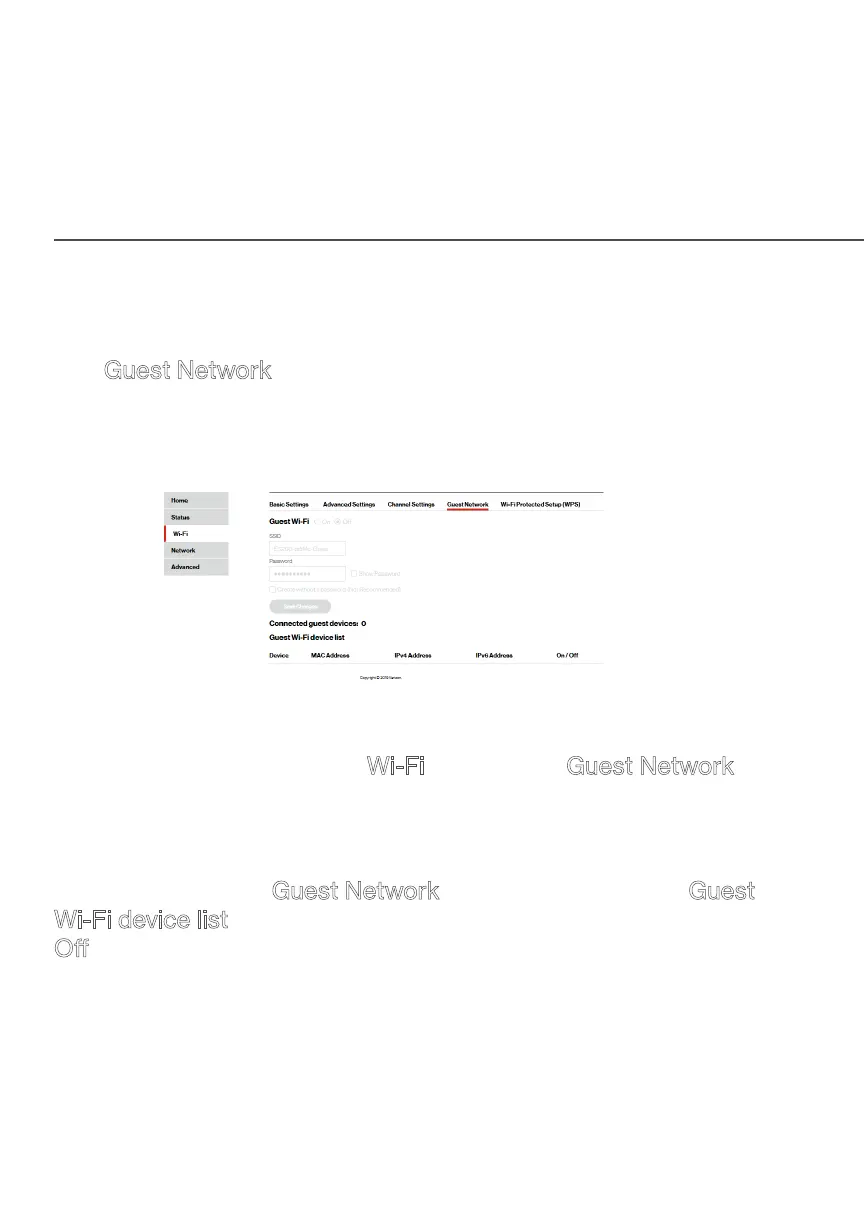
GUEST NETWORK
./ GUEST NETWORK
3.5a/ GUEST WIFI
The Guest Network is designed to provide internet connectivity
to your guests but restricts access to your primary network and
shared files. The primary network and the guest network are
separated from each other through firewalls of your router.
To view Guest Wi-Fi:
From the main menu, select Wi-Fi, then select Guest Network.
3.5b/ GUEST WIFI DEVICE LIST
The devices on the Guest Network can be viewed on the Guest
Wi-Fi device list. If the admin toggles the button next to a device to
O, that device will be blocked from accessing the internet.
Refer to “Connecting A Wi-Fi Device Using WPS” on page 25
for the Wi-Fi Protected Setup (WPS) setup.




 To Next Page