1
The handset at a glance
V100_V100AM / USA EN / A31008-M1908-R301-1-6019 / kombi_overview.fm / 12.3.08
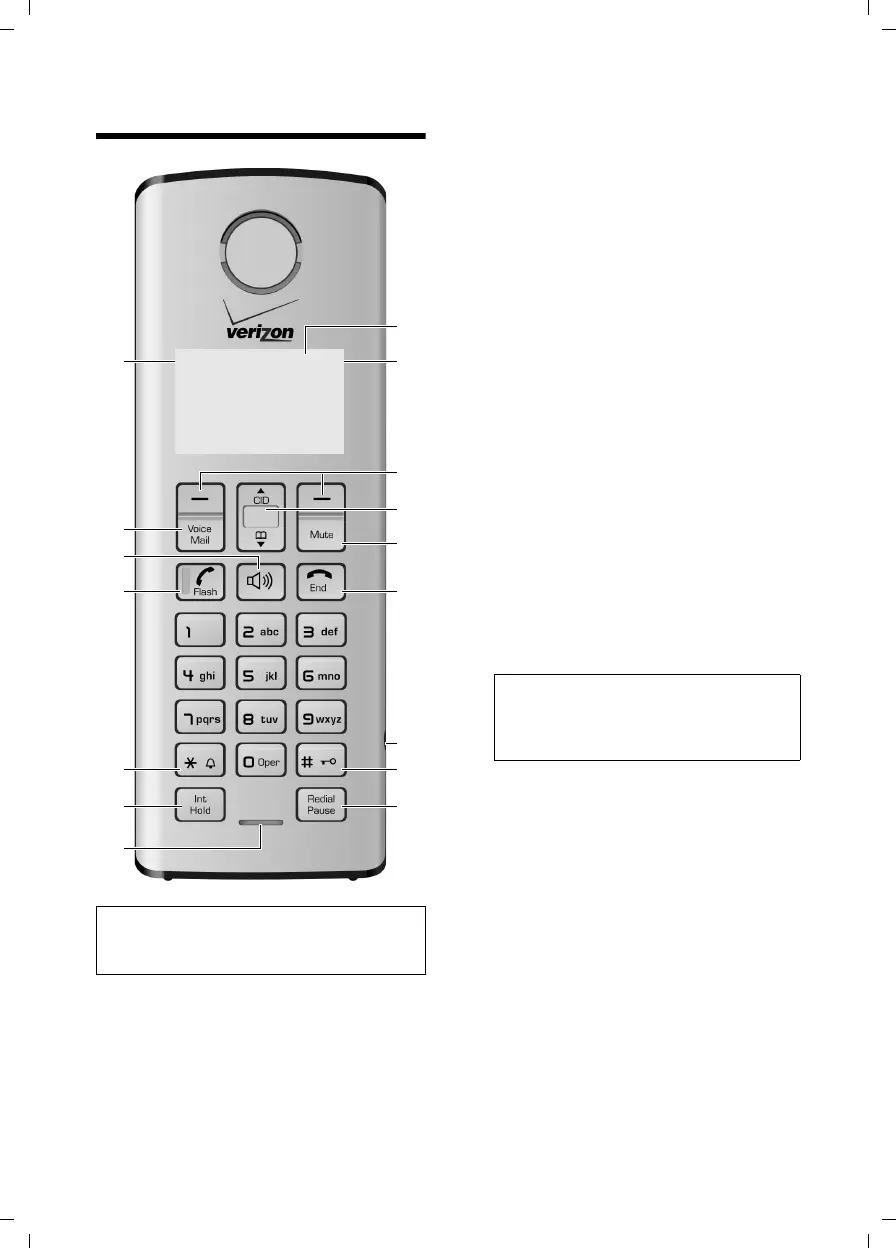
The handset at a glance
1 Display in idle status
2 Charge status of the batteries
= e U (empty to full)
= flashes: batteries almost empty
= U flashes: batteries charging
3 Display keys (page 11)
4Control key
t Access to Call Log list.
s Access to directory.
5 Mute key
Mute/unmute microphone.
6 End Call key, On/Off key
End call, cancel function, go back to idle sta-
tus, activate/deactivate handset (press and
hold in idle status)
7 2.5 mm socket (mono) for headset
8 Pound (#) key
Enter symbol #
Keypad lock on/off (press and hold in idle
status)
Switch between uppercase/lowercase let-
ters for text entry.
9 Redial/Pause key
Open redial list (in idle status) or insert a
dialing pause (when editing a number).
10 Microphone
11 Intercom/Hold/Conference key
Set up an internal call
Switch between external call and internal
handset, or transfer a call during external
call.
Set up a conference call with an external line
and an internal handset (press and hold in
hold-intercom mode).
12 Star (*) key
Ring tone on/off (press and hold)
Switch temporarily to tone dialing (DTMF).
Switch between AM and PM during time set-
ting.
Switch call list display format.
13 Talk/Flash key
Answer or start a call.
Key flashes: incoming call.
Add a flash (in the directory)
Send FLASH (when off hook).
14 Handsfree key
Answer or place a call in speaker mode.
Switch between speaker on and speaker off
(in off hook mode).
15 Voice mail
Connect to your voice mailbox.
16 Signal strength
ÄHandset is linked with the base station.
Ä
flashes: out of range
Note:
Pictures in this user manual may differ from
the actual product.
1
2
3
4
5
6
7
8
911
13
14
15
16
10
12
ÄÕ e
INT 1
01/31 9:45AM
§§§§Menu§§§§
Note:
When only one handset is registered to the
base station, the key is redundant and
therefore has no function.



 To Next Page