8
First Steps
Verizon V100 / USA EN / A31008-M1908-R301-1-6019 / starting.fm / 12.3.08
Range and reception strength
Range:
u Up to 984 feet in the open
u Up to 165 feet in buildings
Reception strength:
The display shows if the handset is linked
to the base station:
u Ä is on: handset is linked to the base
station.
u Ä flashes: no reception, handset is out
of range or not registered.
Connecting the base station
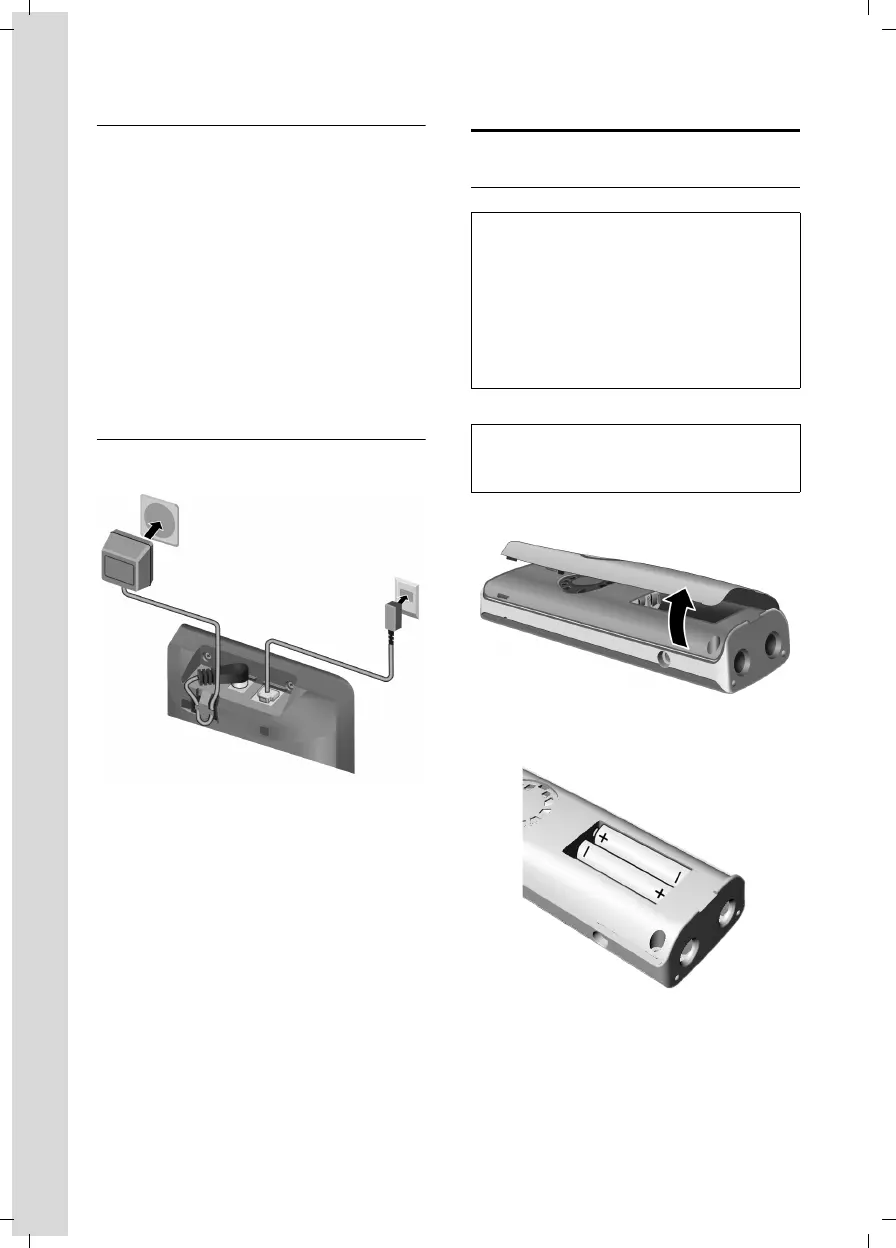
¤ First connect the power adapter and
then the phone jack as shown below.
1 110-V power adapter
2 Back of the base station
3 Phone jack with phone cord
Please note:
u The power adapter must be always
connected, as the phone will not oper-
ate without an electrical supply.
u Your answer machine is set to give a
standard announcement.
Setting up the handset for use
Inserting the batteries
¤ Open the battery cover.
¤ Insert the batteries according to the
correct polarity (see diagram).
¤ Close the cover, and press the top so
that it clicks into place.
1
2
3
Caution:
Use only rechargeable UL-approved AAA bat-
teries. Never use a conventional (non-
rechargeable) battery or other battery types as
this could result in significant health risks and
personal injury. For example, the batteries
could explode. The phone could also malfunc-
tion or be damaged as a result of using batter-
ies that are not of the recommended type.
Note:
If attached, remove the belt clip before open-
ing the battery cover.



 To Next Page