2
The base station at a glance
Verizon V100 / USA EN / A31008-M1908-R301-1-6019 / kombi_overview.fm / 12.3.08
The base station at a glance
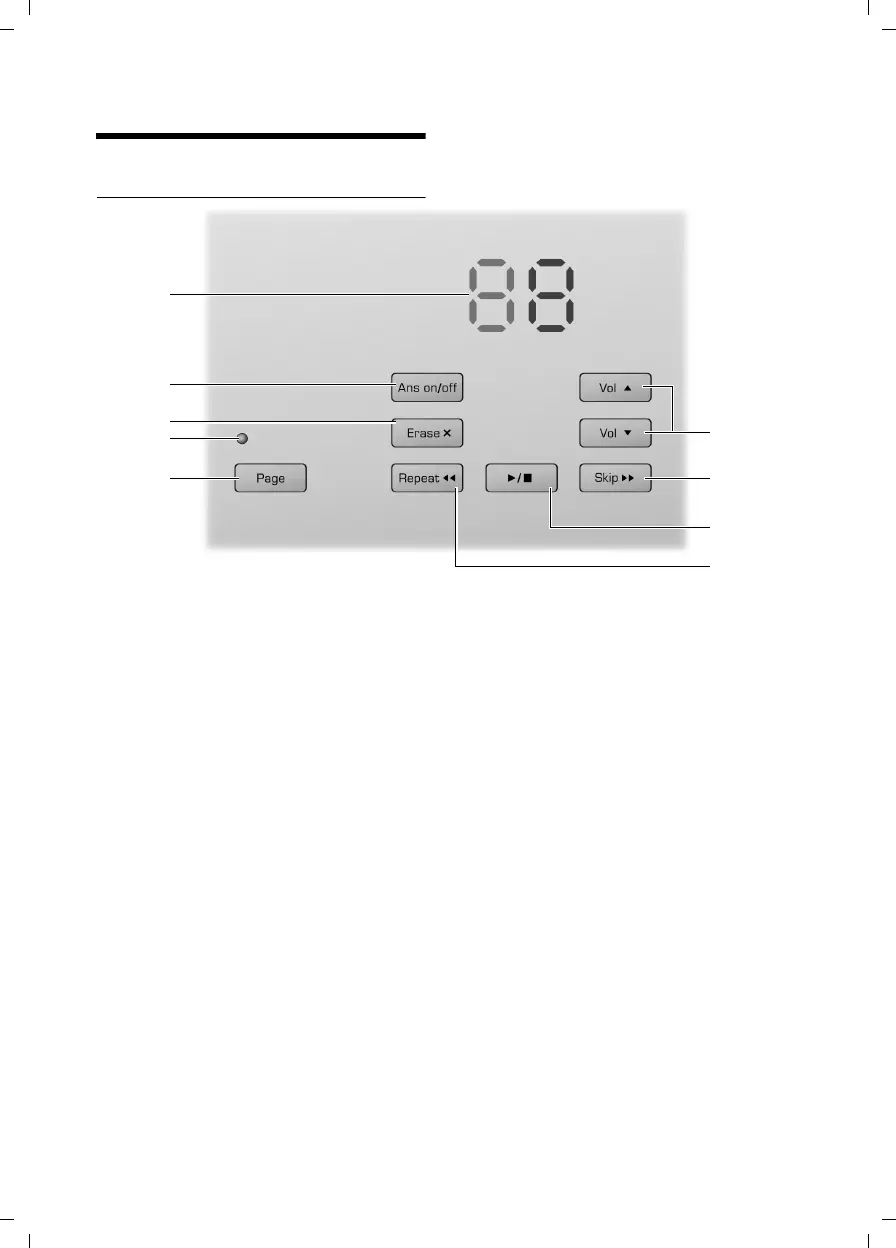
Base station with answer machine
You can use the keys on the base station to
operate the integrated answer machine and
register the handset to the base station.
1Page key
Paging handsets (press briefly)
Start the registration procedure (press and
hold in idle mode). You will hear a beep.
2LED
– Is off when the line is free
– Is on when any handset links to the base
– Flashes when paging handsets and dur-
ing registration mode
3Erase key
Erase current message during playback
Erase all old messages (press and hold in idle
mode)
4On/Off key
Activate/deactivate answer machine.
5 Message counter (page 16)
Status information for answer machine
6Volume keys
Change ring tone volume (in idle mode or
during incoming calls)
Change volume of message playback or call
screening.
During message playback:
7Skip key
Skip to next message.
8
ó key
Start/stop playback.
9 Repeat key
Skip back to beginning of the current mes-
sage (press once) or to the previous mes-
sage (press twice).
10 Skip to beginning of the next message.
Please remember:
If the answer machine is being operated from a
handset, or if it is recording a message, you can-
not operate it from the base station.
1
2
3
4
5
6
7
8
9



 To Next Page