PWC – 500/1000/1010/1500
PureWaterCooler
Copyright 2006 Vertex Water Products
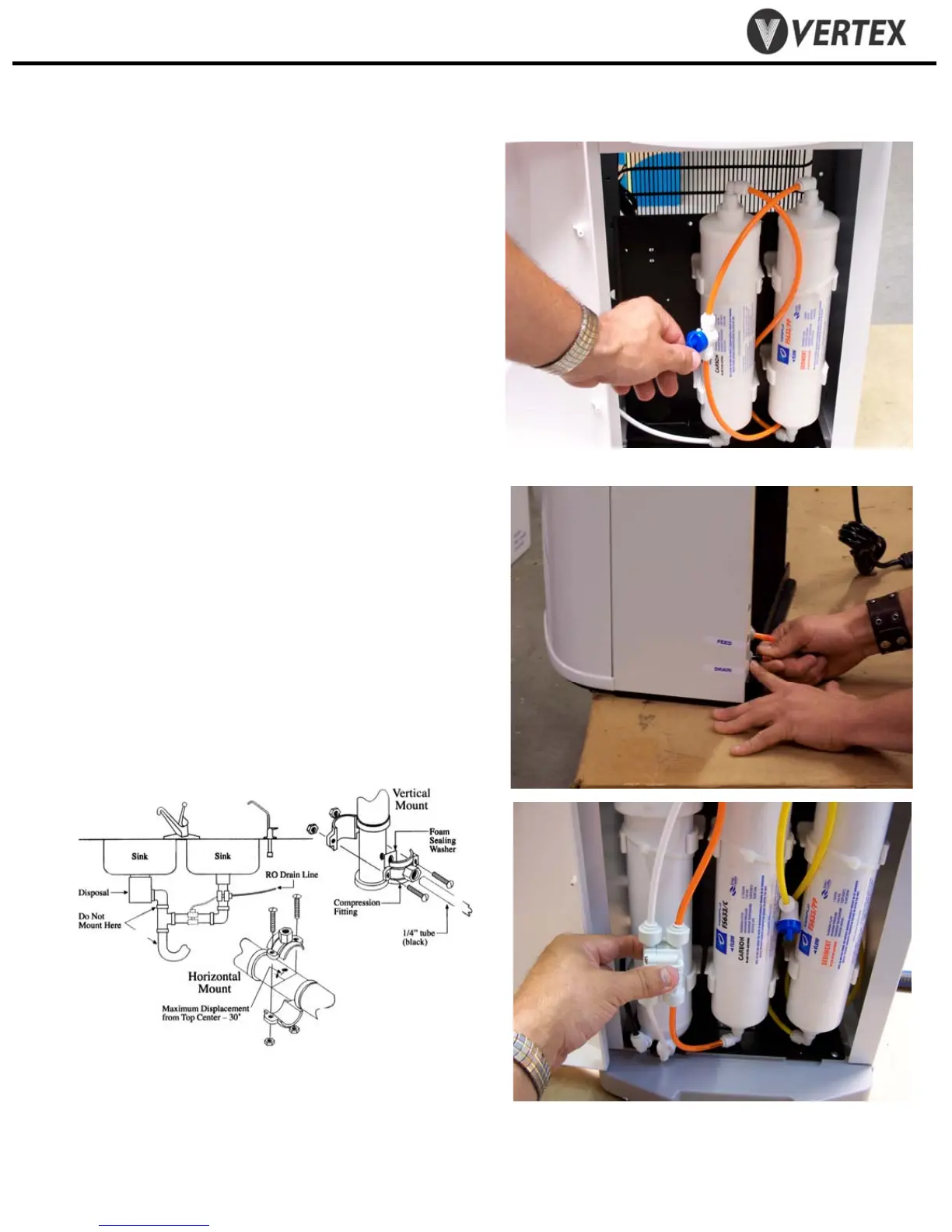
2.9 Turn on feed water at source and turn ball valve
at filter to “on” to let the water flush the filter.
2.10 Flush until water flows clear (1 – 2 gallons)
2.11 Remove flush line. Reconnect tank line to
outlet of carbon filter
2.12 WARNING: Do not turn on cooler hot power
until cooler tanks are full of water.
-Drain Connection
2.9 Drain Connection (for units equipped
with RO)
2.10 Remove drain plug (black) from back of
cooler
2.11 Connect supplied black water tubing to
drain connector on back of cooler
2.12 Attach supplied drain saddle to a
standard 1 ½” drain pipe see fig. 1 below
Drain saddle connection method
Drain connection required only for cooler with reverse osmosis filtration
Figure 1
2. Cooler Set-Up cont.
Figure 2.7
RO filter set showing autovalve.
The autovalve automatically turns off the
water flow when the tanks are full


 To Next Page
 Loading...