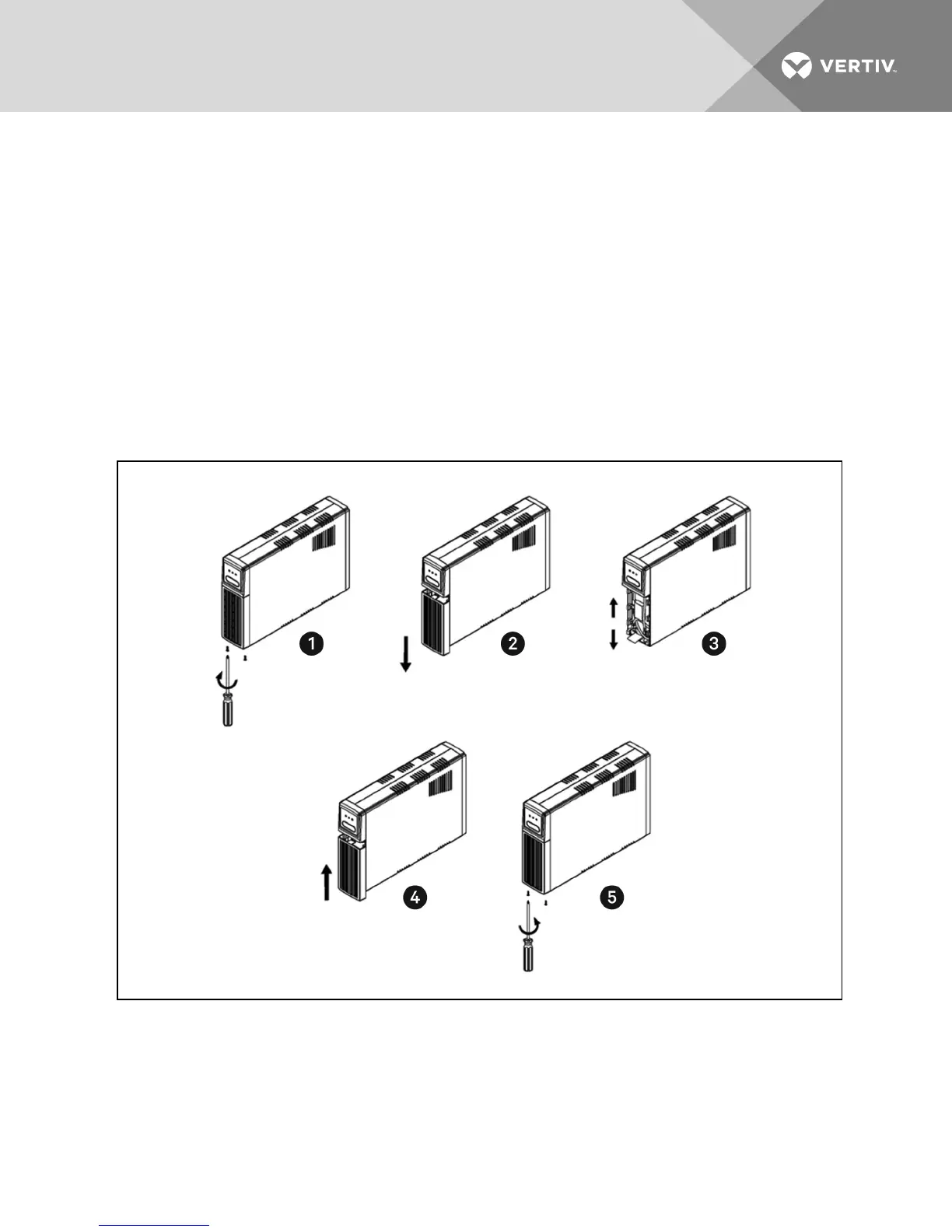
7. Orient the new battery in the same direction as the original battery and place the new battery
close enough to connect the battery wires.
NOTE: Replace the battery with the same type and number as originally installed.
8. Connect the battery negative (Black) wire to the battery negative terminal.
9. Connect the battery positive (Red) wire to the battery positive terminal.
NOTE: When connecting the last wire to the battery, there can be a small spark, thisisnormal.
10. Fully insert the new battery into the UPS and re-install the battery compartment cover
(item4).
11. Re-install the battery compartment retaining screw (item 5).
12. Properly dispose of the old batteries at an appropriate recycling facility or return them to
Vertiv™ in the packing material for the new batteries.
13. The UPS is now ready for normal operation.
Vertiv | Liebert® PSA4™ Installer/User Guide | 11








 To Next Page