16 020815.11
vetus® Installation manual BPPPJA - BPPJA - Proportional panel for bow and stern thruster
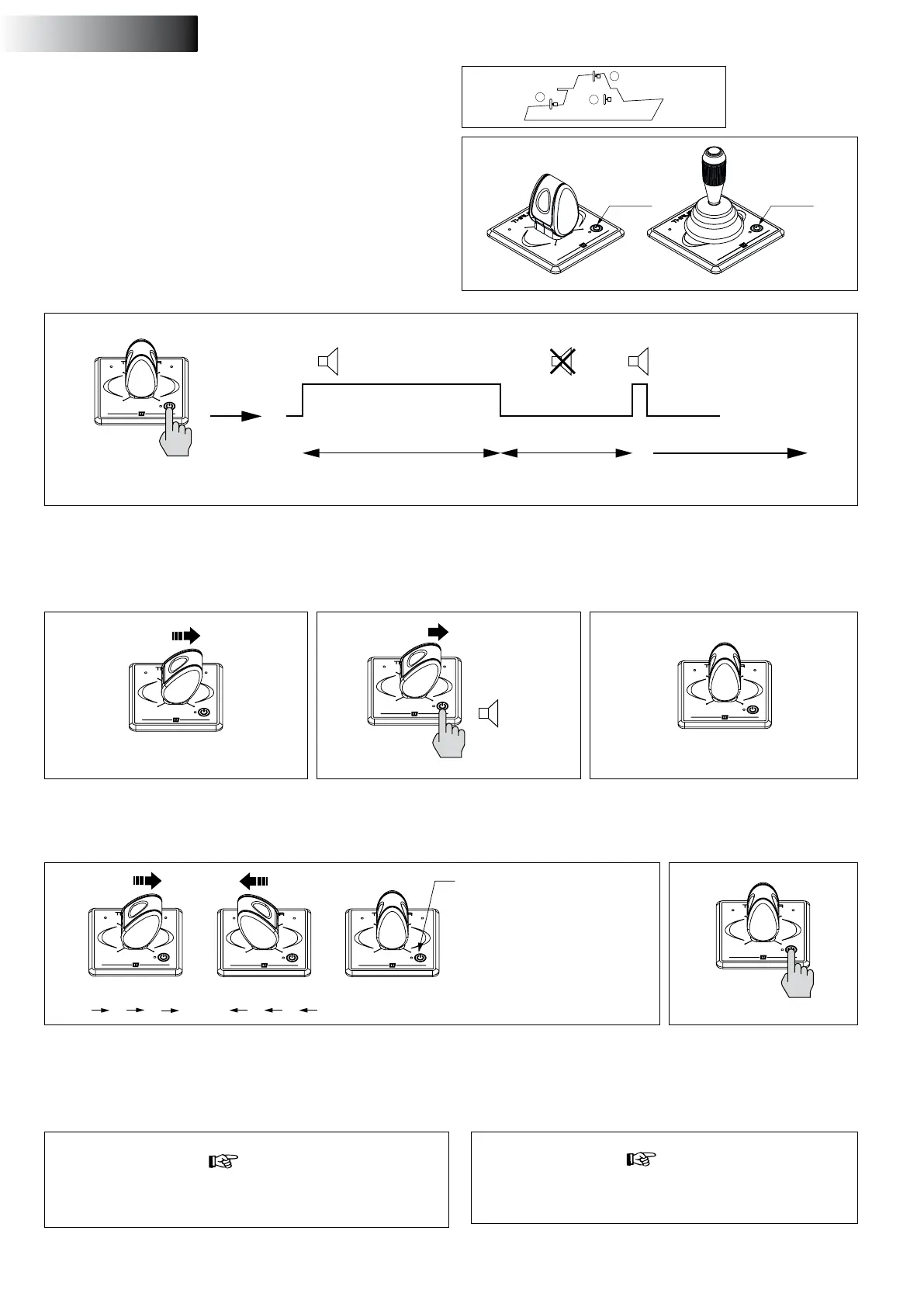
4.8 Conguring a panel for the steering position
where the panel is placed
1 x
N.B. The panel must be in the OFF position (if the panel is NOT in the
OFF position, rst press the On / O button once to switch the panel
to the OFF position.
1 Place the panel in conguration mode
• Press and hold the On / O button for 10 seconds.
OR
Helm station
1
2
3 4
Helm station
1 2 3 4
1 BLUE, ashing
2 RED, ashing
3 BLUE, ashing
RED, quick ashing
4 BLUE and RED,
simultaneously ashing
2 Push the joystick to the right.
didahdi
( . − . )
3 Keep the joystick in this position and press
the On/Off button.
During the rst 6 seconds, the buzzer will continuously signal a didi-
didididi ..... (. . . .). Keep pressing the On / O button. After 10 seconds
the buzzer sounds the signal dididididah (. . . - -). Now the panel is in
conguration mode.
4 Release the joystick after the signal didahdi
( . – . ) is given.
5 Select the helm station where the panel is sited by pushing the joystick to the left or the right and then
releasing it. The colour and flashing of the LED indicates the number of the helm station.
6 Press the On/Off button once
to confirm the setting.
10 seconds
seconds
Conguration mode
seconds
6
dididididididid ( . . . . . . ) dididididah ( . . . . − )
4
2 3 4
5 6
1
Carry out the following actions on EACH panel in the order indi-
cated:
BPPPA BPPJA
ON/OFFON/OFF
note
With a bow and stern thruster panel, together at the same helm
station, the helm station number entered must be the same.
note
Settings are retained even if the supply voltage is switched
off!
1
2
3
ENGLISH


 To Next Page