EasyManua.ls Logo

VEVOR D425-A - Page 10

VEVOR D425-A
192 pages
Print Icon
To Next Page IconTo Next Page
To Previous Page IconTo Previous Page
Loading...
- 8 -
Notice: a.The temperature of the sterilizing solution can not
overpass 60, or else it will damage the spare parts.
B.Draw off all the water in the hopper after clearing, or else it
will damage the beater while the compressor is running.
C.While press the key of “clean”, pay attention to the indicator
light in order to avoid pressing the wrong key.

III.Operation Instruction
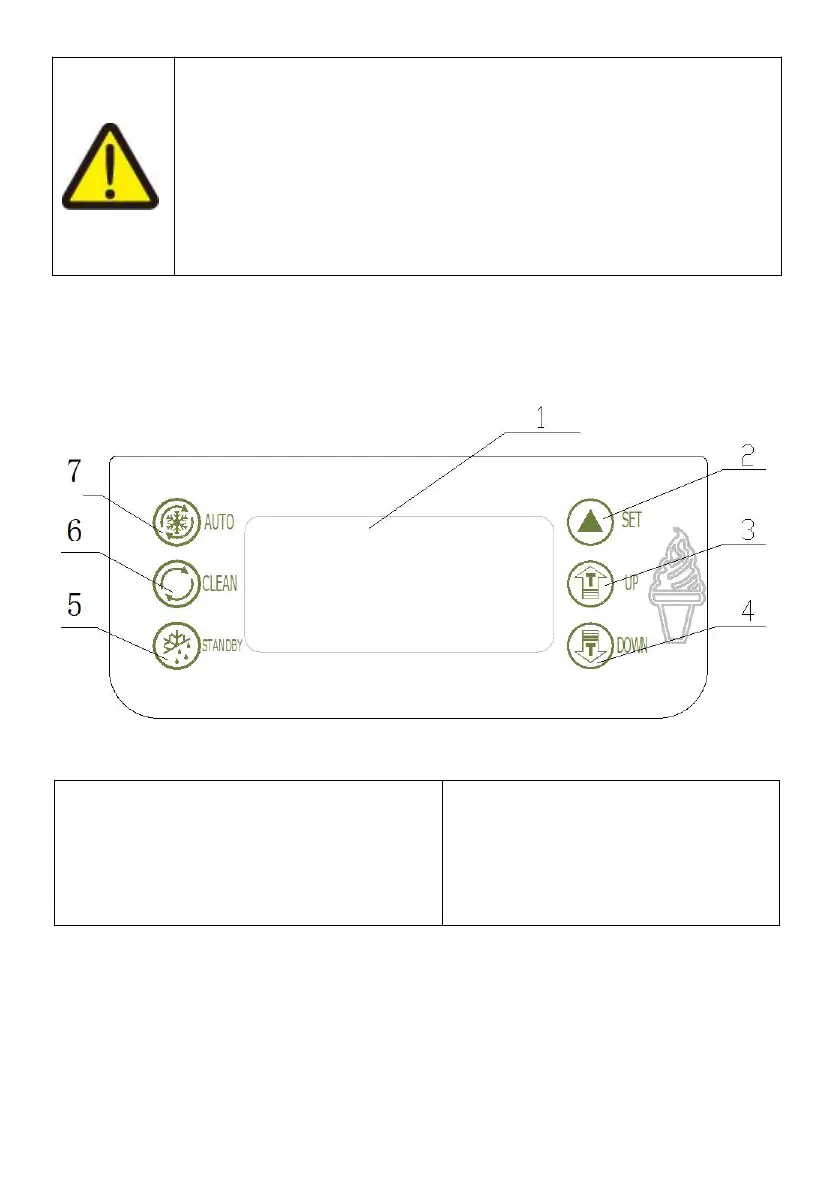
AKey Instruction
Figure.2
1.display screen
2.set key
3.adjust key(up)
4.adjust key(down)
5.standby key
6.Wash key
7.Auto key
SET KEY(UP / DOWN)
a
set hardness level
When the machine is ready mode, press “UP” or DOWN” key for more
than 2 seconds then the “SET” word on the displayer flashes and the

Related product manuals