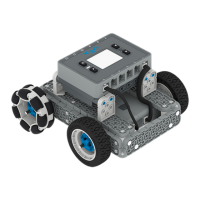
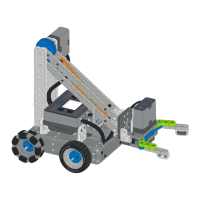
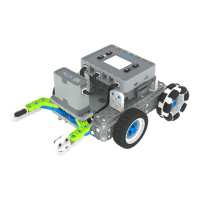
The VEX GO Code Base - Eye Forward is an educational robotics kit designed to introduce users to the fundamentals of robotics, coding, and engineering through hands-on building and experimentation. This particular configuration, the "Eye Forward" code base, focuses on integrating a vision sensor to enable the robot to interact with its environment in more sophisticated ways, such as detecting objects, colors, or lines. It's part of the broader VEX GO system, which is tailored for elementary and middle school students, providing an accessible entry point into STEM concepts.
Function Description
The core function of the VEX GO Code Base - Eye Forward is to serve as a programmable mobile robot platform. At its heart is the VEX GO Brain, a compact, intelligent control unit that acts as the robot's "brain." This Brain is equipped with multiple ports for connecting motors and sensors, allowing for a wide range of functionalities. The "Code Base" aspect refers to the foundational chassis and drivetrain, which typically includes two drive motors connected to wheels, enabling the robot to move forward, backward, turn, and pivot. This mobility is crucial for navigating various environments and completing tasks.
The "Eye Forward" designation highlights the integration of the VEX GO Eye Sensor, strategically positioned at the front of the robot. This sensor is a key component, providing the robot with a sense of "sight." The Eye Sensor is capable of detecting colors, light levels, and even simple object presence. By interpreting data from this sensor, the robot can make decisions and react to its surroundings. For example, it can be programmed to follow a colored line, stop when it detects an obstacle, or identify specific colored objects in its path. This adds a layer of intelligent interaction that goes beyond simple pre-programmed movements.
Programming the VEX GO Code Base is done through a block-based coding interface, typically VEXcode GO. This visual programming language is designed to be intuitive and easy for beginners, allowing users to drag and drop code blocks to create sequences of actions, control motors, and read sensor inputs. This approach helps users understand programming logic without getting bogged down by complex syntax. The code is then downloaded wirelessly or via a cable to the VEX GO Brain, bringing the robot to life.
The modular nature of the VEX GO system means that the Code Base - Eye Forward can be expanded and modified. While the instructions provided focus on a specific build, users are encouraged to experiment with different configurations, add more sensors or actuators (like a claw or an arm), and design their own custom robots. This fosters creativity, problem-solving skills, and a deeper understanding of engineering principles.
In essence, the VEX GO Code Base - Eye Forward functions as a versatile educational tool that combines mechanical building with computational thinking. It allows users to:
- Build: Assemble a physical robot using VEX GO components.
- Program: Write code to control the robot's movements and behaviors.
- Sense: Utilize the Eye Sensor to gather information about the environment.
- React: Program the robot to respond dynamically to sensor input.
- Experiment: Modify the design and code to achieve different outcomes.
This integrated approach helps users grasp concepts related to robotics, physics (motion, forces), computer science (algorithms, logic), and engineering design.
Usage Features
The VEX GO Code Base - Eye Forward offers several usage features that make it an effective and engaging tool for learning:
- Intuitive Building System: The VEX GO components are designed for easy assembly. The pins and beams snap together securely, and the instructions are typically visual and step-by-step, making it accessible for young learners to build the robot with minimal adult supervision. The color-coding of certain components (like pins) can also aid in identification during the building process.
- Block-Based Programming (VEXcode GO): This is a cornerstone feature. VEXcode GO provides a graphical programming environment where code is represented by interlocking blocks. This eliminates the need to type complex syntax, reducing frustration and allowing users to focus on the logic and flow of their programs. It supports drag-and-drop functionality, making it easy to construct programs for controlling motors, reading sensor data, and implementing conditional logic.
- Wireless Connectivity: The VEX GO Brain often supports wireless communication (e.g., Bluetooth), allowing users to download code to the robot without needing a physical cable connection every time. This enhances convenience and allows for more dynamic testing and iteration of programs.
- Rechargeable Power Source: The VEX GO Brain typically includes a built-in rechargeable battery, providing a sustainable power source for the robot. This eliminates the need for disposable batteries, making it more environmentally friendly and cost-effective in the long run.
- Integrated Eye Sensor Capabilities: The Eye Sensor is a powerful feature. It can detect up to 12 different colors, measure ambient light levels, and act as a proximity sensor. This allows for a wide array of programming possibilities, such as:
- Line Following: Programming the robot to follow a black line on a white surface or vice versa.
- Color Sorting/Detection: Identifying and reacting to specific colored objects or areas.
- Obstacle Avoidance: Detecting nearby objects and changing direction to avoid collisions.
- Light Sensing: Responding to changes in light intensity, such as moving towards or away from a light source.
- Multiple Motor Ports: The VEX GO Brain has dedicated ports for connecting motors, ensuring that the robot can be easily configured for various drive systems (like the two-motor drive for the Code Base) and additional mechanisms.
- Expandability and Customization: The VEX GO system is highly modular. Users are not limited to the "Eye Forward" configuration. They can easily disassemble the robot and reconfigure it into different designs, adding other VEX GO sensors (e.g., Bumper Switch, Distance Sensor) or actuators to explore new functionalities and solve different challenges. This encourages iterative design and engineering thinking.
- Educational Curriculum Support: VEX GO is often accompanied by comprehensive educational resources, including lesson plans, activities, and challenges. These resources guide users through various STEM concepts, from basic robot control to advanced sensor integration and problem-solving.
- Durability: VEX GO components are generally designed to be robust and withstand repeated assembly, disassembly, and use in a classroom or home environment. This ensures a long lifespan for the kit.
- Feedback Mechanisms: The VEX GO Brain often includes LED indicators and sometimes a speaker, providing visual and auditory feedback on the robot's status, battery level, and program execution. This helps users debug their code and understand what the robot is doing.
These usage features collectively contribute to a rich learning experience, making robotics and coding accessible, engaging, and educational for a broad audience.
Maintenance Features
Maintaining the VEX GO Code Base - Eye Forward is relatively straightforward, focusing on ensuring the longevity and proper functioning of its components. The design emphasizes durability and ease of care, typical for educational robotics kits.
- Component Durability: VEX GO parts are made from robust plastic materials designed to withstand repeated assembly and disassembly. This inherent durability minimizes the need for frequent replacement of individual structural components. In case of damage, individual replacement parts are typically available.
- Rechargeable Battery Management: The VEX GO Brain contains a rechargeable battery. Maintenance involves:
- Regular Charging: Ensuring the battery is charged after use or before extended storage to maintain its health.
- Proper Storage: Storing the Brain in a cool, dry place and avoiding extreme temperatures. For long-term storage, it's often recommended to charge the battery to about 50% rather than fully charged or completely depleted.
- Avoiding Over-Discharge: While the Brain likely has built-in protection, it's good practice to recharge before the battery is completely drained to prolong its lifespan.
- Cleanliness: Keeping the components clean is important, especially the Eye Sensor.
- Eye Sensor Lens: The lens of the Eye Sensor should be kept free of dust, fingerprints, or smudges, as these can interfere with its ability to accurately detect colors and light. A soft, dry cloth can be used for gentle cleaning.
- General Components: Dust and debris can accumulate on other parts. A soft brush or cloth can be used to wipe down the beams, pins, and motors. Avoid using harsh chemicals or excessive moisture.
- Connection Integrity:
- Pin Connections: Ensure that pins are inserted fully and securely into beams and other components. Loose connections can lead to instability in the robot's structure.
- Cable Connections: The cables connecting the Eye Sensor and motors to the VEX GO Brain should be checked periodically for wear and tear. Ensure they are plugged in firmly to the correct ports. Avoid tugging on the cables themselves; always grasp the connector when plugging or unplugging.
- Software Updates: The VEX GO Brain's firmware and the VEXcode GO software may receive updates. Regularly checking for and applying these updates ensures optimal performance, access to new features, and compatibility with the latest operating systems. This is typically done through the VEXcode GO application.
- Storage and Organization: Proper storage of the VEX GO kit is a key maintenance feature.
- Original Packaging/Storage Bins: Using the original storage box or designated bins helps keep all components organized and prevents loss.
- Disassembly for Storage: For long-term storage, disassembling the robot into its individual components can prevent stress on the plastic parts and make it easier to store compactly.
- Troubleshooting: The VEX GO system is designed with user-friendly troubleshooting in mind.
- LED Indicators: The VEX GO Brain has LED lights that provide status information (e.g., battery level, connection status, program running). Understanding these indicators helps in diagnosing issues.
- Online Resources: VEX Robotics provides extensive online support, including FAQs, troubleshooting guides, and community forums, which are invaluable for resolving common problems.
- Motor Care: While VEX GO motors are generally sealed and require no internal maintenance, ensuring they are not subjected to excessive force or strain during operation can prolong their life. If a motor becomes unresponsive, checking its connection to the Brain and the battery level are the first steps.
By following these simple maintenance practices, users can ensure that their VEX GO Code Base - Eye Forward remains in excellent working condition, providing a reliable platform for countless hours of learning and exploration.

 Need help?
 General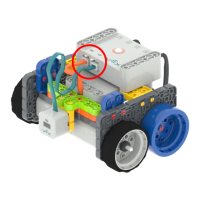

 To Next Page