1
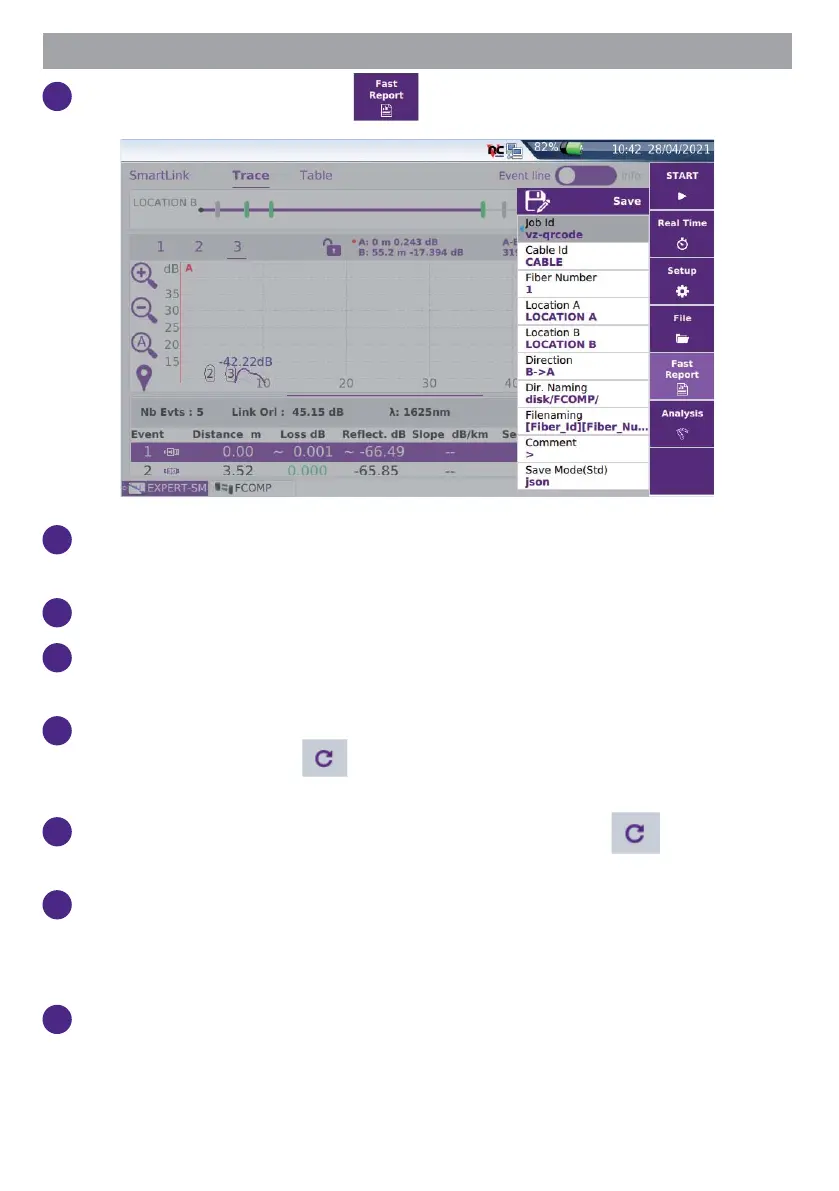
In the Results screen, press .
2
Press on the relevant section to edit the Job ID, Cable Id and Fiber
Number.
3
Enter the location name for each fi ber extremity.
4
Select the test direction. For bi-directional OTDR tests, don’t forget to
change the direction.
5
Press Dir. naming and enter the directory path where the results will be
saved in, or tap on key
to revert to the current directory previously
selected in the fi le explorer.
6
Press Filenaming and enter a fi le name, or tap on key to apply the
default auto fi lenaming.
7
In the Save Mode parameter, set Yes to desired format: txt fi le, pdf fi le
(for report) and json fi le (report(s) saved in addition to the .sor fi le).
If all parameters are set to No, only the .sor (or .msor) fi le will be saved.
8
Once all paramaters are confi gured, press Save.



 To Next Page