22
Connectivity
| Connecting a Viceroy hood with a Viceroy hob
IMPORTANT: The connectivity operation must be completed within
2 minutes of turning on the power to the hood. If this is not
successful, switch o both the hood and the hob, wait for one
minute and attempt the connectivity again.
Setting up a new linking method
1. Make sure that the hob and the hood is o.
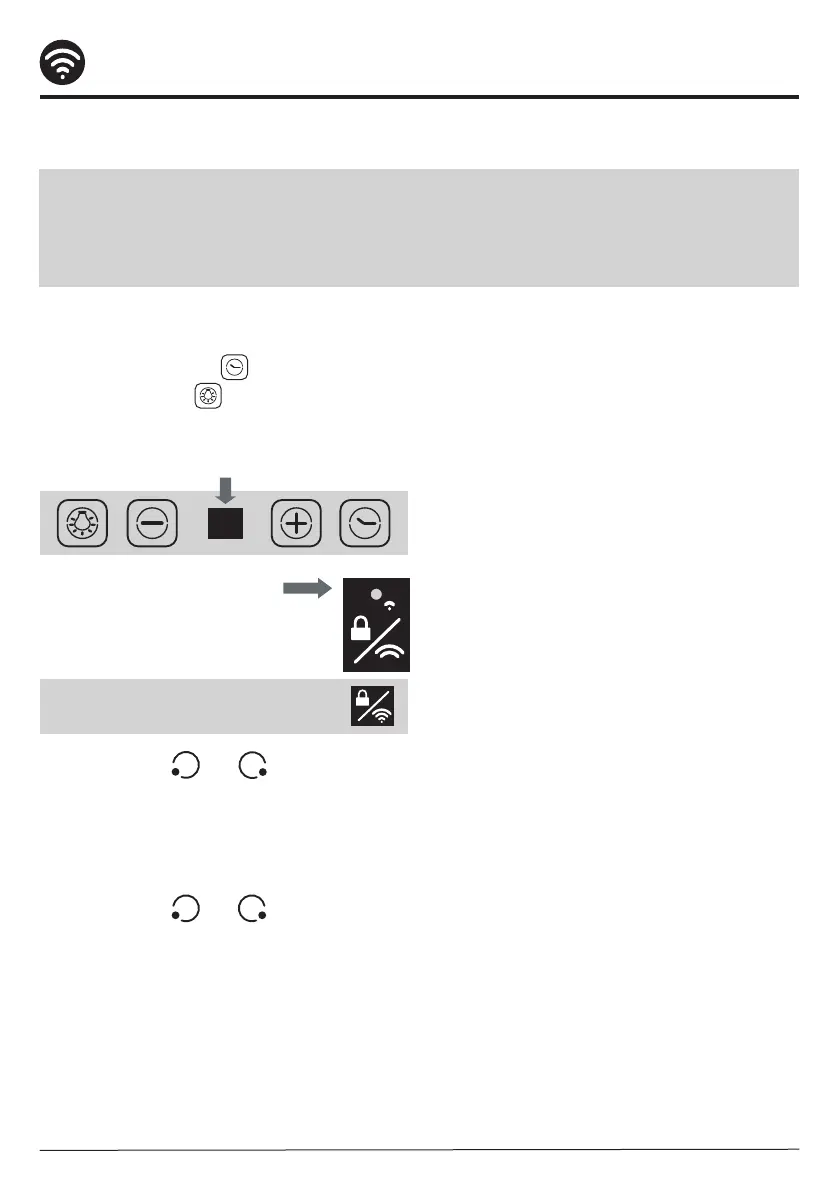
2. Touch the Timer Key and the
Light On/O Key
on the hood control panel simultaneously.
LED light on the hood control panel will be
ashing white.
3. Turn on the hob and make
sure the Connectivity Indicator
lamp is lit up red.
4. Press the keys and together on the
hob and the connection indicator will ash
to conrm connection.
5. The control panel of the hood will show 'A'
for 5 seconds to indicate connectivity has
been made with the hob.
6. Press the keys and together on the
hob one more time to store the connectivity
settings.
Note: Touch the Connectivity Key
if the Connectivity Indicator is o.



 To Next Page