EasyManua.ls Logo

Vicovation Vico-Opia 2 Premium - Speed Alert; GPS Signal

Vicovation Vico-Opia 2 Premium
57 pages
Print Icon
To Next Page IconTo Next Page
To Previous Page IconTo Previous Page
Loading...
External
GPS
Mouse
(Optional)
Settings
Speed
Alert
Users
may
select
to
set
the
value
between
80/90/1
00/1
10/1
20/1
30km.
When
the
driving
speed
is
faster
than
setting,
the
device
will
alert
the
drive
with
a
beep
warning
sound
and
an
alert
icon
to
be
displayed
on
the
screen.
Speed
Cameras
Alert:
This
feature
is
currently
only
available
in
Taiwan
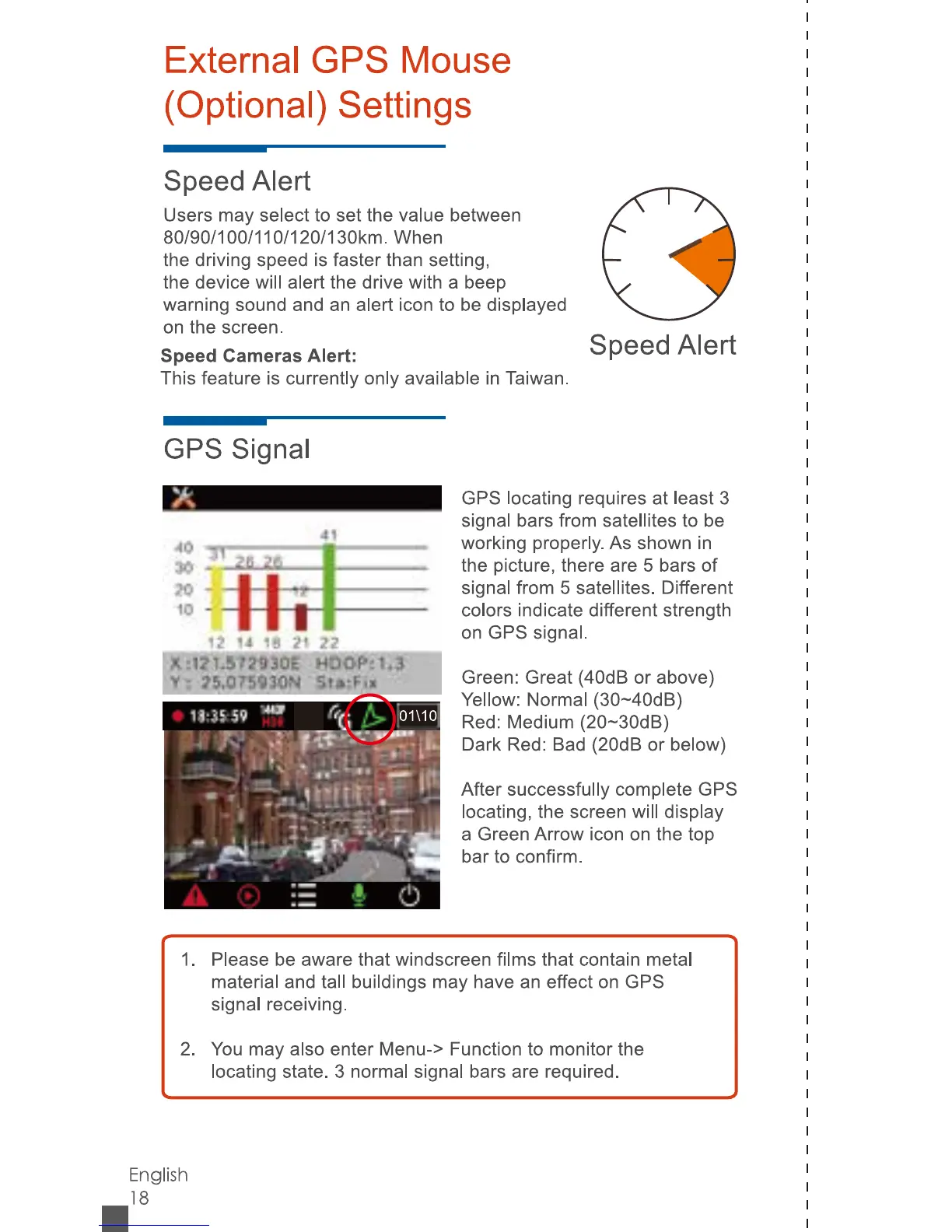
GPS
Signal
GPS
locating
requires
at
least
3
signal
bars
from
satellites
to
be
working
properly.
As
shown
in
the
picture,
there
are
5
bars
of
signal
from
5
satellites.
Different
colors
indicate
different
strength
on
GPS
signal.
Green:
Great
(40dB
or
above)
Yellow:
Normal
(30~40dB)
Red:
Medium
(20~30dB)
Dark
Red:
Bad
(20dB
or
below)
After
successfully
complete
GPS
locating,
the
screen
will
display
a
Green
Arrow
icon
on
the
top
bar
to
confirm.
Speed
Alert
1
.
Please
be
aware
that
windscreen
films
that
contain
metal
material
and
tall
buildings
may
have
an
effect
on
GPS
signal
receiving.
2.
You
may
also
enter
Menu->
Function
to
monitor
the
locating
state.
3
normal
signal
bars
are
required.
English
18
ij
u
is
frt
22
s
17
!J3Qq
V
-
j&.Q75S10N